Configuring access · Topic 3 of 7
Short-Lived Credentials, Impersonation and Workload Identity Federation
Replace service account keys with short-lived tokens, impersonation and Workload Identity Federation for AWS, Azure, GitHub Actions, on premises and GKE.
- 6 min
- Includes a diagram
- Short-lived tokens come from the IAM Service Account Credentials API and need Token Creator.
- Access tokens last one hour by default; up to 12 hours only with an organization policy exception.
- Impersonation keeps humans free of standing privilege and leaves both identities in the audit log.
What it is
The safest credential is one that expires on its own. Google Cloud can issue short-lived OAuth access tokens, ID tokens and signed JWTs for a service account on demand, so no key file ever needs to exist.
Impersonation lets a person or workload get those tokens for a service account they are allowed to use. Workload Identity Federation lets workloads outside Google Cloud swap their own platform credential for a Google token.
How it works
Short-lived credentials
The IAM Service Account Credentials API creates credentials for a service account. The caller needs Service Account Token Creator (roles/iam.serviceAccountTokenCreator) on that account.
| Method | Produces | Typical use |
|---|---|---|
generateAccessToken | OAuth 2.0 access token | Calling Google APIs as the account |
generateIdToken | OpenID Connect ID token | Calling Cloud Run, Cloud Run functions or IAP protected apps |
signJwt and signBlob | A signature made with the account's Google-managed key | Signed URLs or custom tokens without a key file |
Access tokens last one hour by default. The organization policy iam.allowServiceAccountCredentialLifetimeExtension lets listed accounts request up to 12 hours.
Service account impersonation
An administrator keeps no standing privileged roles. Instead a service account holds them, and the admin is granted Token Creator on that account only.
gcloud storage ls gs://prod-audit-archive \
  --impersonate-service-account=audit-reader@sec-ops.iam.gserviceaccount.com

gcloud config set auth/impersonate_service_account \
  terraform@sec-ops.iam.gserviceaccount.com
Audit logs record both the service account and the human who impersonated it, under the delegation details. Impersonation can be chained through several accounts with delegates, but each hop needs Token Creator.
Workload Identity Federation
Workload Identity Federation trusts an external identity provider so workloads outside Google Cloud never need a key.
| Building block | Purpose |
|---|---|
| Workload identity pool | A container for external identities, usually one per environment |
| Provider | Trust settings for AWS, or for any OIDC or SAML 2.0 issuer such as Azure or GitHub |
| Attribute mapping | Maps claims, for example google.subject=assertion.sub |
| Attribute condition | A CEL expression that must be true, or the token is rejected |
| Access | Grant roles to the federated principal directly, or let it impersonate a service account |
gcloud iam workload-identity-pools create cicd-pool \
  --location=global --display-name="CI/CD"

gcloud iam workload-identity-pools providers create-oidc github \
  --location=global --workload-identity-pool=cicd-pool \
  --issuer-uri="https://token.actions.githubusercontent.com" \
  --attribute-mapping="google.subject=assertion.sub,attribute.repository=assertion.repository" \
  --attribute-condition="assertion.repository=='example-org/payments'"
Then grant roles to the repository, using its principalSet identifier:
principalSet://iam.googleapis.com/projects/PROJECT_NUMBER/locations/global/workloadIdentityPools/cicd-pool/attribute.repository/example-org/paymentsThe workload uses a credential configuration file (made with gcloud iam workload-identity-pools create-cred-config). It contains no secret, only where to find the external token and which pool to use.
Always set an attribute condition for a shared issuer such as GitHub. Without one, any repository on that platform could present a valid token to your pool.
Workload Identity Federation for GKE
Inside GKE, pods should not use the node's service account. With Workload Identity Federation for GKE, a Kubernetes service account gets its own principal in the project's pool PROJECT_ID.svc.id.goog, and you grant IAM roles to it or let it impersonate a Google service account. It also hides the node's metadata from pods.
Choosing the credential
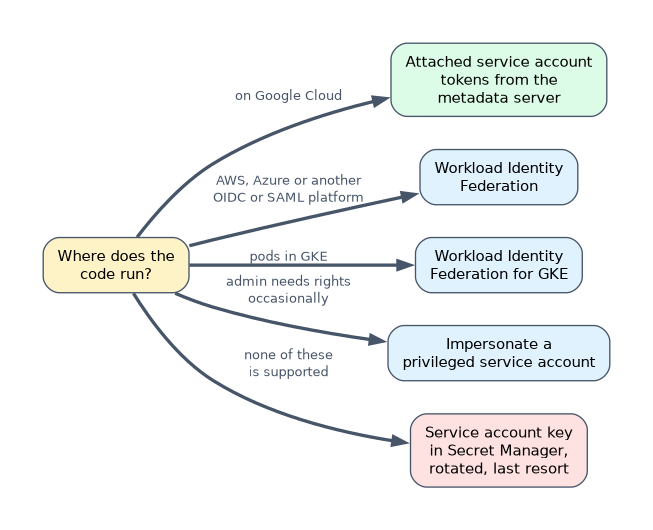
| Situation | Choose |
|---|---|
| Code on Google Cloud | Attached service account; tokens come from the metadata server |
| Code on AWS, Azure or another OIDC or SAML platform | Workload Identity Federation |
| Pods in GKE | Workload Identity Federation for GKE |
| Admin needs privileged rights occasionally | Impersonation of a privileged service account |
| A platform that supports none of these | A key, stored in Secret Manager, rotated, with expiry enforced |
A worked example
A GitHub Actions workflow deploys to Cloud Run with a JSON key stored as a repository secret. The engineer creates a pool and an OIDC provider for GitHub, with a condition on the repository and branch.
The deploy service account grants Workload Identity User (roles/iam.workloadIdentityUser) to the repository's principalSet. The workflow then exchanges its GitHub token for a Google token, and the old key is deleted.
How the exam asks about this
- "An application on AWS EC2 must write to Cloud Storage without any long-lived Google credentials." Workload Identity Federation with an AWS provider.
- "Engineers need Owner-level rights only when running Terraform, and every action must be traceable to the engineer." Put the roles on a service account and let engineers impersonate it with Token Creator.
- "Pods in one namespace must read a BigQuery dataset without using node credentials." Workload Identity Federation for GKE, granting the role to that Kubernetes service account.
What to remember for the exam
- Short-lived tokens come from the IAM Service Account Credentials API and need Token Creator.
- Access tokens last one hour by default; up to 12 hours only with an organization policy exception.
- Impersonation keeps humans free of standing privilege and leaves both identities in the audit log.
- Workload Identity Federation: pool, provider, attribute mapping, attribute condition, then grants.
- GKE pods use Workload Identity Federation for GKE, not the node service account.
Workload Identity User and Token Creator are powerful. Granting them to a broad principalSet such as the whole pool lets every federated identity act as the service account.
Common mistakes
Skipping the attribute condition. A provider for a public issuer without a condition trusts every tenant or repository on it. Restrict by repository, account or tenant ID.
Thinking the credential configuration file is a secret. It holds no key, only token locations and pool details. The real protection is the provider condition and the IAM grants.
Giving Token Creator on the project. It allows impersonating every service account in the project. Grant it on the one account the person needs.
Check yourself
Which role does a caller need to generate an access token for a service account?
Service Account Token Creator on that service account.
What stops any GitHub repository from using your workload identity pool?
An attribute condition on the provider, for example requiring a specific repository claim.
How long does a service account access token last by default?
One hour, extendable up to 12 hours only for accounts allowed by the credential lifetime extension organization policy.
Topic 3 of 7 in Configuring access
Test yourself on Configuring access
The full Google Cloud Professional Cloud Security Engineer question bank has 749 questions, with timed practice exams and an explanation for every answer.
This study guide is independent and is not affiliated with, endorsed by, or sponsored by Google Cloud. Vendor names, certification names and exam codes are trademarks of their respective owners and are used for identification only.