Configuring access · Topic 7 of 7
Resource Hierarchy and Organization Policies
Design the Google Cloud resource hierarchy, manage folders and projects at scale, and apply predefined and custom organization policies safely.
- 5 min
- Includes a diagram
- Organization, folders (up to 10 levels), projects, resources; policies flow down.
- Effective IAM is the union of all ancestors; only deny policies subtract.
- Organization policies restrict configurations regardless of IAM, mostly for new actions.
What it is
The resource hierarchy is the tree of organization, folders, projects and resources. Both IAM allow policies and organization policies are attached to nodes in this tree and flow down to everything below.
A good hierarchy lets you secure hundreds of projects with a few policies set on folders, instead of configuring each project.
How it works
Designing folders and projects
| Layer | Typical design |
|---|---|
| Organization | Org-wide policies, security team viewing roles, aggregated log sink |
| Folders | Environments (prod, nonprod) or business units, then environments; folders can nest up to 10 levels |
| Projects | One application and one environment per project; the trust and billing boundary |
| Shared projects | Separate projects for logging, security tooling, Shared VPC hosts and KMS keys |
Manage this at scale with infrastructure as code, for example Terraform modules that create projects with standard labels, budgets, APIs and IAM. Cloud Asset Inventory searches and exports every resource and policy across the organization.
Inheritance of IAM
The effective allow policy on a resource is the union of its own policy and every ancestor's. A grant on a folder applies to every project in it, and a child cannot remove a parent's grant.
| Want | Do |
|---|---|
| Same access to all prod projects | Grant once on the prod folder |
| Access to one project only | Grant on that project |
| Remove inherited access for a subtree | Deny policy on that node, or move the grant lower |
| Different rules for some projects in a folder | Use resource tags and conditional policies |
Moving a project to another folder changes its inherited policies at once, so check what it gains and loses first.
Organization policies
Organization policies set what configurations are allowed, whatever IAM permits. Each policy sets a constraint on a node.
| Constraint | Effect |
|---|---|
iam.allowedPolicyMemberDomains | Domain restricted sharing: only identities from your Cloud Identity customer IDs can be granted roles |
gcp.resourceLocations | Resources only in allowed regions, for example in:eu-locations |
compute.vmExternalIpAccess | Only listed VMs may have external IPs |
compute.requireOsLogin | SSH access through OS Login |
storage.publicAccessPrevention | No public buckets or objects |
iam.disableServiceAccountKeyCreation | No new service account keys |
compute.skipDefaultNetworkCreation | New projects get no default network |
name: folders/123456789/policies/gcp.resourceLocations
spec:
  rules:
  - values:
      allowedValues:
      - in:eu-locations
gcloud org-policies set-policy eu-only.yamlInheritance of organization policies
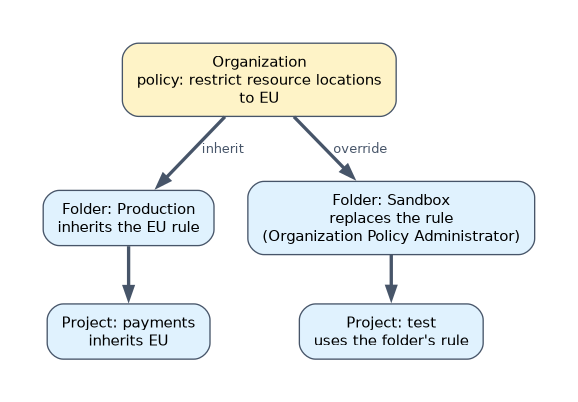 By default a node inherits its parent's policy. A child can replace it, or for list constraints merge with it, if the person has the Organization Policy Administrator role. Changes apply to new actions; most constraints do not alter resources that already exist.
Roll out safely with dry run policies, which log what would be denied without blocking. Tags plus conditional organization policies let one folder hold projects with different rules.
Custom organization policies
When no predefined constraint fits, write a custom constraint with a CEL condition on fields of a supported resource type.
name: organizations/123456789/customConstraints/custom.disableGkeAutoUpgrade
resourceTypes:
- container.googleapis.com/NodePool
methodTypes:
- CREATE
- UPDATE
condition: "resource.management.autoUpgrade == false"
actionType: DENY
displayName: Block GKE node pools without auto upgrade
gcloud org-policies set-custom-constraint custom-gke.yamlAfter creating the constraint, enforce it with a normal policy on the organization, a folder or a project. Custom constraints are preventive: they block the non-compliant create or update request.
A worked example
A company is moving 200 projects to Google Cloud under strict EU residency rules. The engineer creates prod and nonprod folders under a business unit folder, and sets gcp.resourceLocations to in:eu-locations, domain restricted sharing and key creation blocking at the organization.
A dry-run custom constraint on the prod folder blocking GKE node pools without auto upgrade logs violations for two weeks before enforcement. Projects are created by a Terraform pipeline, so every new project inherits all of it.
How the exam asks about this
- "Ensure no IAM role can ever be granted to a Gmail account or another company's users." Domain restricted sharing with
iam.allowedPolicyMemberDomains. - "All resources in the analytics folder must stay in Europe."
gcp.resourceLocationsset on that folder. - "Block GKE node pools that have auto upgrade turned off, and no predefined constraint exists." A custom organization policy constraint, tested in dry run first.
What to remember for the exam
- Organization, folders (up to 10 levels), projects, resources; policies flow down.
- Effective IAM is the union of all ancestors; only deny policies subtract.
- Organization policies restrict configurations regardless of IAM, mostly for new actions.
- Custom constraints use CEL on resource fields and are enforced with a normal policy.
- Use dry run and the organization policy simulator before enforcing at scale.
Domain restricted sharing also blocks grants to allUsers and allAuthenticatedUsers, and to partner identities whose customer ID is not listed. Test it in dry run before enforcing.
Common mistakes
Using IAM to stop a configuration. IAM controls who can act, not which settings are allowed. Region, external IP and key rules are organization policies.
Expecting an organization policy to fix existing resources. Most constraints only block new or updated resources. Find existing violations with Security Command Center or Cloud Asset Inventory.
Putting many environments in one project. A project is the main isolation boundary; mixing prod and dev in it makes least privilege impossible.
Check yourself
How does a folder IAM grant affect a project created in that folder next month?
The project inherits it automatically, because effective policy is the union of all ancestor policies.
Which constraint keeps resources inside the EU?
gcp.resourceLocations with an allowed value such as in:eu-locations.
What must you do after creating a custom organization policy constraint?
Enforce it with an organization policy on the organization, a folder or a project, ideally in dry run first.
Topic 7 of 7 in Configuring access
Test yourself on Configuring access
The full Google Cloud Professional Cloud Security Engineer question bank has 749 questions, with timed practice exams and an explanation for every answer.
This study guide is independent and is not affiliated with, endorsed by, or sponsored by Google Cloud. Vendor names, certification names and exam codes are trademarks of their respective owners and are used for identification only.