Implementing observability practices and troubleshooting issues · Topic 3 of 6
Logs Explorer, Log Routing and Retention, and Redacting Sensitive Data
Query logs in Logs Explorer, route and retain them in BigQuery, Pub/Sub or Cloud Storage, redact PII and PHI, and analyze logs with Gemini Cloud Assist.
- 5 min
- Includes a diagram
- Logging query language:
=,:,=~,>=, AND, OR, NOT; filter ontracefor one request. _Requiredis fixed at 400 days;_Defaultis 30 days by default; custom buckets set their own.- BigQuery for SQL analysis, Pub/Sub for streaming, Cloud Storage for cheap archive.
What it is
Logs are only useful if you can find the right entries, keep them for as long as rules require, send them to the tools that need them, and make sure they do not leak sensitive data.
Cloud Logging provides the Logs Explorer for searching, sinks for routing, log buckets for retention, and controls for who sees what.
How it works
Logs Explorer and the Logging query language
The Logs Explorer searches log entries with the Logging query language. Lines are joined with AND by default.
| Expression | Meaning |
|---|---|
resource.type="k8s_container" | Exact match on a field |
severity>=ERROR | Severity at or above ERROR |
jsonPayload.message:"timeout" | Field contains the text (: is the has operator) |
jsonPayload.user_agent=~"bot" | Regular expression match |
NOT httpRequest.status=200 | Negation |
timestamp>="2026-10-01T00:00:00Z" | Time bound |
trace="projects/shop-prod/traces/4bf92f3577b34da6a3ce929d0e0e4736" | All logs of one request |
resource.type="cloud_run_revision"
resource.labels.service_name="checkout"
severity>=ERROR
jsonPayload.message:"payment"
Use the histogram to spot when errors began, and Log Analytics with SQL when you need grouping and aggregation across large volumes, such as errors per service per hour.
Exporting and retaining logs
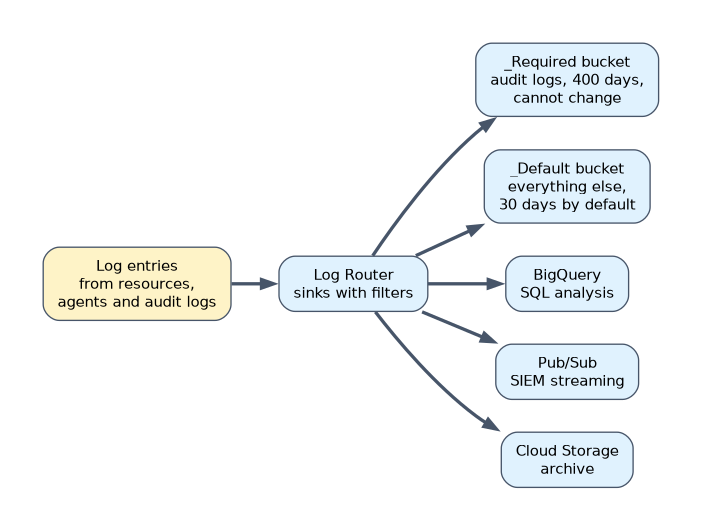 Every project has two buckets:
 _Required (Admin Activity, System Event and some other audit logs, kept 400 days, cannot be changed or deleted) and _Default (everything else, 30 days by default, adjustable). You can create custom log buckets with their own region and retention.
| Destination | Use |
|---|---|
| Log bucket (any project) | Central storage, Logs Explorer, Log Analytics |
| BigQuery | SQL analysis, joining with other data, long-term reporting |
| Pub/Sub | Streaming to a SIEM, Splunk, or a processing pipeline |
| Cloud Storage | Cheapest long-term archive, with lifecycle rules and retention locks |
gcloud logging sinks create audit-to-bq \
  bigquery.googleapis.com/projects/sec-logs/datasets/audit_logs \
  --log-filter='logName:"cloudaudit.googleapis.com"' --use-partitioned-tables
Grant the sink's writer identity access on the destination. For compliance, lock a log bucket's retention so it cannot be shortened, or use a Cloud Storage bucket with a locked retention policy.
Handling sensitive data
The best control is never logging personally identifiable information (PII) or protected health information (PHI) at all. When it cannot be avoided, remove it before it is stored.
| Control | Where | How |
|---|---|---|
| Application discipline | Code | Do not log full request bodies, tokens or identifiers; use structured fields |
| Log processors in the collection agent | Ops Agent or OpenTelemetry collector | Drop or modify fields before sending |
| Streaming redaction | Pub/Sub sink with Dataflow and Sensitive Data Protection | Detect and mask PII before writing to the destination |
| Exclusion filters | Log Router | Stop storing entries that should not be kept |
| Log views | Log bucket | Users see only the logs they are allowed to |
| Restricted fields | Log bucket | Named fields are hidden from anyone without field access permission |
Data Access audit logs and request logs often contain identifiers. Review them before routing to wide-access tools.
Gemini Cloud Assist for log analysis
In the Logs Explorer, Gemini Cloud Assist can explain a log entry in plain language, such as what an error means and possible next steps. It can also help investigate an issue by pulling together related logs, metrics and recent changes.
Treat its output as a starting point. Confirm with the actual entries and metrics before acting.
A worked example
A health provider must keep audit logs for 7 years, analyze application errors with SQL, and keep patient identifiers out of logs. The engineer creates an aggregated sink of audit logs to a Cloud Storage bucket with a locked 7 year retention policy.
Application logs route to a central log bucket upgraded for Log Analytics, with log views per team. An OpenTelemetry collector processor removes the patient ID field from application logs before export.
How the exam asks about this
- "Find every log entry for one failing request across services." Filter on its
tracevalue in the Logs Explorer. - "Stream logs in near real time to a third-party SIEM." Create a sink to Pub/Sub and let the SIEM subscribe.
- "Credit card numbers sometimes appear in application logs and must never be stored." Remove them at the source or with a processor in the collection agent before ingestion.
What to remember for the exam
- Logging query language:
=,:,=~,>=, AND, OR, NOT; filter ontracefor one request. _Requiredis fixed at 400 days;_Defaultis 30 days by default; custom buckets set their own.- BigQuery for SQL analysis, Pub/Sub for streaming, Cloud Storage for cheap archive.
- Redact sensitive data before storage; log views and restricted fields limit who sees it.
- Gemini Cloud Assist explains entries and helps investigations; verify its suggestions.
Redacting data after it reaches a log bucket does not undo the exposure; it was already stored and possibly exported. Remove sensitive fields before ingestion.
Common mistakes
Searching all logs without a resource or time filter. Queries are slow and noisy. Start with resource.type, severity and a time range.
Routing to BigQuery for cheap long-term storage. Cloud Storage is cheaper for archives. Use BigQuery when you need SQL.
Giving everyone access to a central bucket. Teams then see each other's sensitive logs. Use log views.
Check yourself
How long are logs in the _Required bucket kept?
400 days, and this retention cannot be changed.
Which sink destination suits sending logs to an external SIEM?
Pub/Sub, which streams entries that the SIEM or a connector can subscribe to.
What is the safest way to keep PII out of Cloud Logging?
Do not log it in the application, and use a processor in the collection agent to drop or mask any sensitive fields before they are sent.
Topic 3 of 6 in Implementing observability practices and troubleshooting issues
Test yourself on Implementing observability practices and troubleshooting issues
The full Google Cloud Professional Cloud DevOps Engineer question bank has 751 questions, with timed practice exams and an explanation for every answer.
This study guide is independent and is not affiliated with, endorsed by, or sponsored by Google Cloud. Vendor names, certification names and exam codes are trademarks of their respective owners and are used for identification only.