Designing and planning a cloud solution architecture · Topic 3 of 8
Choosing Compute and AI Platforms
Mapping workloads to Compute Engine, GKE, Cloud Run and Cloud Run functions, choosing Spot or custom VMs, and picking Gemini, Model Garden or AI Hypercomputer.
- 4 min
- Includes a diagram
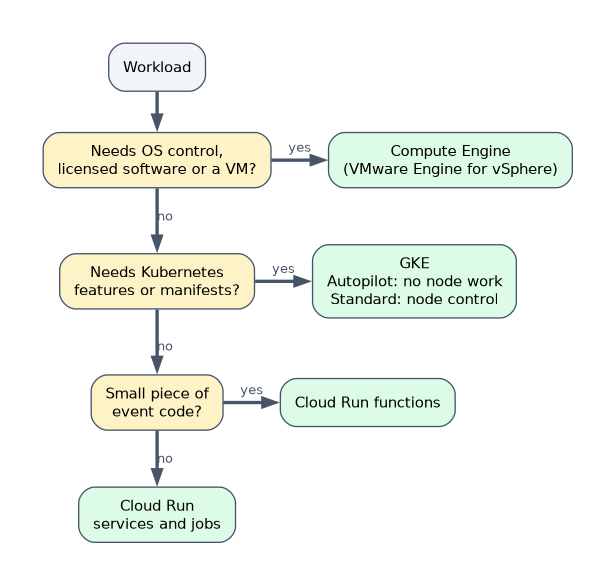
- Compute Engine for VMs, GKE for Kubernetes, Cloud Run for containers without clusters, functions for small event code.
- Autopilot removes node management; Standard keeps node control.
- Spot for interruptible work only; committed use discounts for steady load.
What it is
Choosing compute means matching each workload to the platform that runs it with the least effort and cost while meeting its constraints. The same choice now applies to AI: call a managed model, adapt an open one, or train your own on specialized hardware.
How it works
The compute platforms
| Platform | You manage | Best for |
|---|---|---|
| Compute Engine | VMs, OS, patching (with help from VM Manager) | Legacy apps, licensed software, custom OS needs, lift and shift |
| GKE Standard | Node pools and cluster settings | Kubernetes workloads that need node-level control, GPUs, sole-tenant nodes |
| GKE Autopilot | Workloads only; Google manages nodes | Kubernetes without node management, billed for pod requests |
| Cloud Run (services and jobs) | Container image only | Stateless HTTP services, event handlers and batch jobs, scale to zero |
| Cloud Run functions | Function code only | Small event-driven pieces of code |
| Google Cloud VMware Engine | VMware workloads on dedicated Google Cloud nodes | Moving vSphere estates without converting VMs |
Decision hints from stems:
- "No Kubernetes expertise", "stateless", "spiky traffic" point to Cloud Run.
- "Existing Kubernetes manifests", "consistent across clusters" point to GKE (Autopilot if they do not want to manage nodes).
- "Licensed middleware that needs VMs", "specific OS kernel" point to Compute Engine.
- "VMware", "no time to re-platform" point to VMware Engine or Migrate to Virtual Machines.
Cloud Run services have a request timeout of up to 60 minutes. Long batch work that runs longer belongs in a Cloud Run job, GKE or Batch.
Choosing compute resources
| Choice | Use it when |
|---|---|
| Machine families (general purpose, compute optimized, memory optimized, accelerator optimized) | Matching CPU, memory and accelerator needs |
| Custom machine types | Predefined shapes waste CPU or memory |
| Spot VMs | Fault-tolerant work such as batch, rendering and CI; large discount, can be stopped at any time |
| Sole-tenant nodes | Compliance requires dedicated hardware, or licences are tied to physical cores |
| Committed use discounts | Steady usage for one or three years |
Spot VMs suit work that can restart. Never put a stateful, latency-sensitive service only on Spot.
Specialized workloads
GPUs and TPUs serve ML training and inference, rendering and simulation. GKE and Compute Engine both attach accelerators, and Agent Platform runs managed training on them.
Google Cloud AI and ML choices
| Option | What you get | Fits when |
|---|---|---|
| Gemini models (through Gemini Enterprise Agent Platform) | Managed multimodal LLMs by API | Summaries, extraction, chat, images and video with no training |
| Model Garden | Catalog of Google, partner and open models to deploy or tune | You need a specific open or partner model |
| Agent Builder tools on Agent Platform | Tools to build, ground and deploy AI agents | Conversational or task agents on company data |
| Custom training on Agent Platform | Your own model on managed infrastructure | A unique problem with labeled data |
| AI Hypercomputer | Integrated GPUs, TPUs, storage, networking and software | Large-scale training and serving |
The cheapest path that meets the need wins: a prompt to Gemini before tuning, tuning before custom training.
A worked scenario
A media company must transcode uploads with its own ffmpeg image that takes 90 minutes per file, with no servers and no idle cost. Cloud Run services stop at the 60-minute request limit, the managed Transcoder API cannot run proprietary filters, and a GKE node pool costs money while idle. A Cloud Run job started per upload fits.
How the exam asks about this
- "Three-person team, stateless container, tenfold spikes." Cloud Run with minimum instances.
- "Pay only for what pods request, stop sizing node pools." GKE Autopilot.
- "Summaries with no labeled data and no ML engineers." Prompt a Gemini model.
What to remember for the exam
- Compute Engine for VMs, GKE for Kubernetes, Cloud Run for containers without clusters, functions for small event code.
- Autopilot removes node management; Standard keeps node control.
- Spot for interruptible work only; committed use discounts for steady load.
- Sole-tenant nodes for dedicated-hardware or licensing rules.
- For AI, try a managed model first, then tuning, then custom training.
A design that needs a Kubernetes team is wrong for a company that says it has none, however elegant it is.
Common mistakes
Choosing GKE by default. Cloud Run is often simpler and cheaper for stateless services.
Running long jobs on Cloud Run services. The request timeout ends them.
Training a model when a prompt would do. It costs data, people and time the case may not have.
Check yourself
A team wants Kubernetes but does not want to size or patch nodes, and wants to pay for pod requests. What should it use?
GKE Autopilot.
When should you use Spot VMs?
For fault-tolerant, interruptible work such as batch processing, rendering or CI.
Which option gives managed multimodal models by API with no training?
Gemini models through Gemini Enterprise Agent Platform.
Topic 3 of 8 in Designing and planning a cloud solution architecture
Test yourself on Designing and planning a cloud solution architecture
The full Google Cloud Professional Cloud Architect question bank has 877 questions, with timed practice exams and an explanation for every answer.
This study guide is independent and is not affiliated with, endorsed by, or sponsored by Google Cloud. Vendor names, certification names and exam codes are trademarks of their respective owners and are used for identification only.