Exploring Data Transformation with Google Cloud · Topic 4 of 5
Cloud Storage Classes and Database Migration
Cloud Storage Standard, Nearline, Coldline, Archive and Autoclass by cost and access frequency, plus ways to migrate or modernize databases in Google Cloud.
- 4 min
- Includes a diagram
- Standard (hot), Nearline (monthly, 30 days), Coldline (quarterly, 90 days), Archive (yearly, 365 days).
- Colder means cheaper storage but costlier retrieval and a longer minimum duration.
- All classes have fast access; the difference is cost.
What it is
Cloud Storage offers several storage classes. They store the same objects with the same speed of access, but differ in price to store, price to retrieve and minimum storage duration. The right class depends on how often the data is read. The exam also asks how an organization can migrate or modernize its existing databases in the cloud.
How it works
The storage classes
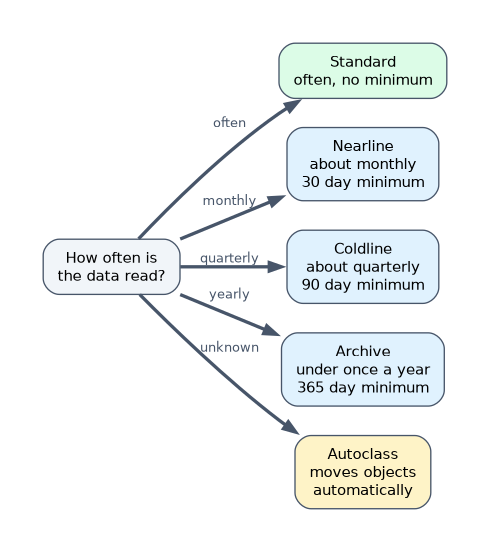
| Class | Typical access | Minimum storage duration | Storage cost | Retrieval cost |
|---|---|---|---|---|
| Standard | Frequently accessed ("hot") data | None | Highest | None |
| Nearline | About once a month or less | 30 days | Lower | Charged |
| Coldline | About once a quarter or less | 90 days | Lower still | Higher |
| Archive | Less than once a year | 365 days | Lowest | Highest |
The trade is simple: the colder the class, the cheaper to store and the more expensive to read. If you delete or change an object before its minimum duration, you are charged as if it had stayed for the full duration.
All classes give the same low latency access when you do read the data. Archive is not a tape library that takes hours; the data is available right away, it just costs more to retrieve.
Match the class to the access pattern stated in the question. "Website images" is Standard; "monthly reports" is Nearline; "quarterly audits" is Coldline; "keep for seven years for compliance" is Archive.
Autoclass
Autoclass is a bucket setting that moves each object between classes automatically based on how it is actually accessed. Objects that are not read move to colder classes; an object that is read again moves back to Standard. It suits data whose access pattern is unknown or changes, and it saves the effort of writing rules.
The alternative is Object Lifecycle Management, where you write rules yourself, for example "move objects to Coldline after 90 days and delete after 3 years".
Locations
A bucket's location also matters: region (lowest latency for workloads in that region), dual-region or multi-region (data stored in more than one place for higher availability). Choose based on where users and workloads are, and on data residency needs.
Migrating or modernizing a database
Organizations can take several paths, from least to most change:
| Approach | What happens | Example | Why choose it |
|---|---|---|---|
| Rehost (lift and shift) | Move the database as is onto virtual machines | Run the same database software on Compute Engine | Fastest, little change, keep full control |
| Move to a managed service | Move to a managed database with the same engine | MySQL on premises to Cloud SQL for MySQL | Google handles patching, backups and availability |
| Modernize | Move to a cloud-native database, possibly a new engine | Oracle to AlloyDB or Spanner | Better scale, performance and cost; needs more work |
Google Cloud provides tools to help. Database Migration Service moves databases into Cloud SQL and AlloyDB with minimal downtime by copying data continuously until you switch over. Datastream streams changes from operational databases into BigQuery and other targets for analytics.
A worked scenario
A hospital stores medical images that doctors view often for a few weeks, then rarely, but must keep for many years. It enables Autoclass so recent images stay in Standard and older ones move to colder classes automatically. Its appointment system runs on an on-premises PostgreSQL database; it uses Database Migration Service to move it to AlloyDB with minimal downtime, gaining a managed service with high performance.
How the exam asks about this
- An access frequency is described and you choose the class.
- "The access pattern is unpredictable." Autoclass.
- "Move the existing MySQL database with minimal changes and no server management." Cloud SQL, often with Database Migration Service.
- "Which approach needs the least change?" Rehost.
What to remember for the exam
- Standard (hot), Nearline (monthly, 30 days), Coldline (quarterly, 90 days), Archive (yearly, 365 days).
- Colder means cheaper storage but costlier retrieval and a longer minimum duration.
- All classes have fast access; the difference is cost.
- Autoclass moves objects automatically by actual access; lifecycle rules are written by you.
- Database paths: rehost, move to a managed service, or modernize.
Archive is a poor choice for data read every week. Retrieval charges would exceed the storage savings.
Common mistakes
Thinking Archive data takes hours to retrieve. Access is immediate; only the price differs.
Choosing Standard for long-term compliance copies. Archive or Coldline costs far less for data rarely read.
Assuming modernization is always best. It brings the most benefit but needs the most effort and risk.
Check yourself
Which storage class fits data read about once a quarter?
Coldline.
What does Autoclass do?
It moves each object between storage classes automatically based on how often it is accessed.
What is the minimum storage duration for Archive?
365 days.
Topic 4 of 5 in Exploring Data Transformation with Google Cloud
Test yourself on Exploring Data Transformation with Google Cloud
The full Google Cloud Digital Leader question bank has 512 questions, with timed practice exams and an explanation for every answer.
This study guide is independent and is not affiliated with, endorsed by, or sponsored by Google Cloud. Vendor names, certification names and exam codes are trademarks of their respective owners and are used for identification only.