Digital Transformation with Google Cloud · Topic 4 of 4
Google's Global Network, Regions and Zones
Networking basics for Cloud Digital Leader: IP addresses, DNS, latency and bandwidth, plus Google Cloud regions, zones, edge locations and the global network.
- 5 min
- Includes a diagram
- IP address identifies a device; DNS maps names to IP addresses.
- Latency is delay; bandwidth is capacity.
- A region is a geographic area; a zone is an isolated area inside a region.
What it is
Every cloud service reaches its users over a network. The exam expects you to know a few networking basics (IP address, DNS, latency, bandwidth) and how Google's global network is organized into regions, zones and edge locations, and why that matters for performance and availability.
How it works
Networking terms
| Term | Meaning | Business relevance |
|---|---|---|
| IP address | A numeric address that identifies a device or service on a network, such as 203.0.113.10 | Every server, load balancer and user device needs one to communicate |
| Domain name system (DNS) | The internet's directory that turns names such as example.com into IP addresses | Customers use names, not numbers; DNS must be fast and reliable |
| Latency | The delay for data to travel from one point to another, usually in milliseconds | High latency makes apps feel slow; distance and routing increase it |
| Bandwidth | How much data can be sent per second over a connection | Low bandwidth limits video, large downloads and data transfer |
Latency is about delay, bandwidth is about volume. A video that buffers may lack bandwidth; a game that lags has high latency.
Regions and zones
| Component | What it is | Why it matters |
|---|---|---|
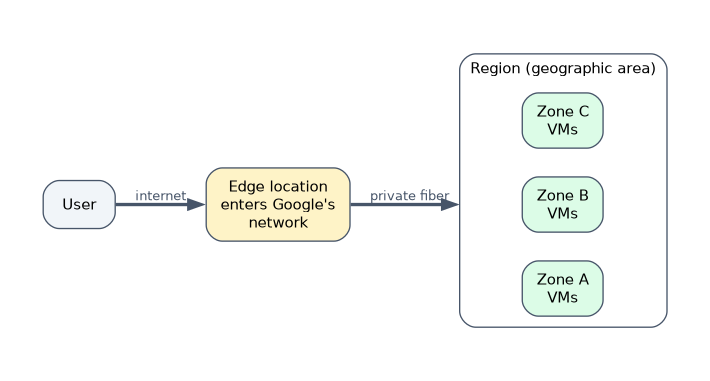
| Region | An independent geographic area, such as a metro area, where Google Cloud runs data centers | Choose a region close to users for low latency, and to meet data residency rules |
| Zone | A deployment area inside a region, isolated from the other zones in that region | Spread resources across zones so one zone failure does not stop the service |
| Multi-region | A large area such as a continent that contains several regions | Some services, such as Cloud Storage and BigQuery, can store data across a multi-region for wider availability |
Most Google Cloud regions contain three or more zones. Resources are described by their scope:
| Scope | Example |
|---|---|
| Zonal | A Compute Engine virtual machine runs in one zone |
| Regional | A regional Cloud Storage bucket or a regional managed instance group spans zones in a region |
| Multi-regional or global | A global load balancer or a multi-region bucket |
Edge locations and the network
Google connects its regions with its own private global fiber network, including undersea cables. Around the world it also has edge locations (points of presence) where user traffic enters Google's network close to the user. Products such as Cloud CDN cache content at the edge, and the global load balancer gives one IP address that routes users to the nearest healthy backend.
The result is that a user's request travels a short distance on the public internet and then rides Google's network, which improves latency and reliability.
Designing for availability
| Goal | Approach |
|---|---|
| Survive a single machine failure | Run more than one instance |
| Survive a zone outage | Spread instances across multiple zones in a region |
| Survive a region outage | Run in multiple regions with data replicated |
| Serve global users fast | Use the global load balancer and Cloud CDN at the edge |
More copies in more places means higher availability and, usually, higher cost. The exam expects you to see this tradeoff.
A worked scenario
An online learning company has students in Europe and Asia complaining that videos load slowly. It moves its video files to Cloud Storage, serves them through Cloud CDN at edge locations, and runs its web servers in two regions, one in each continent, behind a global load balancer. Each region spreads servers across several zones, so a zone outage does not take the site down.
How the exam asks about this
- "Users far from the application see slow responses." Reduce latency: a nearer region, edge caching, the global network.
- "The service must keep running if one data center area fails." Use multiple zones.
- "Data must stay in a specific country." Choose a region in that country.
- "What translates a website name into an address?" DNS.
What to remember for the exam
- IP address identifies a device; DNS maps names to IP addresses.
- Latency is delay; bandwidth is capacity.
- A region is a geographic area; a zone is an isolated area inside a region.
- Use multiple zones for high availability and multiple regions for disaster recovery and global users.
- Edge locations bring users onto Google's private network close to where they are.
Putting everything in one zone is cheaper but is a single point of failure. The exam treats "multiple zones" as the basic step for availability.
Common mistakes
Thinking a zone is a country. A zone is inside a region; a region is a geographic area.
Choosing more bandwidth to fix lag. Lag is usually latency, which distance and routing cause.
Ignoring data residency. Region choice also decides where data is stored.
Check yourself
What is the difference between a region and a zone?
A region is a geographic area with Google Cloud data centers; a zone is an isolated deployment area inside a region.
Which service translates a domain name into an IP address?
The domain name system (DNS).
How can an application survive the failure of one zone?
Run its resources across more than one zone in the region.
Topic 4 of 4 in Digital Transformation with Google Cloud
Test yourself on Digital Transformation with Google Cloud
The full Google Cloud Digital Leader question bank has 512 questions, with timed practice exams and an explanation for every answer.
This study guide is independent and is not affiliated with, endorsed by, or sponsored by Google Cloud. Vendor names, certification names and exam codes are trademarks of their respective owners and are used for identification only.