Planning and implementing a cloud solution · Topic 2 of 9
Managed Instance Groups, OS Login and VM Manager
Instance templates and autoscaled managed instance groups, OS Login, VM Manager patching and inventory, Spot VMs and custom machine types for the ACE exam.
- 4 min
- Includes a diagram
- Instance templates are immutable; MIGs create identical VMs from them.
- Regional MIGs spread across zones; autoscaling and autohealing keep capacity and health.
- OS Login:
enable-oslogin=TRUE,roles/compute.osLoginorroles/compute.osAdminLogin.
What it is
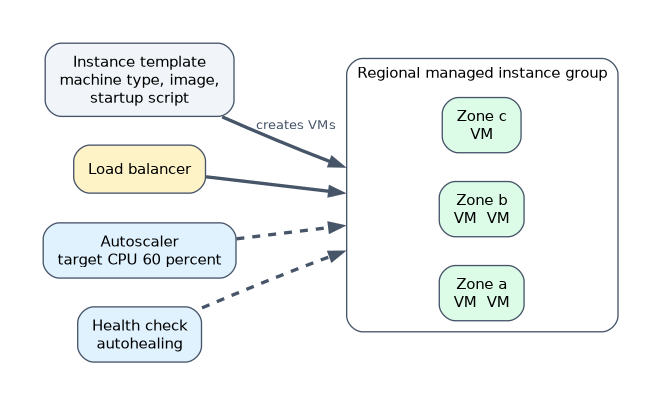
Running many identical VMs by hand does not scale. An instance template defines a VM's configuration, and a managed instance group (MIG) creates identical VMs from it, keeps them healthy and autoscales them. OS Login controls SSH access through IAM. VM Manager patches and inventories fleets of VMs. Spot VMs and custom machine types control cost.
How it works
Instance templates and MIGs
gcloud compute instance-templates create web-template \
  --machine-type=e2-medium --image-family=debian-12 --image-project=debian-cloud \
  --tags=http-server --metadata-from-file=startup-script=startup.sh

gcloud compute instance-groups managed create web-mig \
  --template=web-template --size=2 --region=us-central1

gcloud compute instance-groups managed set-autoscaling web-mig \
  --region=us-central1 --min-num-replicas=2 --max-num-replicas=10 \
--target-cpu-utilization=0.6| MIG feature | What it does |
|---|---|
| Zonal or regional | A regional MIG spreads VMs across zones for higher availability |
| Autoscaling | Adds or removes VMs based on CPU, load balancer serving capacity, Cloud Monitoring metrics or schedules |
| Autohealing | A health check recreates VMs whose application stops responding |
| Rolling updates | Moves the group to a new template gradually, with surge and unavailability limits |
Instance templates cannot be edited; create a new template and roll it out.
"Keep the app available even if a zone fails, and scale with load" is a regional MIG with autoscaling behind a load balancer.
OS Login
OS Login links Linux SSH access to IAM identities instead of managing SSH keys in metadata.
| Step | How |
|---|---|
| Enable | Set metadata enable-oslogin=TRUE on the project or instance |
| Grant normal access | roles/compute.osLogin |
| Grant admin (sudo) access | roles/compute.osAdminLogin |
| External users | Also need roles/compute.osLoginExternalUser at the organization level |
| Extra security | Can require two-step verification for SSH |
Removing a user's IAM role removes their SSH access, and logins are recorded in audit logs.
VM Manager
VM Manager is a suite of tools to manage operating systems on large fleets of Compute Engine VMs:
| Feature | Purpose |
|---|---|
| Patch management | Run patch jobs and schedule patch deployments across VMs |
| OS inventory | Collect what OS and packages are installed |
| OS policies | Declare desired configuration (packages, files) and enforce it |
It relies on the OS Config agent running on the VMs and the OS Config API being enabled.
Spot VMs and custom machine types
| Option | What it is | Use when |
|---|---|---|
| Spot VMs | Spare capacity at a large discount; Compute Engine can preempt them at any time with a short notice; no live migration | Fault-tolerant batch jobs, rendering, CI, stateless workers in a MIG |
| Custom machine types | Choose vCPU and memory amounts yourself | Workloads that do not fit predefined shapes, to avoid paying for unused resources |
gcloud compute instances create batch-1 --zone=us-central1-a \
  --machine-type=e2-standard-4 --provisioning-model=SPOT \
  --instance-termination-action=STOP

gcloud compute instances create app-1 --zone=us-central1-a \
  --custom-cpu=6 --custom-memory=20GB
A worked scenario
A web shop needs its front end to scale between 2 and 20 VMs and survive a zone outage. The engineer builds an instance template, a regional MIG with autoscaling on CPU and an HTTP health check for autohealing, enables OS Login so developers SSH with their Google identities, and uses VM Manager to patch the fleet monthly. Nightly reports run on Spot VMs.
How the exam asks about this
- "Recreate VMs whose application stops responding." Autohealing with a health check on a MIG.
- "Control SSH access to Linux VMs with IAM." OS Login.
- "Patch hundreds of VMs on a schedule." VM Manager patch management.
- "Lowest cost for interruptible batch jobs." Spot VMs.
- "Need 6 vCPUs and 20 GB memory exactly." A custom machine type.
What to remember for the exam
- Instance templates are immutable; MIGs create identical VMs from them.
- Regional MIGs spread across zones; autoscaling and autohealing keep capacity and health.
- OS Login:
enable-oslogin=TRUE,roles/compute.osLoginorroles/compute.osAdminLogin. - VM Manager: patching, OS inventory, OS policies via the OS Config agent.
- Spot VMs are cheap but preemptible; custom machine types fit exact needs.
A Spot VM can be stopped at any time. Never run a single, stateful production database on one.
Common mistakes
Editing an instance template. Templates are immutable; create a new one and roll it out.
Granting osLogin when sudo is needed. Admin access needs roles/compute.osAdminLogin.
Using autoscaling without health checks. Autoscaling adds capacity; autohealing replaces broken VMs.
Check yourself
Which IAM role gives a user sudo access through OS Login?
roles/compute.osAdminLogin.How do you change the configuration of VMs in a MIG?
Create a new instance template and perform a rolling update to it.
What does VM Manager provide?
Patch management, OS inventory and OS policies for fleets of Compute Engine VMs.
Topic 2 of 9 in Planning and implementing a cloud solution
Test yourself on Planning and implementing a cloud solution
The full Google Cloud Associate Cloud Engineer question bank has 661 questions, with timed practice exams and an explanation for every answer.
This study guide is independent and is not affiliated with, endorsed by, or sponsored by Google Cloud. Vendor names, certification names and exam codes are trademarks of their respective owners and are used for identification only.