Planning and implementing a cloud solution · Topic 1 of 9
Choosing Compute and Launching VMs
Choosing Compute Engine, GKE, Cloud Run, Cloud Run functions or Agent Runtime, launching VMs with availability policies and SSH keys, disks, and GPUs versus TPUs.
- 5 min
- Includes a diagram
- Compute Engine (control), GKE (Kubernetes), Cloud Run (serverless containers), Cloud Run functions (event code), Agent Runtime (AI agents).
- Availability policy: on host maintenance MIGRATE or TERMINATE, automatic restart; GPU VMs must TERMINATE.
- Prefer OS Login over metadata SSH keys.
What it is
Google Cloud offers several ways to run code, from virtual machines you manage to fully serverless services. The exam expects you to select the right compute option for a workload, launch a Compute Engine instance with the right settings, choose its disk type, and decide between GPUs and TPUs.
How it works
Choosing compute
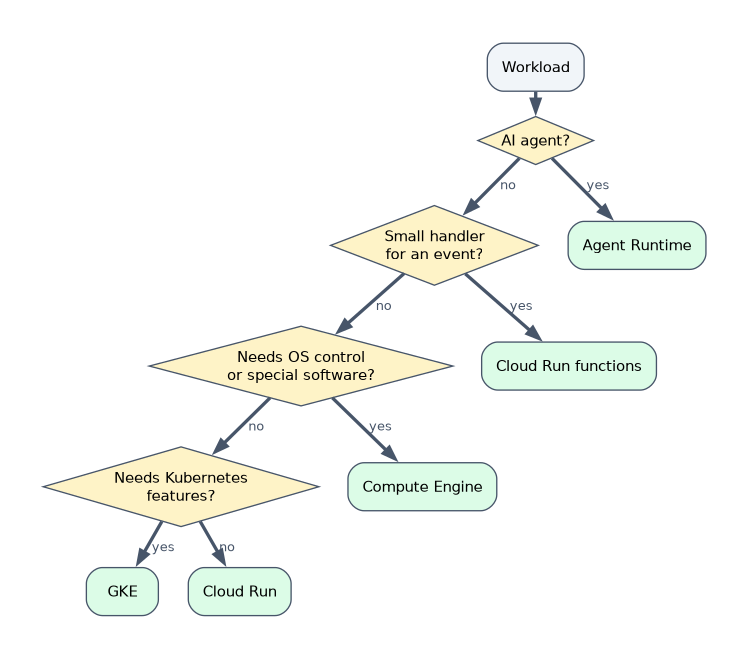
| Option | Best for | You manage |
|---|---|---|
| Compute Engine | Existing apps, custom OS or software, full control, specialized hardware | OS, patches, scaling setup |
| Google Kubernetes Engine (GKE) | Containerized microservices needing Kubernetes features and portability | Workloads and some cluster settings (less in Autopilot) |
| Cloud Run | Stateless containers, web apps and APIs, jobs; scales to zero | Container and settings only |
| Cloud Run functions | Small single-purpose functions triggered by HTTP or events | Function code |
| Agent Runtime on Gemini Enterprise Agent Platform (formerly Vertex AI Agent Engine) | Deploying, scaling and managing AI agents in production | Agent code |
Launching an instance
gcloud compute instances create web-1 \
  --zone=us-central1-a --machine-type=e2-medium \
  --image-family=debian-12 --image-project=debian-cloud
Key settings at creation:
| Setting | Options and meaning |
|---|---|
| Machine type | Predefined families (general purpose E2, N2, N4; compute optimized C-series; memory optimized M-series; accelerator optimized A-series) or custom |
| Availability policy | On host maintenance: MIGRATE (live migrate, default for standard VMs) or TERMINATE; automatic restart on or off; Spot and preemptible VMs cannot live migrate |
| SSH keys | Use OS Login (recommended, IAM-based) or metadata-managed SSH keys at project or instance level; gcloud compute ssh manages keys for you |
| Service account and scopes | The identity the VM uses to call Google APIs |
| Network tags and labels | Tags target firewall rules; labels organize costs |
| Startup script | Runs on boot, through metadata startup-script |
VMs with GPUs cannot live migrate, so their on host maintenance policy must be TERMINATE.
Storage for Compute Engine
| Disk option | Characteristics | Use |
|---|---|---|
| Zonal Persistent Disk | Durable network block storage in one zone; types such as balanced, SSD and standard | Most boot and data disks |
| Regional Persistent Disk | Synchronously replicated across two zones in a region | High availability: fail over a VM to the other zone with its data |
| Google Cloud Hyperdisk | Next-generation block storage where you provision performance (IOPS and throughput) independently of capacity | Demanding databases and analytics; supported on newer machine series |
| Local SSD | Physically attached, very fast, temporary | Scratch data and caches; data is lost when the VM stops (by default) or is deleted |
GPUs or TPUs
| GPUs | TPUs | |
|---|---|---|
| What | Graphics processors from NVIDIA, general-purpose accelerators | Google's Tensor Processing Units, designed for ML |
| Strength | Broad framework support, graphics, many ML workloads, CUDA-based code | Large-scale training and inference of ML models, especially with JAX, TensorFlow and PyTorch |
| How to use | Attach to Compute Engine VMs or GKE nodes; accelerator-optimized machine types | Cloud TPU VMs or GKE TPU node pools |
Choose GPUs when software depends on CUDA or needs broad compatibility; choose TPUs for large ML training and inference at scale where the framework supports them. Check regional availability and quota for both.
A worked scenario
A company moves a licensed Windows application that needs a specific OS configuration (Compute Engine), runs its new microservices in containers with Kubernetes tooling (GKE), hosts a public API with spiky traffic (Cloud Run), resizes images when files land in a bucket (Cloud Run functions), and deploys a customer-support agent (Agent Runtime). Its database VM uses a regional Persistent Disk so it can fail over to another zone.
How the exam asks about this
- "Full control of the OS for a legacy app." Compute Engine.
- "Stateless HTTP container with minimal operations, scale to zero." Cloud Run.
- "Disk data must survive a zone failure." Regional Persistent Disk.
- "Set performance independently of disk size." Hyperdisk.
- "Fastest temporary scratch space." Local SSD.
What to remember for the exam
- Compute Engine (control), GKE (Kubernetes), Cloud Run (serverless containers), Cloud Run functions (event code), Agent Runtime (AI agents).
- Availability policy: on host maintenance MIGRATE or TERMINATE, automatic restart; GPU VMs must TERMINATE.
- Prefer OS Login over metadata SSH keys.
- Zonal PD for most disks, regional PD for cross-zone HA, Hyperdisk for tunable performance, Local SSD for temporary speed.
- GPUs for broad compatibility, TPUs for large-scale ML.
By default, data on Local SSD does not survive stopping or deleting the VM. Never keep the only copy of important data there.
Common mistakes
Choosing GKE for a single simple container. Cloud Run needs far less management.
Expecting zonal disks to survive a zone outage. Use regional Persistent Disk or snapshots.
Forgetting quota and zone availability for accelerators. GPUs and TPUs are not in every zone.
Check yourself
Which disk type replicates data synchronously across two zones?
Regional Persistent Disk.
What must the on host maintenance policy be for a VM with GPUs?
TERMINATE, because GPU VMs cannot live migrate.
Which compute option deploys and manages AI agents in production?
Agent Runtime on Gemini Enterprise Agent Platform.
Topic 1 of 9 in Planning and implementing a cloud solution
Test yourself on Planning and implementing a cloud solution
The full Google Cloud Associate Cloud Engineer question bank has 661 questions, with timed practice exams and an explanation for every answer.
This study guide is independent and is not affiliated with, endorsed by, or sponsored by Google Cloud. Vendor names, certification names and exam codes are trademarks of their respective owners and are used for identification only.