Forensic Science · Topic 7 of 9
Email and Malware Fundamentals
Learn how email is delivered, how to read message headers, and the components, distribution, types and coordinated handling of malware in an incident.
- 5 min
- Includes a diagram
- MUA, MTA and MDA are the three agents; SMTP sends, POP3 and IMAP retrieve.
- Received lines are added by each server; read from the bottom up.
- SPF, DKIM and DMARC authenticate the sender domain and message.
What it is
Email and malware are two of the most common sources of evidence. Email shows who communicated, when and from where, and its headers can reveal the real path of a message. Malware is the tool of many attacks, and investigators must know what it is made of and how it spreads.
How it works
Components involved in email communication
| Component | Role |
|---|---|
| Mail user agent (MUA) | The client the user reads and writes mail with |
| Mail transfer agent (MTA) | Server software that relays mail between servers |
| Mail delivery agent (MDA) | Places the message into the recipient's mailbox |
| Mail submission agent (MSA) | Accepts outgoing mail from the client |
| DNS | MX records tell senders which server accepts mail for a domain |
Protocols: SMTP sends and relays mail (port 25 between servers, 587 for client submission). POP3 (port 110) downloads mail to the client. IMAP (port 143) keeps mail on the server and lets clients synchronize.
How email communication works
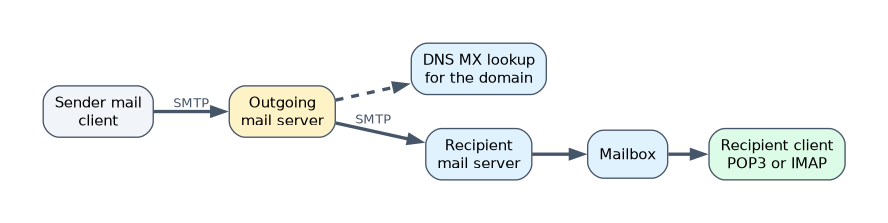
- The user writes a message in the MUA and sends it to the outgoing server by SMTP.
- The outgoing MTA looks up the MX record of the recipient's domain.
- The message is relayed, possibly through several MTAs, to the recipient's server.
- The MDA stores it in the recipient's mailbox.
- The recipient's MUA retrieves it by POP3 or IMAP, or through a web interface.
Each server that handles the message adds a line to its header, which is why the header is the main source of forensic evidence.
Parts of an email message
A message has a header and a body, plus attachments.
| Header field | Meaning |
|---|---|
| From, To, Cc, Subject, Date | The visible fields, easily forged |
| Received | One line added by every server that handled the message; read from the bottom (first server) up to the top (last server) |
| Message-ID | A unique ID created by the originating mail system |
| Return-Path | Where bounces go |
| Reply-To | Where replies go, which may differ from From |
| X-Originating-IP | Sender address added by some providers |
| Authentication-Results | Shows SPF, DKIM and DMARC checks |
| MIME fields | Describe attachments and encoding |
SPF checks whether the sending server is allowed for the domain. DKIM verifies a digital signature on the message. DMARC sets the policy based on those two. A failed check on a message that claims to come from a bank is a sign of possible spoofing, although forwarding can also break SPF.
Malware and its components
Malware is software designed to harm, steal, spy or gain unauthorized control. Its common components are:
- Payload: the harmful action.
- Dropper and downloader: a dropper carries the malware inside it, while a downloader fetches it from a remote server.
- Crypter and packer: hide the code from detection.
- Exploit: code that takes advantage of a vulnerability.
- Obfuscation: makes code hard to read.
- Command and control (C2): channel used to control the infected host.
- Persistence mechanism: keeps the malware after a reboot.
Common techniques used to distribute malware across the web
- Malicious email attachments and links (phishing).
- Drive by downloads from compromised or malicious sites.
- Malvertising, which places malicious advertisements on legitimate sites.
- Search engine poisoning, which pushes malicious pages up the results.
- Fake software updates and cracked software.
- Social media links and fake apps.
- Infected removable media and supply chain compromise.
Types of malware and their characteristics
| Type | Characteristic |
|---|---|
| Virus | Attaches to a file and spreads when it is run |
| Worm | Spreads by itself over networks |
| Trojan | Looks legitimate but hides harmful function |
| Ransomware | Encrypts data and demands payment |
| Spyware | Secretly collects information |
| Rootkit | Hides itself and other malware at a deep level |
| Botnet agent | Joins the host to a remotely controlled network |
| Keylogger | Records keystrokes |
| Backdoor | Provides hidden remote access |
| Adware | Shows unwanted advertisements |
| Fileless malware | Runs in memory using legitimate tools |
Coordination and management in addressing malware
Dealing with malware needs a plan and teamwork: detection, isolating infected hosts, collecting evidence (memory and samples) before cleaning, analysis, removal, recovery and communication. Roles are shared among the SOC, incident responders, IT operations, legal and management. Indicators found in one case are shared with the team and, when appropriate, with outside partners so that other systems are checked.
A worked example
A recipient gets a message that shows "From: accounts@bank.example". The header shows a Return-Path at a different domain, a Received line from an unrelated server at the bottom, and an Authentication-Results line with SPF fail.
The message is very likely spoofed. The investigator preserves the original message in its native format with full headers, traces the first Received line and records the attached file hash for malware analysis.
How the exam asks about this
- "In which direction should the Received headers be read to trace the origin?" → From the bottom up.
- "Which agent places incoming mail into the user's mailbox?" → The mail delivery agent.
- "Which malware spreads by itself without a host file?" → A worm.
What to remember for the exam
- MUA, MTA and MDA are the three agents; SMTP sends, POP3 and IMAP retrieve.
- Received lines are added by each server; read from the bottom up.
- SPF, DKIM and DMARC authenticate the sender domain and message.
- A dropper contains the malware, a downloader fetches it.
- Preserve the original message and the malware sample with hashes before cleaning.
Forwarding inline or printing an email can strip or alter the original headers. Collect the message in its native format.
Common mistakes
Trusting the From field. It is easily forged, so use the Received lines and authentication results.
Confusing virus and worm. A virus needs a host file to spread, and a worm spreads on its own.
Cleaning before collecting. Removing malware first destroys the sample and memory evidence.
Check yourself
Which protocol keeps mail on the server so many clients stay in sync?
IMAP.
What does a failed SPF check suggest?
The sending server is not authorized for the domain, so the message may be spoofed.
What is the difference between a dropper and a downloader?
A dropper contains the malware itself, while a downloader fetches it from a remote location.
Topic 7 of 9 in Forensic Science
Test yourself on Forensic Science
The full EC-Council 312-49 question bank has 900 questions, with timed practice exams and an explanation for every answer.
This study guide is independent and is not affiliated with, endorsed by, or sponsored by EC-Council. Vendor names, certification names and exam codes are trademarks of their respective owners and are used for identification only.