Digital Forensics · Topic 1 of 11
Anti-Forensics, File Deletion and File Carving
What happens when a Windows file is deleted, the Recycle Bin, file carving, anti-forensics techniques and how examiners counter them, for CHFI v11.
- 6 min
- Includes a diagram
- Deleting removes the pointer, not the data. Overwriting is what destroys it.
- NTFS marks the $MFT record unused. FAT replaces the first directory entry byte with 0xE5.
$Iholds metadata and$Rholds content inC:\$Recycle.Bin\<SID>\.
What it is
Anti-forensics is any attempt to hide, destroy or confuse digital evidence so that an investigation fails or is slowed down. This page explains what each technique is, what it leaves behind and how an investigator counters it.
Deletion is the most common technique, so the first half covers what really happens to a deleted file and how data is recovered. The second half covers the other techniques named in the outline.
How it works
Data and file deletion
Deleting normally removes the pointer to the data, not the data. The clusters stay on disk until the file system reuses them. Overwriting the clusters is what makes recovery fail.
| Deletion type | What happens | Recoverable? |
|---|---|---|
| Normal delete | File moves to the Recycle Bin | Yes, restore it |
| Shift+Delete or emptied bin | Directory entry released, clusters marked free | Often, until overwritten |
| Quick format | File system structures rebuilt, data area untouched | Often, with carving |
| Secure wipe | Clusters overwritten with other data | Usually no |
What happens when a file is deleted in Windows
On NTFS, the file's record in the $MFT is marked as not in use and its clusters are marked free in the $Bitmap file. The record and the data runs often remain until the record is reused.
On FAT, the first character of the directory entry is changed to 0xE5 and the entries in the File Allocation Table are cleared. The data is intact, but the cluster chain is lost, so a fragmented file is hard to rebuild.
Recycle Bin in Windows
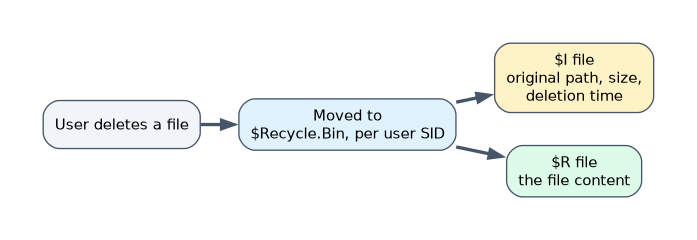 Since Windows Vista the bin is
 C:\$Recycle.Bin\<user SID>\. Each deleted file becomes two files.
| File | Content |
|---|---|
$I<random>.<ext> | Metadata: original full path, original size, deletion date and time |
$R<random>.<ext> | The actual file content |
Windows XP used a Recycler folder and an INFO2 index file. Files deleted with Shift+Delete, from removable media or from network shares usually bypass the bin. The SID in the folder name identifies the account whose bin holds the file, which is a lead on who deleted it, not proof.
File carving
Carving recovers files from unallocated space or a raw image without file system metadata. It searches for file headers and footers (signatures) and extracts the bytes between them.
| Type | Header (hex) | Footer |
|---|---|---|
| JPEG | FF D8 FF | FF D9 |
| PNG | 89 50 4E 47 | 49 45 4E 44 AE 42 60 82 |
| 25 50 44 46 (%PDF) | %%EOF | |
| ZIP, DOCX, XLSX | 50 4B 03 04 | none fixed |
Tools include Foremost, Scalpel, PhotoRec and the PhotoRec Carver ingest module in Autopsy. Carved files lose their names and timestamps, and fragmented files often come out corrupt.
Other anti-forensics techniques
| Technique | What it is | Detection or counter |
|---|---|---|
| Password protection | Documents or archives locked with a password | Password recovery tools, dictionary attacks with legal authority |
| Steganography | Data hidden inside an image, audio or video file | Steganalysis, file size and statistical anomalies, Stegdetect |
| Alternate data streams | Extra NTFS data stream attached to a file (file.txt:hidden) | dir /r, Sysinternals streams, forensic suites |
| Trail obfuscation | Spoofed addresses, falsified timestamps, log edits | Compare $STANDARD_INFORMATION with $FILE_NAME times, correlate logs |
| Artifact wiping | Disk wipers and secure delete utilities | Wiper traces in Prefetch, registry, unusual unallocated patterns |
| Overwriting data and metadata | Replacing contents or timestamps | Look in $LogFile, USN journal, backups and shadow copies |
| Encryption | File, container or full disk encryption | Capture memory for keys, collect keys and passwords legally |
| Program packers | Compress or encrypt an executable to evade analysis | High entropy, few imports, packer signatures, unpack in a sandbox |
| Exploiting forensic tool bugs | Crafted files that crash or mislead a tool | Update and validate tools, confirm with a second tool |
| Detecting forensic tool activity | Malware that checks for analysis tools and changes behavior | Analyze in a controlled lab, avoid network exposure |
Anti-forensics countermeasures and tools
Countermeasures combine process and technology. Acquire volatile data first, because memory can hold keys, decrypted content and wiper traces. Hash every image, use more than one tool, and keep tools current. Examine the $MFT, $LogFile and $UsnJrnl for signs of tampering, and look for the same events in backups, volume shadow copies and logs held on other systems.
A worked example
An investigator images a laptop and finds the Documents folder empty. The $Recycle.Bin\<SID> folder holds $I files showing 40 spreadsheets deleted at 18:02 on the last working day. The matching $R files are gone because the bin was emptied.
The $MFT still holds records for the files, so the names and sizes are recovered. Carving unallocated space with a ZIP signature then returns several of the XLSX files intact. The investigator hashes the carved files and documents the source offsets.
How the exam asks about this
- "Which file in
$Recycle.Binholds the original path and deletion time?" -> The$Ifile. - "A tool recovers JPEG files by their header and footer bytes, with no file system data. What is it?" -> File carving.
- "A file looks normal but also carries a hidden NTFS stream. What is this?" -> An alternate data stream.
What to remember for the exam
- Deleting removes the pointer, not the data. Overwriting is what destroys it.
- NTFS marks the $MFT record unused. FAT replaces the first directory entry byte with 0xE5.
$Iholds metadata and$Rholds content inC:\$Recycle.Bin\<SID>\.- Carving uses signatures, so it works without a file system but loses names and timestamps.
- Encryption, packing and wiping are countered with memory capture, entropy analysis and multi tool validation.
A file in the bin is not proof that the user deleted it deliberately. The SID, the timestamps and other artifacts must be correlated before you attribute the action.
Common mistakes
Assuming a deleted file is gone. The data usually remains in unallocated space until the clusters are reused, so recovery is often possible.
Treating carving like undeleting. Undeletion uses file system metadata and keeps names. Carving ignores metadata and returns nameless files.
Trusting timestamps blindly. Timestamps can be altered, so compare several sources before building a timeline on them.
Check yourself
Where does Windows Vista and later store deleted files and their metadata?
In
C:\$Recycle.Bin\<user SID>\, with$Ifiles for metadata and$Rfiles for content.What does the first byte 0xE5 in a FAT directory entry mean?
The entry has been deleted and the space is available for reuse.
Why is a memory capture valuable against disk encryption?
A running system may hold encryption keys and decrypted data in RAM, which can unlock the disk image.
Topic 1 of 11 in Digital Forensics
Test yourself on Digital Forensics
The full EC-Council 312-49 question bank has 900 questions, with timed practice exams and an explanation for every answer.
This study guide is independent and is not affiliated with, endorsed by, or sponsored by EC-Council. Vendor names, certification names and exam codes are trademarks of their respective owners and are used for identification only.