Working with Lakeflow Jobs · Topic 1 of 2
Tasks, Dependencies and Control Flow
Databricks DEA Lakeflow Jobs tasks: notebook, SQL, dashboard and pipeline tasks, DAG dependencies, run if, retries, repair runs, If/else and For each.
- 6 min
- Includes a diagram
- Tasks plus Depends on links form the job's DAG; tasks without dependencies run in parallel.
- Run if defaults to All succeeded, so an upstream failure skips the downstream task and fails the run.
- SQL and Dashboard tasks run on a serverless or pro SQL warehouse; a Pipeline task runs a pipeline update.
What it is
A Lakeflow Job is a set of tasks that Databricks runs together. Each task does one unit of work, such as running a notebook or refreshing a pipeline, and Depends on links set the order. The links form a directed acyclic graph (DAG), shown as the task graph in the Jobs UI.
Control flow adds logic to the graph: retries for failures, run if conditions on dependencies, If/else tasks for branching and For each tasks for looping.
How it works
Common task types
| Task type | Runs | Compute |
|---|---|---|
| Notebook | A notebook from the workspace or a Git provider | Job cluster, all purpose cluster or serverless; SQL notebooks can use a SQL warehouse |
| SQL | A query, an alert or a .sql file | Serverless or pro SQL warehouse |
| Dashboard | Refreshes a published dashboard, optionally emailing subscribers | Serverless or pro SQL warehouse |
| Pipeline | An update of a Lakeflow Declarative Pipeline | The pipeline's own compute |
Other task types include Python script, Python wheel, JAR, dbt, Run Job (start another job), If/else and For each. A Run Job task lets one job call another, so shared work is defined once.
Dependencies and the DAG
A task with no dependencies starts as soon as the run starts, so independent tasks run in parallel. A task with several upstream tasks waits until they finish, then checks its Run if condition.
| Run if | The task runs when |
|---|---|
| All succeeded (default) | Every dependency succeeded |
| At least one succeeded | One or more dependencies succeeded |
| None failed | No dependency failed and at least one ran |
| All done | All dependencies finished, whatever their status |
| At least one failed | One or more dependencies failed |
| All failed | Every dependency failed |
With the default, a failed upstream task means the downstream task does not run and the job run fails. All done suits a cleanup or notification task that must run either way; At least one failed suits an alert task.
Passing values between tasks
A notebook task can publish a task value that later tasks read through a dynamic reference. Job parameters are read the same way.
dbutils.jobs.taskValues.set(key="row_count", value=df.count())
# referenced later as {{tasks.load_orders.values.row_count}}
# job parameter as {{job.parameters.env}}
Retries, timeouts and repair
Each task can have a retry policy: how many times to retry after a failure and how long to wait between attempts. By default, most job configurations do not retry, though serverless jobs auto-optimize retries. A task timeout sets the maximum duration; when both are set, the timeout applies to each retry.
Retries fit transient failures, such as a source API that is briefly unavailable. They do not fix a code bug.
Repair run reruns only the failed or canceled tasks of a run and the tasks that depend on them, so successful tasks are not redone. A repaired task starts from the beginning, so a task that wrote part of its output before failing must be safe to rerun.
Branching with If/else
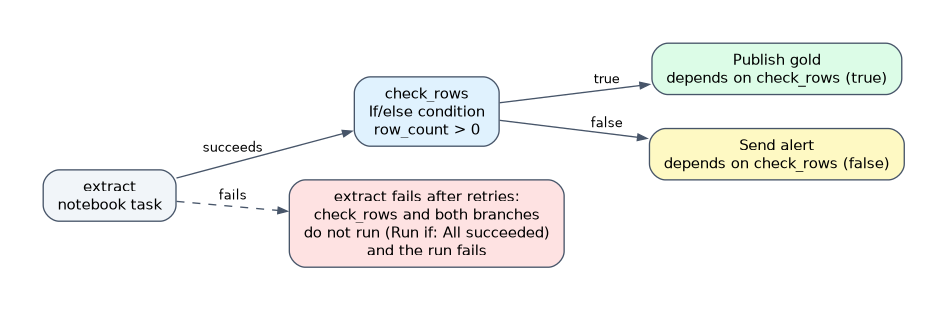 An If/else condition task compares two operands with
 ==, !=, >, >=, < or <=. The operands are usually a task value or job parameter reference and a literal. == and != compare as strings; the others compare as numbers.
Downstream tasks pick a branch in their Depends on field: check_rows (true) or check_rows (false).
Looping with For each
A For each task runs one nested task once per element of an input array. The inputs are a JSON array, a task value reference or a job parameter. Inside the nested task, {{input}} is the current element and {{input.<key>}} is a field of an object element.
The Concurrency setting controls how many iterations run in parallel; the default is 1. A common use is one ingestion notebook run per source table or region.
How the exam asks about this
- "A cleanup task must run even when the transform task fails." Set its Run if to All done.
- "Process 40 regions with the same notebook, several at a time." Use a For each task with a higher Concurrency.
- "Publish only if the load produced rows; otherwise notify the team." Set a task value and branch with an If/else task.
What to remember for the exam
- Tasks plus Depends on links form the job's DAG; tasks without dependencies run in parallel.
- Run if defaults to All succeeded, so an upstream failure skips the downstream task and fails the run.
- SQL and Dashboard tasks run on a serverless or pro SQL warehouse; a Pipeline task runs a pipeline update.
- Retries are set per task; a timeout applies to each retry.
- Repair run reruns failed and canceled tasks and their dependents only.
- If/else branches on a condition; For each loops over inputs with
{{input}}.
Run if conditions react to upstream task status, not to data values. To branch on a value such as a row count, publish it as a task value and use an If/else task.
Common mistakes
Assuming a downstream task runs after a failure. With the default All succeeded, it does not. Choose All done or At least one failed when the task must react to failure.
Using retries to cover a bug. A retry reruns the same code with the same input; a logic error fails every attempt. Retries are for transient problems.
Building one job per input. Copying the same task for each table or region is hard to maintain. A For each task over an input array runs the nested task once per element.
Check yourself
What is the default Run if condition for a task with dependencies?
All succeeded. If any upstream task fails, the task does not run and the job run fails.
What does Repair run rerun?
Only the failed or canceled tasks and the tasks that depend on them. Tasks that already succeeded are not run again.
How does a nested task in a For each loop read the current element?
Through the
{{input}}reference, or{{input.<key>}}for a field of an object element.
Topic 1 of 2 in Working with Lakeflow Jobs
Test yourself on Working with Lakeflow Jobs
The full Databricks Data Engineer Associate question bank has 598 questions, with timed practice exams and an explanation for every answer.
This study guide is independent and is not affiliated with, endorsed by, or sponsored by Databricks. Vendor names, certification names and exam codes are trademarks of their respective owners and are used for identification only.