Working with Lakeflow Jobs · Topic 2 of 2
Job Triggers and Schedules
Databricks DEA Lakeflow Jobs triggers: cron schedules, file arrival on volumes and external locations, table update triggers, time based vs data driven.
- 6 min
- Includes a diagram
- Scheduled is time based; file arrival and table update are data driven.
- Schedules use Quartz cron with a seconds field and a time zone, and can be paused.
- File arrival watches a Unity Catalog volume or external location, checking about every minute.
What it is
A trigger decides when a Lakeflow Job starts a run. A scheduled trigger is time based: it fires at set times whether or not new data exists. File arrival and table update triggers are data driven: they fire when new files land in storage or when Unity Catalog tables change.
Jobs can also start manually, from a Run Job task in another job, or through the API.
How it works
Scheduled triggers
A schedule is either simple (every N minutes, hours, days or weeks) or advanced, written as a Quartz cron expression with a time zone. A schedule can be paused without deleting it.
schedule:
  quartz_cron_expression: "0 0 6 * * ?"
  timezone_id: "Europe/London"
  pause_status: UNPAUSED
Quartz cron has a seconds field first, so 0 0 6 * * ? means 06:00:00 every day.
A schedule fits when the source lands at a known time or when the business needs results by a fixed deadline. If the data arrives late, the run still starts and may process nothing or partial data.
File arrival triggers
A file arrival trigger watches the root or a subpath of a Unity Catalog volume or external location on S3, Azure storage or Google Cloud Storage, including subdirectories. It checks for new files about every minute, on a best effort basis.
| Setting | Effect |
|---|---|
| Minimum time between triggers (seconds) | Waits at least this long after a run completes before the next run can start |
| Wait after last change (seconds) | Waits this long after a file lands; further arrivals reset the timer, so a batch of files starts one run |
Requirements: Unity Catalog in the workspace, READ permission on the storage location and CAN MANAGE on the job. Databricks recommends file events on the external location; without them, the monitored location is limited to 10,000 files.
The trigger only starts the job. The job still needs ingestion logic, typically Auto Loader or COPY INTO, to load each new file once.
trigger:
  file_arrival:
    url: /Volumes/main/raw/landing/
    wait_after_last_change_seconds: 120
Table update triggers
A table update trigger watches up to 25 Unity Catalog tables, including managed and external Delta tables, materialized views, streaming tables and supported views. It fires on updates, merges and deletes.
With several tables, choose Any table is updated or All tables are updated. The same two advanced settings, minimum time between triggers and wait after last change, apply.
trigger:
  table_update:
    table_names: [main.silver.orders, main.silver.customers]
    condition: ALL_UPDATED
The job's Run as principal needs SELECT on each monitored table, plus USE CATALOG and USE SCHEMA. Without them, the trigger cannot evaluate and the job does not run.
Time based or data driven
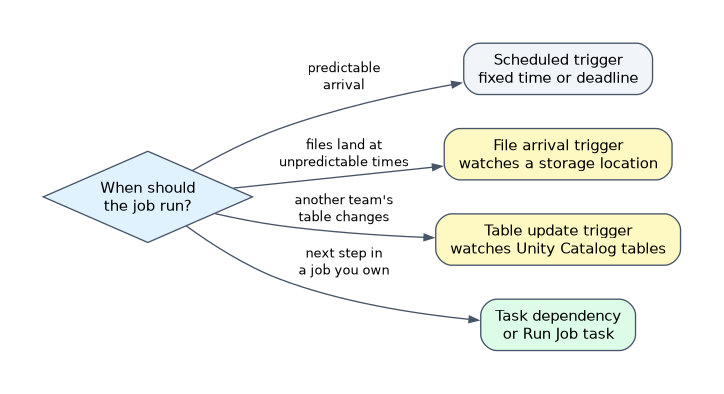
| Situation | Best trigger |
|---|---|
| Report due at 07:00 daily; source loaded by 05:00 | Scheduled |
| Partner drops files at unpredictable times; process soon after | File arrival |
| Gold job must run after another team's pipeline updates its silver tables | Table update |
| Several upstream tables must all be fresh first | Table update with All tables are updated |
| Next step in a workflow you own | One job with task dependencies, or a Run Job task |
Data driven triggers avoid two costs of polling on a schedule: empty runs when nothing arrived, and delay when data arrives just after a run. A schedule is simpler when arrival is predictable or the deadline matters more than freshness.
When both jobs are yours, a dependency inside the DAG or a Run Job task is more direct than a trigger. Table update triggers suit dependencies across teams or pipelines you do not control.
How the exam asks about this
- "Vendors upload CSV files to a volume at random times; process each upload within minutes." Use a file arrival trigger.
- "Rebuild the gold job only after both silver tables owned by another team have been refreshed." Use a table update trigger with All tables are updated.
- "Finance needs the summary every weekday at 06:00 New York time." Use a scheduled trigger with a Quartz cron expression and the America/New_York time zone.
What to remember for the exam
- Scheduled is time based; file arrival and table update are data driven.
- Schedules use Quartz cron with a seconds field and a time zone, and can be paused.
- File arrival watches a Unity Catalog volume or external location, checking about every minute.
- Table update watches up to 25 Unity Catalog tables, with any or all conditions.
- Wait after last change groups a burst of changes into one run; minimum time between triggers spaces runs out.
- The Run as principal needs SELECT on monitored tables, or the table update trigger does not fire.
A file arrival trigger does not load files or track which ones were processed. Pair it with Auto Loader or COPY INTO so each file is ingested once even if a run covers several arrivals.
Common mistakes
Scheduling a job for data that arrives at random. A frequent schedule wastes runs on no data, and an infrequent one delays processing. When arrival is unpredictable, the answer is a data driven trigger.
Pointing a file arrival trigger at a plain cloud path. The monitored location must be a Unity Catalog volume or external location; managed locations of catalogs and schemas are not supported.
Using a trigger for steps of one workflow. If the downstream step belongs to the same process you own, add it as a dependent task in the same job instead of a separate triggered job.
Check yourself
Which trigger starts a job when another team's Unity Catalog table is updated?
A table update trigger. It watches up to 25 Unity Catalog tables and can wait for any or all of them.
What does the wait after last change setting do on a file arrival trigger?
It delays the run until no new file has arrived for the set number of seconds, so a burst of files starts one run.
When is a scheduled trigger the better choice than a data driven one?
When the data arrives at a predictable time or results are due by a fixed clock deadline. A data driven trigger fits unpredictable arrival.
Topic 2 of 2 in Working with Lakeflow Jobs
Test yourself on Working with Lakeflow Jobs
The full Databricks Data Engineer Associate question bank has 598 questions, with timed practice exams and an explanation for every answer.
This study guide is independent and is not affiliated with, endorsed by, or sponsored by Databricks. Vendor names, certification names and exam codes are trademarks of their respective owners and are used for identification only.