AI/BI Genie Agents · Topic 2 of 2
Sharing and Improving Genie Agents
Databricks Data Analyst Associate: Genie Agent permissions, links, embedding, Teams and Slack apps, monitoring, feedback, benchmarks and metadata.
- 5 min
- Includes a diagram
- CAN VIEW or CAN RUN is enough to ask questions; CAN EDIT to change the agent; CAN MANAGE for permissions and all users' questions.
- Users also need the entitlement plus SELECT, USE CATALOG and USE SCHEMA on the data.
- Link for workspace users, embed for portals, Conversation API for custom apps, channel apps for Teams and Slack.
What it is
Once a Genie Agent is built, the author shares it in the Share dialog and decides who may ask and who may change it. The agent can reach users through links, embedded pages, external apps and chat tools.
After launch, real questions, feedback and benchmark runs show where Genie goes wrong, and the author fixes the context.
How it works
Permission levels
| Level | What the user can do |
|---|---|
| CAN VIEW | Open the agent and ask questions |
| CAN RUN | Open the agent and ask questions |
| CAN EDIT | Change instructions, data, example queries, settings and warehouse; run benchmarks |
| CAN MANAGE | Everything in CAN EDIT, plus change permissions and see all users' questions in the Monitor tab |
The creator gets CAN MANAGE automatically. Permissions are granted to users, groups or all account users in the Share dialog.
Data access still applies
Agent permission alone does not show any data. End users need the consumer access or Databricks SQL entitlement, and they need SELECT on the tables (plus USE CATALOG and USE SCHEMA) because each question is checked against the asking user's own Unity Catalog permissions.
Row filters and column masks on the tables therefore work inside Genie too.
Distributing an agent
| Channel | Use when |
|---|---|
| Copy link | Users already work in the Databricks workspace |
| Embed | The agent should appear inside an internal web page or portal as an iframe; a workspace admin must allow embedding |
| Genie Conversation API | An external or custom app sends questions and gets answers in code, with follow-ups kept in a conversation |
| Channel apps | Users work in Microsoft Teams or Slack and should ask Genie there |
Whatever the channel, the user's identity and Unity Catalog permissions still decide what data comes back.
Tracking questions and feedback
The Monitor tab lists the questions asked in the agent and their answers. It filters by time, rating, user and status. Users with CAN MANAGE see every user's questions here.
Users rate answers and can request a review of a response they doubt. Authors with CAN MANAGE review the flagged exchanges. Feedback on its own does not change how Genie behaves, so the author must act on it.
Updating instructions and trusted assets
Stakeholder input usually points to a missing definition or a repeated wrong answer:
- A misunderstood business term: add it to general instructions or as a SQL expression.
- A question that must always return the same figure: add a parameterized example SQL query as a trusted asset.
- A wrong column picked: improve the column description or add synonyms.
Validating accuracy with benchmarks
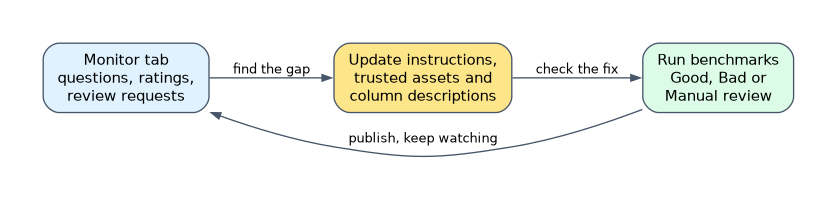 Benchmarks are test questions written by the author, each with an optional expected SQL Answer. Running them shows how accurately Genie answers, so the author can check that a change helped and did not break other questions.
| Result | Meaning |
|---|---|
| Good | Genie's SQL or its result set matches the SQL Answer |
| Bad | Empty result, an error, extra columns or a different result |
| Manual review needed | Genie cannot judge, or no SQL Answer was given |
Users with at least CAN EDIT can run benchmarks. The Evaluations tab shows an accuracy figure for each run.
Refreshing Unity Catalog metadata
Genie relies on table and column comments, so keep them current in Unity Catalog. Descriptions edited in the agent are scoped to the agent and do not change Unity Catalog; Reset on a table description restores the Unity Catalog one.
COMMENT ON TABLE sales.gold.orders IS 'One row per order line, net of returns';
ALTER TABLE sales.gold.orders
  ALTER COLUMN region COMMENT 'Sales region code, such as EMEA';
When new values appear in a column, such as a new region code, use Refresh prompt matching on that column so Genie knows the current values.
How the exam asks about this
- "A manager must change the agent's instructions but not its permissions." Grant CAN EDIT.
- "Sales staff should ask Genie inside Microsoft Teams." Use the Teams channel app.
- "Prove that new instructions improved accuracy before sharing widely." Run the benchmarks and compare accuracy.
What to remember for the exam
- CAN VIEW or CAN RUN is enough to ask questions; CAN EDIT to change the agent; CAN MANAGE for permissions and all users' questions.
- Users also need the entitlement plus SELECT, USE CATALOG and USE SCHEMA on the data.
- Link for workspace users, embed for portals, Conversation API for custom apps, channel apps for Teams and Slack.
- The Monitor tab shows real questions, ratings and review requests.
- Benchmarks are curator questions with expected SQL that measure accuracy after each change.
- Keep Unity Catalog comments current and refresh prompt matching when column values change.
Granting CAN MANAGE on the agent does not give a user access to the tables. A user without SELECT on the data still cannot get answers from it.
Common mistakes
Fixing access with agent permissions. If a user can open the agent but sees no data, the missing piece is a Unity Catalog grant, not a higher agent permission level.
Treating feedback as training. Ratings and review requests do not teach Genie anything on their own. The author must turn them into new instructions, example queries or descriptions.
Changing context without measuring. An instruction that fixes one question can break another. Running benchmarks after each change shows the real effect on accuracy.
Check yourself
What is the minimum Genie Agent permission needed to ask questions?
CAN VIEW or CAN RUN, together with SELECT, USE CATALOG and USE SCHEMA on the data the agent queries.
Which permission is needed to see other users' questions in the Monitor tab?
CAN MANAGE, which the agent's creator receives automatically.
What does a benchmark need for Genie to score it automatically?
An expected SQL Answer; without one, the result is marked for manual review.
Topic 2 of 2 in AI/BI Genie Agents
Test yourself on AI/BI Genie Agents
The full Databricks Data Analyst Associate question bank has 600 questions, with timed practice exams and an explanation for every answer.
This study guide is independent and is not affiliated with, endorsed by, or sponsored by Databricks. Vendor names, certification names and exam codes are trademarks of their respective owners and are used for identification only.