Security Engineering · Topic 3 of 8
Network Security Faults and Attacks
Troubleshoot network security issues such as firewall rule order, asymmetric routing, VPN failures, DNS abuse, ARP and DHCP attacks and certificate faults.
- 5 min
- Includes a diagram
- Most firewall and ACL rule sets are evaluated in order, so a broad permit can defeat a later deny.
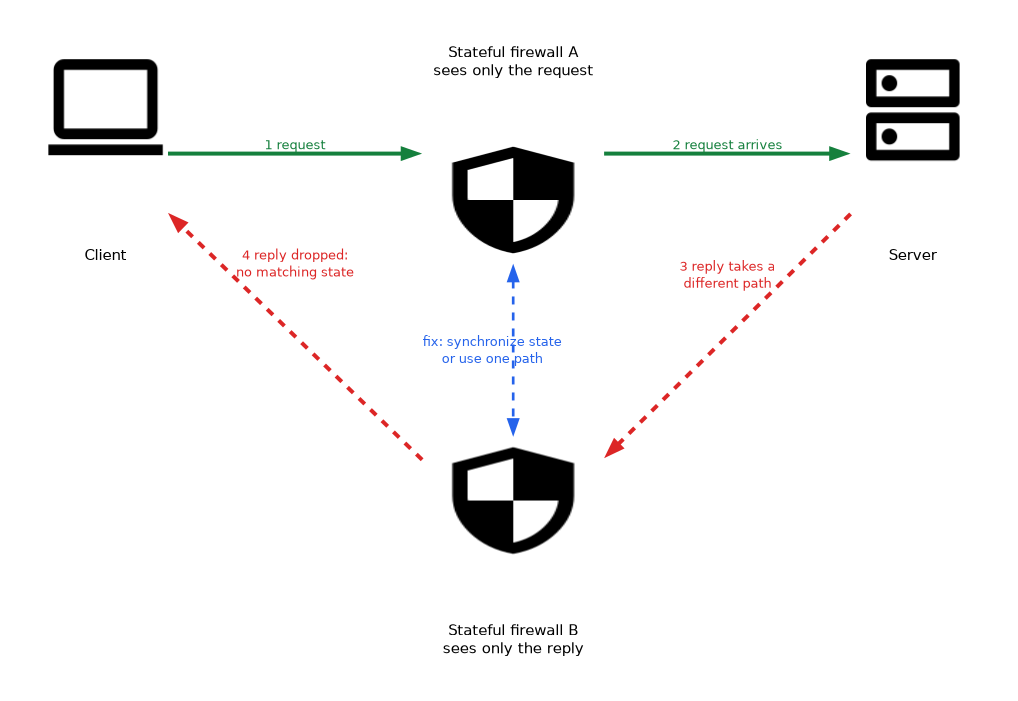
- Asymmetric routing breaks stateful inspection when only one direction is seen.
- BGP hijacks are mitigated by prefix filtering and route origin validation with RPKI.
What it is
Network security problems come from two sources: honest misconfiguration and active attack. The two often look alike, so a security engineer has to diagnose both by reading symptoms against how the network is meant to work.
Typical causes include firewall rules in the wrong order, routing that bypasses an inspection device, tunnels that fail to establish, name resolution abuse, layer 2 attacks, and expired certificates. This page covers the faults, and the next page covers the tools used to find them.
How it works
Configuration drift and policy errors
Devices drift from their approved configuration through emergency changes, manual edits and mistakes. Most firewalls and access control lists (ACLs) are evaluated top to bottom, and the first match decides.
A broad permit placed above a specific deny makes the deny useless. Most firewalls end with an implicit deny, so traffic that was never allowed is dropped.
Overlapping or stale rules grow over time. Regular rule reviews, change control and configuration comparison against a known baseline catch them.
Routing and switching faults
| Fault | Effect | Typical fix |
|---|---|---|
| Asymmetric routing | A stateful firewall sees only one direction of a flow and drops it | Make both directions use the same inspection path or synchronize state |
| Routing leak or insecure routing protocol | Traffic takes an unintended path or is hijacked | Authenticate routing updates, filter prefixes |
| Border Gateway Protocol (BGP) hijack | Another network falsely announces your address space | Prefix filtering, route origin validation using Resource Public Key Infrastructure (RPKI) |
| Spanning tree or loop fault | Broadcast storms and outages | Loop prevention features on switches |
| Virtual local area network (VLAN) misconfiguration | Traffic crosses zones | Correct trunk and access port settings, disable unused ports |
Tunnel failures
A virtual private network (VPN) tunnel needs both ends to agree on authentication, encryption and addressing. Common failures are mismatched proposals or lifetimes, expired certificates or wrong pre shared keys, and blocked ports or protocols along the path.
Routing or Network Address Translation (NAT) that rewrites addresses can break IP Security (IPsec) tunnels unless NAT traversal is supported. Split tunnel settings can also create a path around inspection.
Name resolution problems
Domain Name System (DNS) is both a dependency and a target. Failures cause many other symptoms, so check DNS early.
- Cache poisoning or spoofing: false answers send users to attacker sites. DNS Security Extensions (DNSSEC) sign records so they can be validated.
- DNS tunneling: data is hidden in queries and responses. Look for unusually long names, high query volume or odd record types.
- Encrypted DNS such as DNS over Hypertext Transfer Protocol Secure (DoH) protects privacy but can hide queries from monitoring that relies on seeing DNS.
- Sinkholing redirects malicious domains to a harmless address to block and detect infected hosts.
Layer 2 and local attacks
| Attack | How it works | Control |
|---|---|---|
| Address Resolution Protocol (ARP) spoofing | Attacker answers ARP requests to intercept traffic | Dynamic ARP inspection, segmentation |
| Rogue Dynamic Host Configuration Protocol (DHCP) server | False addressing or gateway sent to clients | DHCP snooping |
| Media access control (MAC) flooding | Switch table filled, so traffic floods out of all ports | Port security |
| VLAN hopping | Traffic escapes its VLAN through trunk abuse | Disable dynamic trunking, change native VLAN |
| Rogue access point | Unauthorized wireless device | Wireless monitoring, port authentication |
Port based authentication using the Institute of Electrical and Electronics Engineers (IEEE) 802.1X standard reduces many of these by authenticating devices before they get network access.
Certificate, time and cryptographic faults
An expired or untrusted certificate breaks Transport Layer Security (TLS) connections, VPNs and device authentication. Name mismatches and incomplete certificate chains cause similar errors.
Time must be synchronized with Network Time Protocol (NTP), since certificate validity, log correlation and Kerberos depend on it. Using outdated protocols or weak ciphers is a misuse of cryptographic controls that should be flagged and corrected.
Device and capacity faults
Hardware failure, overloaded inspection devices and full logs reduce security without obvious errors. A saturated intrusion prevention system may fail open or drop packets, so monitor device health and capacity.
What to remember for the exam
- Most firewall and ACL rule sets are evaluated in order, so a broad permit can defeat a later deny.
- Asymmetric routing breaks stateful inspection when only one direction is seen.
- BGP hijacks are mitigated by prefix filtering and route origin validation with RPKI.
- VPN failures come from mismatched parameters, certificates, blocked ports or NAT issues.
- DNSSEC protects the integrity of DNS answers, while encrypted DNS can reduce monitoring visibility.
- DHCP snooping, dynamic ARP inspection and port security counter layer 2 attacks.
- Certificate expiry and time drift are common hidden causes of failures.
- Check the lowest layers first and change one thing at a time.
If a stateful firewall drops traffic that both sides think is allowed, suspect asymmetric routing before rewriting the rules.
Common mistakes
Blaming the firewall first. Routing, DNS, certificates or time are frequent real causes.
Making several changes at once. You will not know which change fixed or broke the system.
Treating DNSSEC as encryption. It provides authenticity and integrity of answers, not confidentiality.
Ignoring unused ports. Open switch ports and default VLANs give attackers an easy foothold.
Temporarily disabling inspection to test a fault can leave the network exposed, so use a controlled and logged window.
Check yourself
Work through these three questions.
Why would a stateful firewall drop legitimate traffic after a routing change?
Asymmetric routing can send the return path around the firewall, so it sees only one direction and cannot match the session.
Which control stops a rogue DHCP server?
DHCP snooping, which only trusts DHCP responses from approved ports.
What does DNSSEC provide?
It signs DNS records so resolvers can verify authenticity and integrity, but it does not encrypt queries.
Topic 3 of 8 in Security Engineering
Test yourself on Security Engineering
The full CompTIA SecurityX CAS-005 question bank has 654 questions, with timed practice exams and an explanation for every answer.
This study guide is independent and is not affiliated with, endorsed by, or sponsored by CompTIA. Vendor names, certification names and exam codes are trademarks of their respective owners and are used for identification only.