Security Engineering · Topic 5 of 8
Hardware Security Technologies
Understand TPM, HSM, secure boot, measured boot, attestation, trusted execution environments, self encrypting drives and firmware protection.
- 6 min
- Includes a diagram
- A TPM stores keys and boot measurements for one device, and an HSM protects keys at enterprise scale.
- Use an HSM for certificate authority keys, code signing keys and other high value keys.
- Secure boot blocks unsigned boot code, and measured boot records hashes for later attestation.
What it is
Hardware security uses dedicated silicon to protect keys and to prove that a system started in a trusted state. Software controls can be altered by an attacker who gains administrator rights, but a hardware root of trust is far harder to change.
The exam asks you to match a hardware feature to a requirement, such as protecting disk encryption keys, proving boot integrity, or protecting private keys for a certificate authority.
How it works
Roots of trust and the Trusted Platform Module
A root of trust is a component that is trusted by definition, because everything above it depends on it. A Trusted Platform Module (TPM) is a small secure chip, or a firmware equivalent, built into or attached to a computer. It generates and stores cryptographic keys, holds measurements of the boot process, and can seal data so that it is only released if the system is in an expected state.
Typical uses include protecting full disk encryption keys so a stolen drive cannot be read on another machine, storing device certificates and supporting attestation. A virtual TPM gives virtual machines similar functions.
Hardware security modules
A hardware security module (HSM) is a hardened, tamper resistant device that generates, stores and uses keys, and performs cryptographic operations without exposing the keys. Use an HSM for high value keys, such as the private key of a certificate authority, code signing keys, or payment systems, and for meeting strict compliance rules. It can be a network appliance, a card in a server, or a cloud service.
| Feature | TPM | HSM |
|---|---|---|
| Typical location | Inside one device | Shared network appliance, card or cloud service |
| Typical purpose | Device identity, disk key protection, boot measurements | Enterprise key storage and cryptographic services |
| Performance | Low, per device | High, built for many operations |
| Scale | One per computer | Serves many applications |
Secure boot and measured boot
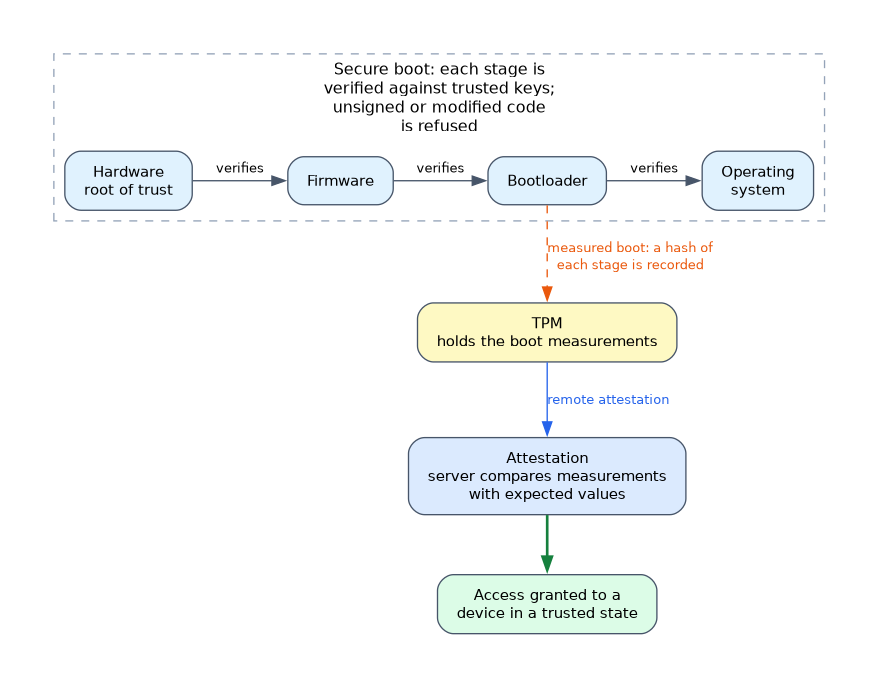 Secure boot, part of the Unified Extensible Firmware Interface (UEFI), checks digital signatures of boot components against trusted keys and refuses to load code that is unsigned or modified. It helps stop bootkits and rootkits that load before the operating system.
Measured boot records a hash of each boot stage into the TPM. It does not block anything by itself.
Instead, a later check, called attestation, compares those measurements with expected values. Remote attestation lets a server verify the state of a device before granting access, which supports Zero Trust device posture decisions.
Trusted execution environments
A trusted execution environment (TEE), also called a secure enclave, is an isolated area of a processor where code and data are protected even from the operating system or hypervisor. Confidential computing uses such environments so that data stays protected while in use, which helps when running sensitive workloads on shared cloud hardware. TEEs reduce trust in the host, but they do not remove the need to secure the application code inside.
Self encrypting drives and memory protection
A self encrypting drive (SED) encrypts data in the drive controller using a key that never leaves the drive. It adds little performance cost and is simple to deploy, and the key can be protected by the TPM or a password. Software full disk encryption is more flexible, while SEDs depend on trusting the drive firmware.
Memory encryption and protections such as execution controls limit the value of memory scraping and some physical attacks.
Firmware and supply chain integrity
Firmware runs below the operating system, so malicious or vulnerable firmware is very hard to detect. Protect it with signed updates, secure update channels, a firmware update process, and configuration locks such as firmware passwords. Buy from trusted sources and check hardware provenance, since tampered or counterfeit parts are a supply chain risk.
Self healing hardware
Self healing hardware can recover its own firmware. The device keeps a protected known good copy, checks the running firmware at start, and restores the good copy if the check fails, for example after a corrupted update or a malicious change.
This shortens downtime and removes persistent firmware malware without a technician reflashing the device. It only works if the backup copy is protected from modification and the checks rely on signatures, so it complements signed updates and does not replace them.
Physical and side channel concerns
Tamper evident seals and tamper resistant enclosures show or prevent physical access. Side channel attacks infer secrets from physical effects such as timing, power use or electromagnetic emission, and good hardware design plus constant time implementations reduce the risk. In sensitive environments, disable unused ports and block booting from external media.
What to remember for the exam
- A TPM stores keys and boot measurements for one device, and an HSM protects keys at enterprise scale.
- Use an HSM for certificate authority keys, code signing keys and other high value keys.
- Secure boot blocks unsigned boot code, and measured boot records hashes for later attestation.
- Remote attestation lets a server verify a device's state before allowing access.
- A TEE or secure enclave protects data in use from the host operating system.
- Self encrypting drives encrypt in hardware, with little performance impact.
- Firmware needs signed updates and protection, since it runs below the operating system.
- Hardware provenance matters because of counterfeit and tampered parts.
If the stem says a stolen laptop must not reveal its data on another computer, think disk encryption with the key sealed in a TPM.
Common mistakes
Mixing up secure boot and measured boot. Secure boot enforces by blocking, while measured boot records for later verification.
Using a TPM as an enterprise key vault. It is bound to one device and not built for shared high volume key services.
Assuming a TEE removes all risk. Bugs in the application inside the enclave and some side channels remain.
Forgetting firmware. Patching the operating system does not update the firmware beneath it.
Losing the TPM or its recovery key can lock you out of encrypted data, so store recovery keys securely and separately.
Check yourself
Work through these three questions.
What does measured boot add to secure boot?
It records hashes of boot stages in the TPM so a later attestation can check the system state, rather than only blocking unsigned code.
When should you choose an HSM over a TPM?
When many applications need high volume, tamper resistant key protection, such as for a certificate authority or code signing keys.
What does a trusted execution environment protect?
Code and data in use, isolating them even from the operating system or hypervisor.
Topic 5 of 8 in Security Engineering
Test yourself on Security Engineering
The full CompTIA SecurityX CAS-005 question bank has 654 questions, with timed practice exams and an explanation for every answer.
This study guide is independent and is not affiliated with, endorsed by, or sponsored by CompTIA. Vendor names, certification names and exam codes are trademarks of their respective owners and are used for identification only.