Security Architecture · Topic 3 of 7
Secure Infrastructure Design and Zero Trust
Security+ infrastructure design: device placement, security zones, attack surface, diversity, fail open versus fail closed and Zero Trust architecture.
- 6 min
- Includes a diagram
- A screened subnet holds public facing servers between the internet and the internal network.
- Inline devices can block. Tap or monitor devices only see a copy and alert.
- Firewalls go at zone boundaries, and internal sensors catch lateral movement.
What it is
Secure infrastructure design decides where devices sit, how traffic flows between zones and what happens when a security device fails. The goal is to give each system only the exposure it needs.
Zero Trust architecture goes further. It stops trusting anything because of where it sits on the network and checks the user, the device and the application on every request.
How it works
Security zones
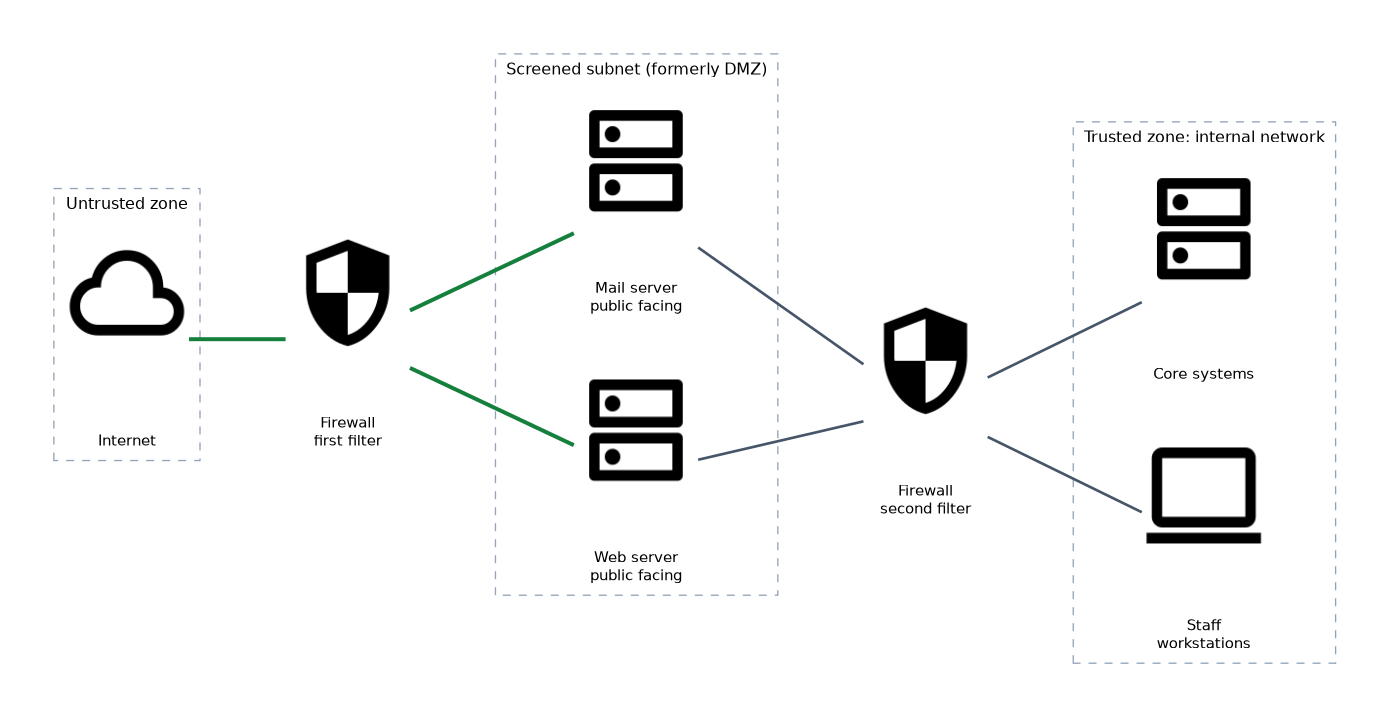 A zone is a group of systems with a similar level of trust. Traffic between zones passes through a control point, such as a firewall, that applies rules.
| Zone | Meaning |
|---|---|
| Untrusted | Outside networks such as the internet |
| Trusted | The internal network with staff and core systems |
| Screened subnet | A buffer zone for public facing servers, formerly called a demilitarized zone (DMZ) |
| Restricted | A tightly controlled zone for the most sensitive systems, such as payment or OT systems |
Public servers such as web and mail servers go in the screened subnet. If one is attacked, the internal network is still behind another filter.
Device placement
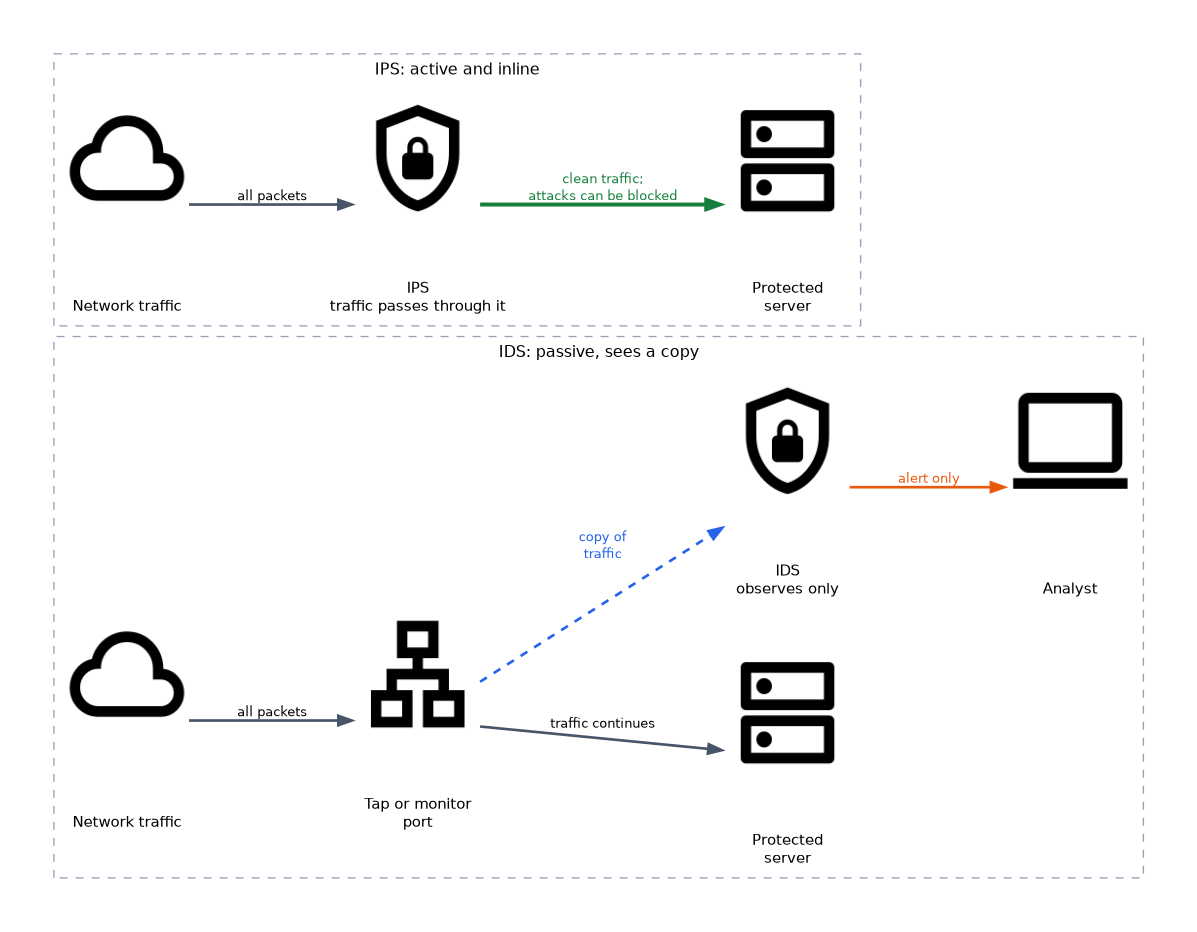 Where a device sits decides what it can see and stop. Firewalls belong at the boundaries between zones, where traffic must pass through them.
| Placement | Behavior | Example |
|---|---|---|
| Inline | Traffic passes through the device, so it can block | Firewall, intrusion prevention system (IPS) |
| Tap or monitor | The device sees a copy of the traffic, so it can only alert | Intrusion detection system (IDS), sensor |
A sensor placed only at the internet edge cannot see attacks that move between internal systems. Placing sensors inside the network as well gives visibility of lateral movement.
Attack surface
The attack surface is every point where an attacker could try to get in, such as open ports, exposed services, user accounts and connected devices. Reduce it by closing unneeded ports, removing unused services and limiting which zones can talk to each other.
Every extra path is another route for an attacker. Each new cloud link, remote access method or connected device should be counted as part of the attack surface.
Diversity
Diversity, sometimes called vendor diversity, means using different vendors or technologies at different layers. If the outer firewall and the inner firewall come from different vendors, one flaw is less likely to defeat both.
The trade off is more products to learn, patch and support. Diversity adds resilience against a single flaw, but it raises cost and management effort.
Failure modes
A failure mode says what a device does when it breaks.
| Mode | Behavior | Priority |
|---|---|---|
| Fail open | Traffic is allowed through when the device fails | Availability |
| Fail closed | Traffic is blocked when the device fails | Security |
An inline IPS in fail open mode keeps the network running if it crashes, but traffic passes unchecked. A fail closed firewall protects the network but stops all traffic until it is repaired.
Zero Trust architecture
Zero Trust assumes a breach is possible anywhere, so no user or device is trusted because of its network location. Every request is checked against identity, device state and context.
| Element | What it means |
|---|---|
| User authentication | Strong proof of identity, such as multifactor authentication, checked for each session and again when risk changes |
| Device management: health | The device must meet policy, for example patched, encrypted and running endpoint protection |
| Device management: inventory | Only known, registered devices are allowed, so the organization must keep an accurate list |
| Application access control | Access is granted to a single application, not to the whole network, with the least privilege needed |
Granting access per application limits how far an attacker can move after stealing an account. A device that falls out of compliance, for example by missing patches, loses access until it is fixed.
How the exam asks about this
- "The company's web server must be reachable from the internet without exposing internal systems." -> Place it in a screened subnet.
- "The IPS must never be the reason the business stops." -> Configure it to fail open.
- "A laptop with valid credentials is refused because it lacks current patches." -> Zero Trust device health checking.
What to remember for the exam
- A screened subnet holds public facing servers between the internet and the internal network.
- Inline devices can block. Tap or monitor devices only see a copy and alert.
- Firewalls go at zone boundaries, and internal sensors catch lateral movement.
- Reduce the attack surface by removing unneeded ports, services and paths.
- Diversity uses different vendors or technologies so one flaw does not defeat every layer.
- Fail open favors availability. Fail closed favors security.
- Zero Trust checks user authentication, device health and inventory, and grants access per application.
If a scenario says security matters more than uptime, choose fail closed. If the device must never stop the business, choose fail open.
Common mistakes
Mixing up IDS and IPS placement. An IDS on a tap only alerts. An IPS sits inline and can block.
Placing public servers on the internal network. A compromised public server then has direct access to internal systems.
Treating the internal network as trusted. Zero Trust checks requests from inside the network as strictly as those from outside.
Forgetting the device in Zero Trust. A valid password on an unknown or unhealthy device should not be enough.
Choosing a failure mode without reading the priority. Fail closed stops all traffic, and fail open lets all traffic through unchecked.
A passive tap cannot block anything. If a question needs prevention, the device must be inline.
Check yourself
Where should a public web server be placed?
In a screened subnet, separated from both the internet and the internal network by filtering.
What does fail closed mean?
When the device fails, it blocks traffic, which protects security at the cost of availability.
What device information does Zero Trust check before granting access?
The device's health, such as patches and protection, and whether it is in the inventory of known devices.
Topic 3 of 7 in Security Architecture
Test yourself on Security Architecture
The full CompTIA Security+ SY0-801 question bank has 998 questions, with timed practice exams and an explanation for every answer.
This study guide is independent and is not affiliated with, endorsed by, or sponsored by CompTIA. Vendor names, certification names and exam codes are trademarks of their respective owners and are used for identification only.