Security Architecture · Topic 3 of 6
Network Design and Security Appliances
Secure network design for Security+: zones, screened subnet, IDS versus IPS, fail open and fail closed, proxies, jump servers and load balancers.
- 5 min
- Includes a diagram
- A screened subnet holds public facing servers between the internet and the internal network.
- An IPS is active and inline. An IDS is passive and sees a copy of traffic.
- Fail open favors availability. Fail closed favors security.
What it is
Secure network design decides where devices sit, how traffic flows between zones and what happens when a security device fails.
The goal is to give each system only the exposure it needs. Good design puts the right appliance in the right place, in the right mode.
How it works
Security zones
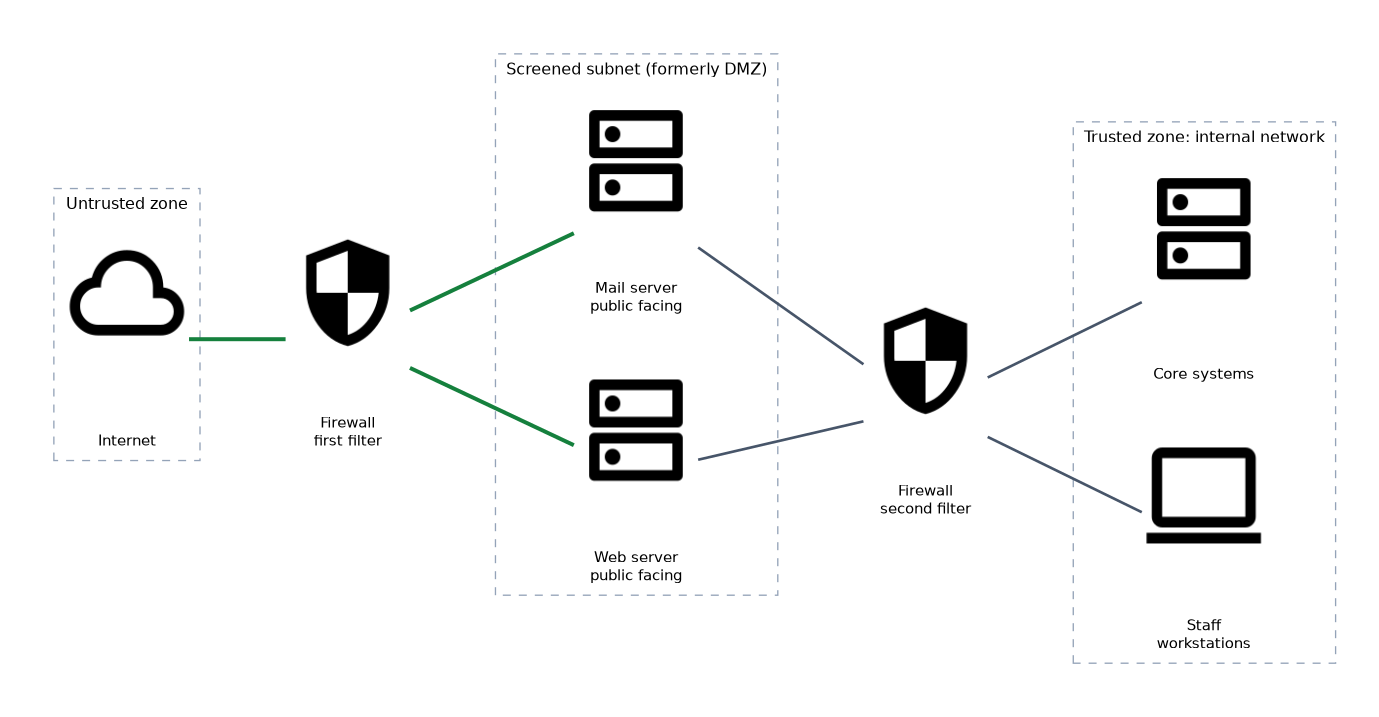 A zone is a group of systems with a similar level of trust. Traffic between zones is controlled.
| Zone | Meaning |
|---|---|
| Untrusted | Outside networks such as the internet |
| Trusted | The internal network with staff and core systems |
| Screened subnet | A buffer zone for public facing servers, formerly called a demilitarized zone (DMZ) |
Public servers such as web and mail servers go in the screened subnet. If one is attacked, the internal network is still behind another filter.
Device placement and attributes
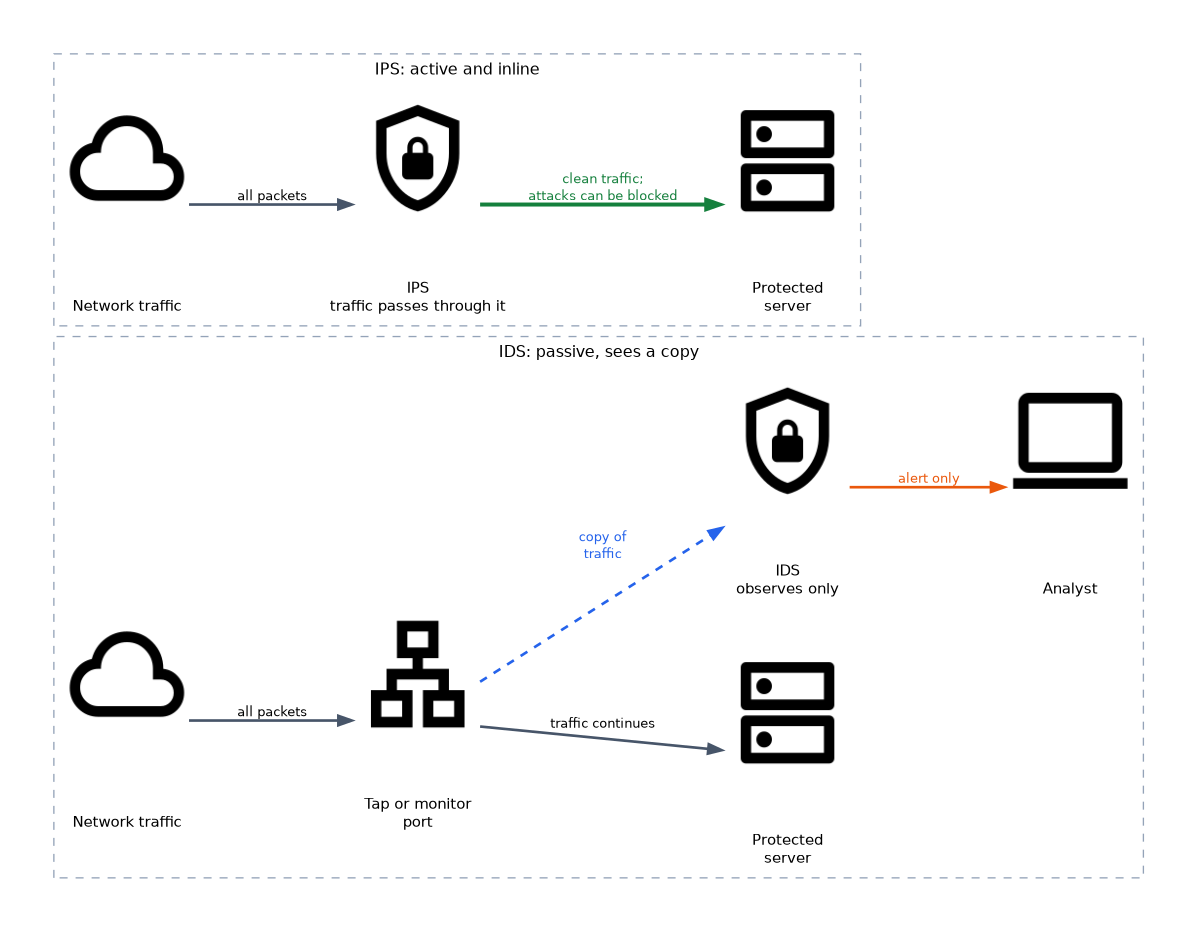 Where a device sits and how it works both matter.
| Attribute | Option A | Option B |
|---|---|---|
| Mode of action | Active: takes action on traffic | Passive: only observes |
| Position | Inline: traffic passes through it | Tap or monitor: sees a copy of traffic |
An intrusion prevention system (IPS) is active and inline, so it can block an attack. An intrusion detection system (IDS) is passive and sees a copy of the traffic, so it can alert but not stop the packet itself.
Failure modes
A failure mode says what a device does when it breaks.
| Mode | Behavior | Priority |
|---|---|---|
| Fail open | Traffic is allowed through when the device fails | Availability |
| Fail closed | Traffic is blocked when the device fails | Security |
An inline IPS in fail open mode keeps the network running if it crashes, but traffic passes unchecked. A fail closed firewall protects the network but stops all traffic until it is repaired.
Network appliances
| Appliance | Role |
|---|---|
| Jump server | A hardened host used as a controlled stepping stone to administer systems in a protected zone |
| Proxy server | Stands between clients and the internet; a forward proxy filters and caches client requests |
| Reverse proxy | Sits in front of servers and receives requests on their behalf |
| Load balancer | Spreads traffic over several servers for availability and scaling |
| Sensor | A device or agent that collects traffic or events for analysis |
| Web application firewall (WAF) | Filters web traffic to block attacks against applications |
A jump server limits the number of paths into a sensitive network and gives one place to log and control administrator sessions. A load balancer can also hide the real servers from users.
Attack surface and connectivity
Reduce the attack surface by closing unneeded ports, limiting which zones can talk to each other and using secure connection methods. Every extra path is another route for an attacker.
Port security and network access control
Switch port security restricts which devices may connect to a port. It can limit the number of media access control (MAC) addresses allowed on it. Network access control (NAC) checks a device's identity and health before it joins the network.
What to remember for the exam
- A screened subnet holds public facing servers between the internet and the internal network.
- An IPS is active and inline. An IDS is passive and sees a copy of traffic.
- Fail open favors availability. Fail closed favors security.
- A jump server is a hardened intermediary for administration.
- A forward proxy represents clients. A reverse proxy represents servers.
- A load balancer improves availability and scalability.
- A WAF protects web applications from attacks such as injection and cross site scripting.
- NAC and port security control which devices may connect.
If a scenario says the security device must never be the reason the business stops, choose fail open. If security matters more than uptime, choose fail closed.
Common mistakes
Mixing up IDS and IPS. An IDS only alerts. An IPS sits in line and can block.
Placing public servers on the internal network. A compromised public server then has direct access to internal systems.
Confusing forward and reverse proxies. A forward proxy serves internal users going out. A reverse proxy shields servers receiving requests.
Assuming a load balancer is a security appliance. Its main job is availability, although it may add some protection.
Forgetting what failure does. A device that fails closed stops traffic, and one that fails open lets all traffic through.
A passive tap cannot block anything. If a question needs prevention, the device must be inline and active.
Check yourself
Where should a public web server be placed?
In a screened subnet, separated from both the internet and the internal network by filtering.
What does fail closed mean?
When the device fails, it blocks traffic, which protects security at the cost of availability.
What is the role of a jump server?
It is a hardened host used to reach and administer systems in a protected zone in a controlled, logged way.
Topic 3 of 6 in Security Architecture
Test yourself on Security Architecture
The full CompTIA Security+ SY0-701 question bank has 848 questions, with timed practice exams and an explanation for every answer.
This study guide is independent and is not affiliated with, endorsed by, or sponsored by CompTIA. Vendor names, certification names and exam codes are trademarks of their respective owners and are used for identification only.