Vulnerability Discovery and Analysis · Topic 1 of 5
Vulnerability Scan Types
Compare authenticated and unauthenticated vulnerability scans, agent and network scanning, discovery and compliance scans, and key scan settings.
- 4 min
- Includes a diagram
- A vulnerability scan reports possible weaknesses, and a penetration test validates and exploits them.
- Authenticated scans log in, so they are deeper and more accurate than unauthenticated ones.
- Unauthenticated scans show the external attacker's view.
What it is
A vulnerability scan is an automated check of systems for known weaknesses, such as missing patches, weak settings and exposed services. The scanner compares what it finds with a database of known issues and reports matches.
A scan is not a penetration test. It finds and lists possible problems, while a tester then validates them and shows what an attacker could really do.
How it works
Authenticated and unauthenticated scans
The main difference is whether the scanner has valid credentials for the target.
| Feature | Unauthenticated (uncredentialed) | Authenticated (credentialed) |
|---|---|---|
| Viewpoint | An outside attacker with no access | A logged-in user or administrator |
| Method | Probes from the network, reads banners and responses | Logs in and inspects patches, packages, registry and settings |
| Depth | Shallow, sees only exposed services | Deep, sees local issues |
| Accuracy | More false positives and false negatives | Fewer, because it reads real data |
| Risk | Lower impact on hosts | Needs protected credentials and a little more load |
Use unauthenticated scans to see what an external attacker sees. Use authenticated scans to find patch and configuration weaknesses that matter once an attacker has a foothold.
The scanning account should have the least privilege that still allows the checks, and its password must be stored securely. Common methods are Secure Shell (SSH) keys for Linux and a read-capable account for Windows.
Agent-based and network-based scanning
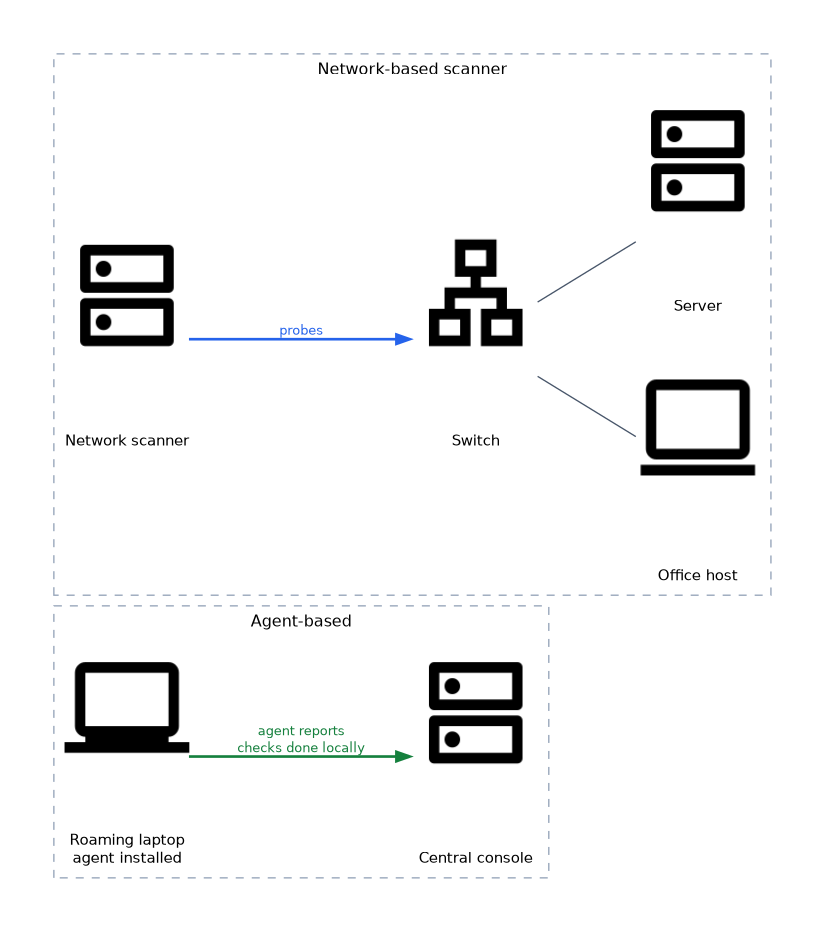 A network scanner sits on the network and probes hosts. An agent is a small program installed on each host that checks the system locally and reports to a central console.
Agents work well for laptops that leave the office and for hosts behind firewalls. They need installation and maintenance, and an agent that has stopped reporting is a blind spot.
Scan purposes
| Scan type | Goal |
|---|---|
| Discovery scan | Find live hosts, open ports and services, building an asset list |
| Full vulnerability scan | Run all relevant checks against discovered services |
| Compliance scan | Compare settings with a policy or benchmark, such as the Center for Internet Security (CIS) benchmarks |
| Targeted scan | Check one system or one type of issue, often after a change or alert |
| Stealth (low and slow) scan | Reduce speed and noise to cause less disturbance or fewer alerts |
Scan configuration
Results depend heavily on settings. These choices are made before the scan.
- Scope and targets: exact address ranges, with exclusions for fragile or out-of-scope systems.
- Schedule and window: run within the agreed testing window, outside business peaks where possible.
- Intensity: safe checks only, or also checks that can disturb a service. Dangerous checks should stay off for production unless approved.
- Plug-ins and signatures: update them before every scan, or new flaws are missed.
- Credentials: the correct accounts for each platform.
- Throttling: limit the number of simultaneous hosts and requests to avoid overload.
- Network position: a scanner outside a firewall sees different results from one inside.
Web applications and application programming interfaces (APIs) need a scan profile built for them. A network scan sees only that a web server runs, not the logic flaws in the application.
Other targets
Scanners also cover containers, cloud settings, databases, wireless networks and industrial control systems. Operational technology (OT) systems are often fragile, so scans there need special care and usually passive monitoring or a very gentle profile.
Scanning production systems can cause crashes or slowdowns, so confirm the scan profile and window with the client before you start.
What to remember for the exam
- A vulnerability scan reports possible weaknesses, and a penetration test validates and exploits them.
- Authenticated scans log in, so they are deeper and more accurate than unauthenticated ones.
- Unauthenticated scans show the external attacker's view.
- Agents help with remote and roaming devices, and they report to a central console.
- Discovery scans build an asset list, while compliance scans compare configuration to a policy or benchmark.
- Update plug-ins before every scan, and limit intensity on fragile systems.
- Results depend on where the scanner sits and what the firewall allows.
- Web applications and OT systems need special scan profiles.
Common mistakes
Treating a scan as a test. A list of possible weaknesses is not proof that they can be exploited.
Expecting an unauthenticated scan to find missing patches reliably. It can only guess from banners and responses.
Using a domain administrator account for scanning. The scan account needs only enough rights to read, and anything more raises the risk if the credentials leak.
Forgetting to update the scanner. An old plug-in set misses recent vulnerabilities.
Scanning during peak hours with full intensity. Production use suffers, and the test may be blamed for outages.
Check yourself
Which scan type is more accurate for finding missing patches?
An authenticated (credentialed) scan.
When is an agent preferable to a network scanner?
For roaming or remote devices that are not always reachable from the scanner.
What is the aim of a compliance scan?
To compare system settings with a policy or benchmark.
Topic 1 of 5 in Vulnerability Discovery and Analysis
Test yourself on Vulnerability Discovery and Analysis
The full CompTIA PenTest+ PT0-003 question bank has 653 questions, with timed practice exams and an explanation for every answer.
This study guide is independent and is not affiliated with, endorsed by, or sponsored by CompTIA. Vendor names, certification names and exam codes are trademarks of their respective owners and are used for identification only.