Reconnaissance and Enumeration · Topic 5 of 6
Wireshark, Shodan and Other Recon Tools
Know what Wireshark, tcpdump, Shodan, Censys, Maltego, Recon-ng and similar tools are for, and how to choose the right reconnaissance tool for a task.
- 5 min
- Includes a diagram
- Wireshark and tcpdump capture and analyse packets, and pcap is the capture file format.
- Capture filters use BPF syntax and limit what is saved, while display filters hide packets after capture.
- Shodan and Censys give a passive view of internet-exposed devices from earlier scans.
What it is
Besides Nmap, the exam expects you to match common reconnaissance tools to their purpose. Questions give a goal, such as "see credentials in captured traffic" or "find exposed devices without touching them", and ask which tool fits.
The skill is selection: know what each tool does, whether it is passive or active, and what output it produces.
How it works
Packet capture and analysis
Wireshark is a graphical packet analyser. It captures traffic from a network interface or opens a saved capture file (pcap), and decodes hundreds of protocols.
The command line tool tcpdump captures packets on Linux and macOS. Both rely on filters, and the two filter types are different.
| Filter type | Applied | Syntax style | Example |
|---|---|---|---|
| Capture filter | While capturing, to limit what is stored | Berkeley Packet Filter (BPF) | host 192.0.2.10 or port 80 |
| Display filter | After capture, to hide packets from view | Wireshark's own | ip.addr == 192.0.2.10 or http |
Linux shell:
tcpdump -i eth0 -w capture.pcap port 80
This writes packets on interface eth0 for port 80 into a file that Wireshark can open later. Useful Wireshark features include Follow TCP Stream, which rebuilds a Transmission Control Protocol (TCP) conversation, and statistics views of protocols and conversations.
A packet capture is how testers show that a protocol sends data in cleartext. The same technique is used by defenders to investigate suspicious traffic.
Internet-wide device search
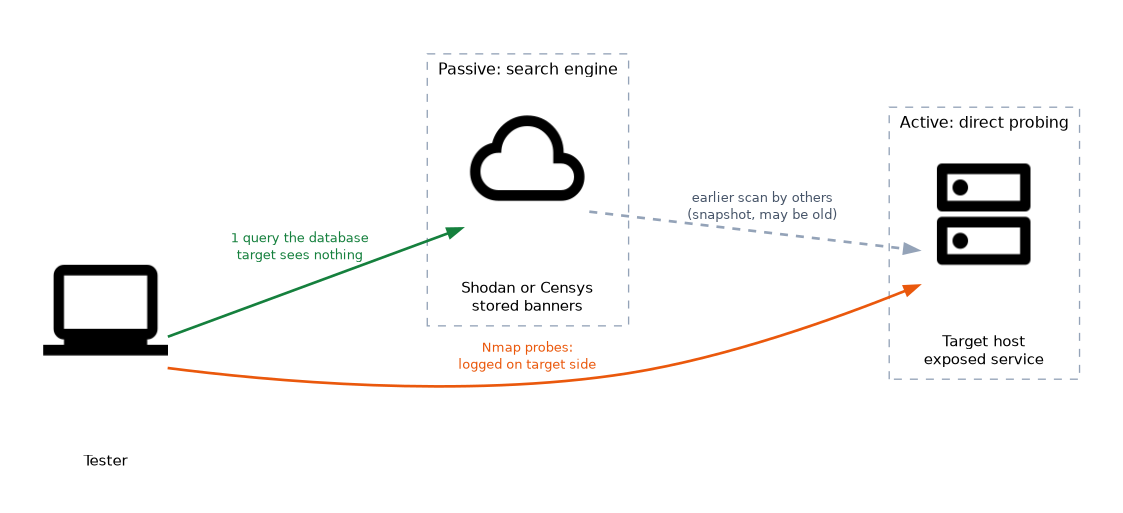 Shodan and Censys are search engines that continuously scan the internet and store the banners they receive. A tester can search by organisation name, address range, product or port and see exposed services, versions and sometimes default login pages.
Because the scanning was done earlier by someone else, using the results is passive reconnaissance. The data may be old, so findings must be confirmed.
Other common tools
| Tool | Main purpose | Type |
|---|---|---|
| theHarvester | Gather emails, names and subdomains from public sources | Passive |
| Recon-ng | Modular OSINT framework with a database of results | Mostly passive |
| Maltego | Visualise relationships between people, domains and hosts | Passive |
| SpiderFoot | Automated OSINT collection | Mostly passive |
| dnsenum, DNSRecon, Amass | DNS records, brute forcing and subdomain discovery | Active or passive |
| WHOIS, dig, nslookup | Registration and DNS lookups | Light active |
| Nmap, Masscan | Port and service scanning | Active |
| Netcat | Read and write raw network connections, banner grabbing | Active |
| enum4linux, smbclient | SMB and Windows share enumeration | Active |
| snmpwalk | Query SNMP information | Active |
| Gobuster, ffuf, Dirb | Web directory enumeration | Active |
| WPScan | Enumerate a WordPress site, its themes and plug-ins | Active |
| Aircrack-ng suite | Wireless capture and assessment | Active or passive |
SNMP is the Simple Network Management Protocol. SMB is Server Message Block, and OSINT is open-source intelligence.
Choosing the right tool
Work from the goal and from what the rules of engagement allow.
- Need to stay invisible to the target: use search engines like Shodan, certificate logs and archives.
- Need to see what a host exposes right now: use Nmap and service banner checks.
- Need to prove cleartext credentials or study a protocol: use Wireshark or tcpdump.
- Need to map relationships between people and domains: use Maltego or SpiderFoot.
- Need to find hidden web content: use Gobuster, Dirb or ffuf.
- Need to list Windows shares or users: use SMB enumeration tools.
Reading a capture
When reading a capture, check the protocol column, the source and destination addresses, and the time. Look for unexpected protocols, large transfers to unusual addresses, and cleartext such as Hypertext Transfer Protocol (HTTP) forms or File Transfer Protocol (FTP) logins.
A repeated pattern of short connection attempts across many ports from one source indicates a scan. Address Resolution Protocol (ARP) replies in which one hardware (MAC) address claims several different IP addresses suggest ARP spoofing.
A capture filter cannot be changed after the capture starts, while a display filter can be changed at any time, so use a display filter when unsure.
What to remember for the exam
- Wireshark and tcpdump capture and analyse packets, and pcap is the capture file format.
- Capture filters use BPF syntax and limit what is saved, while display filters hide packets after capture.
- Shodan and Censys give a passive view of internet-exposed devices from earlier scans.
- theHarvester, Recon-ng, Maltego and SpiderFoot are OSINT and relationship tools.
- Netcat is used for banner grabbing and raw connections.
- Gobuster, Dirb and ffuf enumerate web paths.
- WPScan targets WordPress, and enum4linux and smbclient target SMB.
- Pick passive tools when stealth matters, and active tools when current accuracy matters.
Common mistakes
Mixing up the two filter types. BPF syntax such as port 80 works as a capture filter, while tcp.port == 80 is for display.
Calling Shodan an active scan. The tester only queries a database that others built, so the target sees nothing.
Expecting Wireshark to show everything. Without a good position, a mirror port or monitor mode, it sees only local traffic.
Treating encrypted traffic as readable. A capture of Transport Layer Security (TLS) traffic shows addresses and sizes, not the content.
Using an invasive tool when a passive one is enough. Start quietly, and escalate only when scope and need justify it.
Check yourself
Which tool type lets a tester view exposed devices without sending traffic to them?
An internet-wide search engine such as Shodan or Censys.
What is the difference between a capture filter and a display filter?
A capture filter limits what is recorded, while a display filter only hides packets already captured.
Which tool is suited to rebuilding a captured TCP conversation?
Wireshark, using Follow TCP Stream.
Topic 5 of 6 in Reconnaissance and Enumeration
Test yourself on Reconnaissance and Enumeration
The full CompTIA PenTest+ PT0-003 question bank has 653 questions, with timed practice exams and an explanation for every answer.
This study guide is independent and is not affiliated with, endorsed by, or sponsored by CompTIA. Vendor names, certification names and exam codes are trademarks of their respective owners and are used for identification only.