Reconnaissance and Enumeration · Topic 2 of 6
Active Reconnaissance and Network Sniffing
Understand active reconnaissance: host discovery, port and protocol scanning, banner grabbing and network sniffing, and how they differ from passive work.
- 5 min
- Includes a diagram
- Active reconnaissance sends traffic to the target, so it can be logged and detected.
- ARP discovery works only on the local segment, while ICMP and TCP probes cross routers.
- Port states are open, closed and filtered, and filtered usually points to a firewall.
What it is
Active reconnaissance means interacting directly with the target to learn about it. The tester sends packets or requests and studies the replies.
This gives much more accurate and current data than public sources, but it also leaves traces in logs and can be detected by intrusion detection systems (IDS). It must therefore stay inside the approved scope and testing window.
How it works
Host discovery
The first question is which addresses are in use. Common techniques are an Internet Control Message Protocol (ICMP) echo request (a ping), an Address Resolution Protocol (ARP) request on a local network, and a probe to a common Transmission Control Protocol (TCP) port.
On a local segment, ARP is very reliable because hosts must answer it to communicate. Across a firewall, ICMP is often blocked, so TCP probes are used instead.
Port scanning
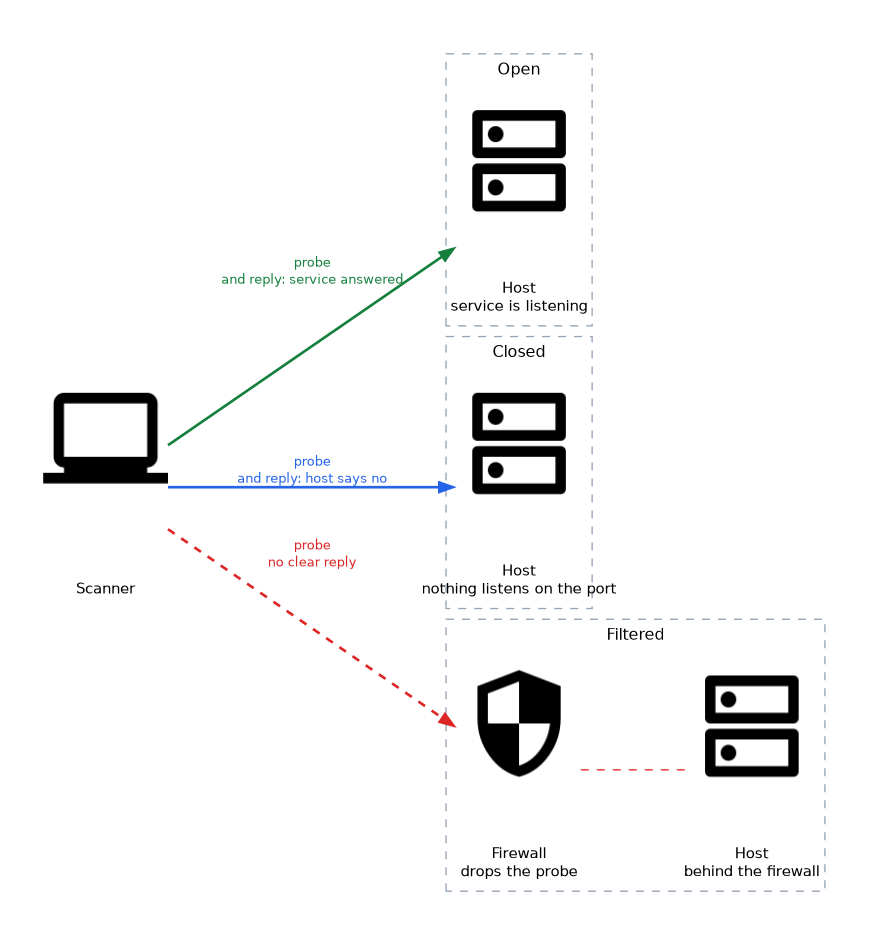 A port scan tests which ports on a host accept connections. Each port ends up in a state.
| State | Meaning |
|---|---|
| Open | A service is listening and answered |
| Closed | The host answered, but nothing listens on that port |
| Filtered | No clear answer, usually because a firewall drops the probe |
TCP scans use the connection handshake. A full connect scan completes it, while a SYN scan (also called a half-open scan) sends the first packet and watches the reply without completing the connection.
User Datagram Protocol (UDP) scanning is slower and less certain, because an open UDP port often does not reply at all. For that reason UDP scans take longer and need extra care in interpretation.
Service and version detection
Once a port is open, the tester finds what is behind it. Banner grabbing reads the greeting a service sends when a client connects, which often names the product and version.
More advanced detection sends probes and compares the replies to a database of known service fingerprints. The same idea applies to operating system (OS) fingerprinting, where subtle differences in how a host builds its packets suggest the OS family.
Protocol scanning
Protocol scanning checks which network protocols a host speaks, not only which ports are open. Examples are testing for supported Simple Network Management Protocol (SNMP) versions, Transport Layer Security (TLS) versions and cipher suites, or Server Message Block (SMB) dialects.
The results show outdated and weak protocols that a vulnerability scan will later flag. Internet Protocol (IP) protocol scans can also list which transport protocols, such as ICMP, TCP and UDP, a host supports.
Network sniffing
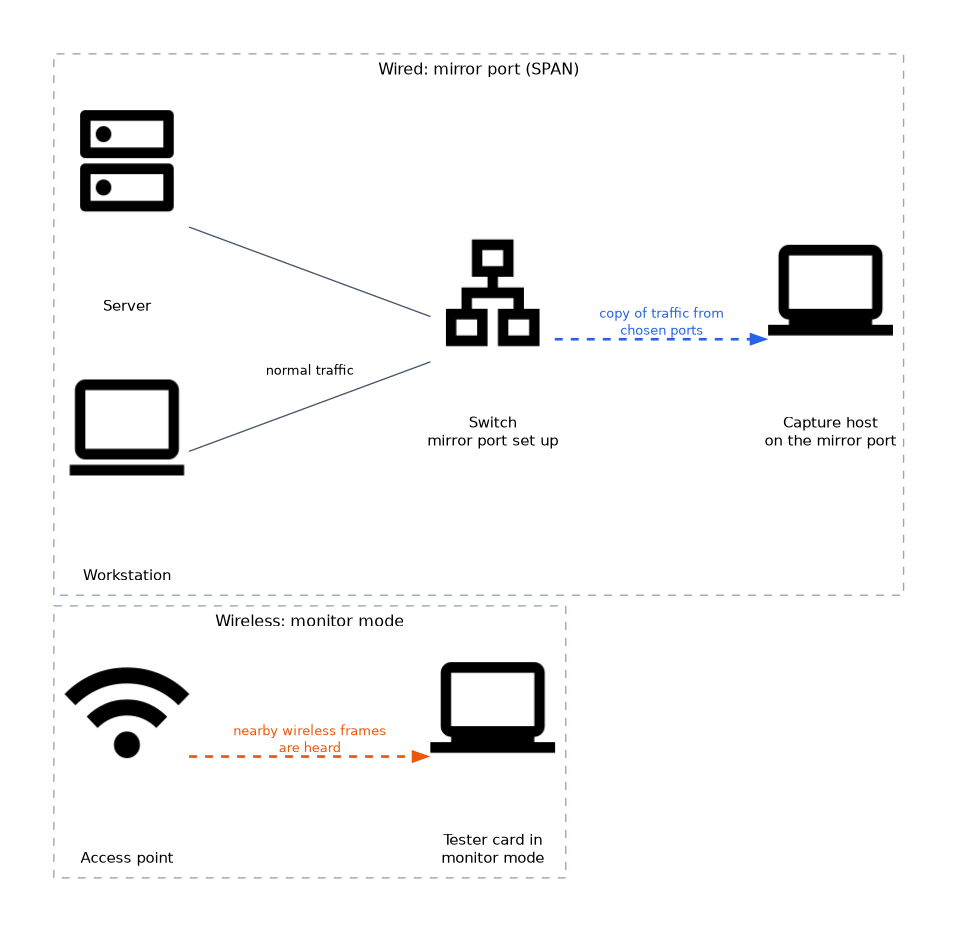 Sniffing captures traffic and reads it. On a switched network, a capture normally sees only traffic sent to or from the capturing host, plus broadcasts.
To see more, testers need a position on the path, a mirror (SPAN, Switched Port Analyzer) port or a network tap. Wireless networks are different, because a card in monitor mode can hear nearby frames.
| Method | What it gives |
|---|---|
| Capture on own host | Own traffic and broadcasts |
| Mirror port or tap | Copy of traffic from chosen ports |
| Wireless monitor mode | Nearby wireless frames |
Sniffing is passive on the wire, but it needs a foothold or approval for the placement. It can expose cleartext protocols such as Telnet, File Transfer Protocol (FTP) and plain Hypertext Transfer Protocol (HTTP), where credentials may travel unprotected.
A scan that reports many filtered ports usually means a firewall sits in the path, whereas many closed ports means the host itself answered that nothing listens there.
Sniffing IoT and OT protocols
Internet of Things (IoT) and operational technology (OT) networks often carry protocols such as MQTT, Modbus, BACnet and Zigbee. Many send data in cleartext, so a capture can reveal device details, sensor values and control messages.
This makes sniffing valuable on these networks, and it is a reason to segment and encrypt them. Testing here needs care, because the systems can be fragile.
What to remember for the exam
- Active reconnaissance sends traffic to the target, so it can be logged and detected.
- ARP discovery works only on the local segment, while ICMP and TCP probes cross routers.
- Port states are open, closed and filtered, and filtered usually points to a firewall.
- A SYN scan is half-open, and a connect scan completes the TCP handshake.
- UDP scans are slower and less reliable because open ports may not respond.
- Banner grabbing and fingerprinting identify services, versions and the operating system.
- Protocol scanning finds weak or outdated protocol versions, not just open ports.
- Sniffing needs a good vantage point such as a mirror port, tap or monitor mode, and it exposes cleartext protocols.
Common mistakes
Believing a closed port is a firewall. A closed port got an answer from the host, and a filtered port got none.
Trusting banners blindly. Administrators can change a banner, so the reported version may be false.
Expecting to see all traffic on a switch. A normal switch sends unicast frames only to the right port, so a plain capture sees little else.
Ignoring scan impact. Aggressive scans can slow fragile systems, so the rules of engagement and timing options must be respected.
Assuming a missing ping reply means the host is down. Many hosts block ICMP, so another discovery method is needed.
Check yourself
What does a filtered port usually indicate?
A firewall or filter is dropping or blocking the probe, so there was no clear reply.
Why is UDP scanning harder than TCP scanning?
Open UDP ports often send no reply, so open and filtered are hard to tell apart.
What does banner grabbing do?
It reads the greeting a service sends, which often reveals the product and version.
Topic 2 of 6 in Reconnaissance and Enumeration
Test yourself on Reconnaissance and Enumeration
The full CompTIA PenTest+ PT0-003 question bank has 653 questions, with timed practice exams and an explanation for every answer.
This study guide is independent and is not affiliated with, endorsed by, or sponsored by CompTIA. Vendor names, certification names and exam codes are trademarks of their respective owners and are used for identification only.