Post-Exploitation and Lateral Movement · Topic 2 of 5
Lateral Movement and Pivoting
Understand lateral movement and pivoting after a foothold: remote services, credential reuse, tunnelling concepts, detection and segmentation controls.
- 6 min
- Includes a diagram
- Lateral movement reaches other hosts from a compromised one, and pivoting uses a host as a relay.
- Legitimate services such as RDP, SSH, SMB, WinRM and WMI are commonly reused.
- Credential reuse, including pass-the-hash and pass-the-ticket, is a major enabler.
What it is
Lateral movement is using one compromised system to reach others in the same environment. The attacker moves sideways across the network, often toward valuable assets such as domain controllers or databases.
Pivoting is a closely related idea: using a compromised host as a relay, so traffic can reach networks that the tester cannot reach directly. Together they explain why one weak machine can put a whole network at risk.
How it works
The usual sequence
After the first foothold, the tester gathers information about the host and its surroundings, such as user accounts, network connections, shares and trust relationships. This is called internal reconnaissance, and it decides where to go next.
Credentials and access obtained on one host are then used on another. The tester repeats the cycle, and each step tends to bring higher privileges or more sensitive data.
More to enumerate on a foothold
Internal reconnaissance also looks for specific services and clues.
| Item | Why it matters |
|---|---|
| String searches | Searching files and memory for strings such as passwords or keys |
| Process identifiers (PIDs) | Identifying interesting running processes to target or inspect |
| Remote Procedure Call (RPC), port 135 | The endpoint mapper that points to other services, and a route for remote execution through Distributed Component Object Model (DCOM) |
| Line Printer Daemon (LPD), TCP 515 | A printing service found on printers and print servers |
| JetDirect, TCP 9100 | Raw printing on networked printers |
Printers and similar devices are easy to overlook, yet they can expose credentials and a foothold.
Means of movement
| Method | Idea |
|---|---|
| Remote administration services | Reusing legitimate services such as Remote Desktop Protocol (RDP), Secure Shell (SSH), Server Message Block (SMB) shares and Windows Remote Management (WinRM) |
| Credential reuse | Using the same password, hash or ticket on other hosts (pass-the-hash, pass-the-ticket) |
| Remote execution tools | Administrative features such as Windows Management Instrumentation (WMI), remote service creation and scheduled tasks on remote hosts |
| Shared and default local administrator passwords | One password opens many machines |
| Trust relationships | Domain trusts, cloud role assumption, and service accounts with wide reach |
| Exposed internal services | Management consoles, databases and file shares with weak access control |
Many of these use normal administration tools, which makes the activity hard to tell from legitimate work. That is why attackers favour them.
Mapping the path
In Active Directory environments, the tester looks for chains of permissions that lead to high privilege. BloodHound is a well known tool for this, because it draws relationships between users, groups, computers and sessions so that the shortest route to a privileged account becomes visible.
A path might be: a user has local administrator rights on a server, a domain administrator is logged on to that server, and so a credential on it leads to the whole domain. Showing this path in a report is more useful than a list of separate weaknesses.
Pivoting concepts
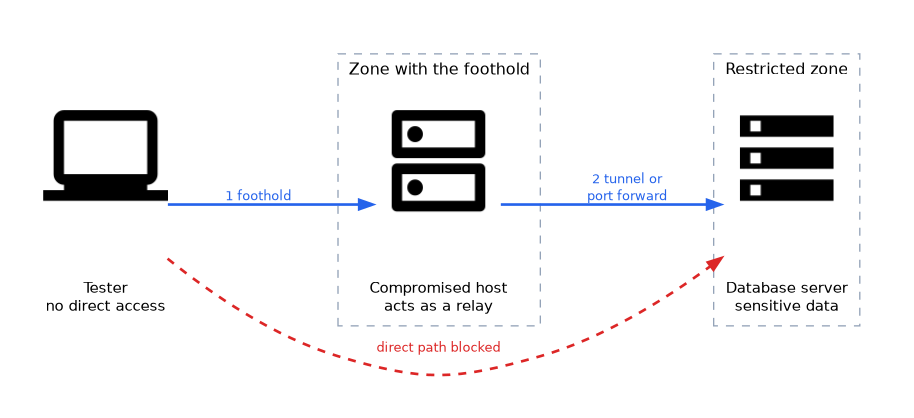 Pivoting makes a compromised host act as a gateway.
| Concept | Description |
|---|---|
| Port forwarding | Traffic sent to a port on one host is relayed to a port on another |
| Tunnelling | Wrapping traffic inside another protocol or connection, such as an SSH tunnel |
| SOCKS proxy | A general relay that lets many tools send traffic through the compromised host |
| Double pivot | Using a second compromised host to reach a further network |
SSH tunnels are a common example of a legitimate feature that is also used for pivoting. In a test, pivoting proves that network segmentation is weak, because a host in one zone gave reach into another.
Movement and pivoting tools
Know the one-line purpose of each.
| Tool | Purpose |
|---|---|
| PsExec | Runs processes on remote Windows hosts over Server Message Block (SMB) with administrator credentials |
| Impacket | Python scripts that automate Windows protocol tasks, including remote execution |
| Metasploit | Provides post-exploitation and pivoting features, such as routes and a SOCKS proxy |
| Covenant | A .NET command and control framework |
| sshuttle | Forwards traffic over Secure Shell (SSH) like a lightweight virtual private network (VPN) for pivoting |
| Proxychains | Forces other tools through a SOCKS proxy, used with the pivot above |
| PowerShell ISE | The built-in PowerShell Integrated Scripting Environment on Windows hosts |
| Batch files | Simple Windows command scripts for automation on a foothold |
Detection
| Indicator | Meaning |
|---|---|
| A user logging on to many hosts in a short time | Possible credential reuse |
| Network logons from workstations to other workstations | Workstations rarely need to connect to each other |
| Remote service creation, remote scheduled tasks, WMI use from unusual sources | Remote execution |
| Administrative share access from unexpected hosts | Movement over SMB |
| Long-lived tunnels, unusual outbound traffic, or traffic on odd ports | Pivoting or tunnelling |
| Sudden use of a service account from new systems | Credential theft |
Windows logon events, EDR telemetry and network flow data are the main sources. Correlating them in a security information and event management (SIEM) system shows the whole sequence.
Preventing movement
- Segmentation: separate user, server, management and sensitive zones with firewall rules.
- Host firewalls: block workstation-to-workstation traffic.
- Least privilege and tiered administration: admin accounts do not log on to lower-trust machines.
- Unique local administrator passwords: for example with Local Administrator Password Solution (LAPS).
- Multifactor authentication (MFA) for remote administration.
- Disable legacy protocols such as NTLM where possible.
- Monitoring and alerting on unusual internal connections.
If the question asks which control limits how far an attacker can go after compromising one host, choose network segmentation combined with least privilege.
What to remember for the exam
- Lateral movement reaches other hosts from a compromised one, and pivoting uses a host as a relay.
- Legitimate services such as RDP, SSH, SMB, WinRM and WMI are commonly reused.
- Credential reuse, including pass-the-hash and pass-the-ticket, is a major enabler.
- BloodHound maps Active Directory attack paths.
- Port forwarding, tunnelling and SOCKS proxies are pivoting techniques.
- Workstation-to-workstation logons and logons to many hosts are strong indicators.
- Segmentation, host firewalls, tiered administration and unique local admin passwords limit movement.
- Pivoting results prove weak segmentation, and they belong in the report.
Common mistakes
Thinking lateral movement needs new vulnerabilities. Valid credentials and normal tools are often enough.
Mixing up lateral movement and escalation. Lateral movement changes where the attacker is, and escalation changes the rights.
Assuming a firewall at the edge is enough. Once inside, a flat network offers few barriers.
Moving outside scope. A pivot may reach systems that were never approved, so stop and ask before testing them.
Ignoring service accounts. They often have wide rights and reused passwords.
Check yourself
What is pivoting?
Using a compromised host as a relay to reach networks the tester cannot reach directly.
Which control best limits lateral movement across a network?
Network segmentation, together with host firewalls and least privilege.
Name one indicator of lateral movement.
A workstation logging on to other workstations, or one user logging on to many hosts quickly.
Topic 2 of 5 in Post-Exploitation and Lateral Movement
Test yourself on Post-Exploitation and Lateral Movement
The full CompTIA PenTest+ PT0-003 question bank has 653 questions, with timed practice exams and an explanation for every answer.
This study guide is independent and is not affiliated with, endorsed by, or sponsored by CompTIA. Vendor names, certification names and exam codes are trademarks of their respective owners and are used for identification only.