Networking Concepts · Topic 1 of 11
The OSI Reference Model
Learn the seven OSI layers, the data unit and typical devices at each layer, and how encapsulation and decapsulation carry data across a network.
- 5 min
- Includes a diagram
- Layers from top to bottom: Application, Presentation, Session, Transport, Network, Data link, Physical.
- Data units: bits at layer 1, frames at layer 2, packets at layer 3, segments (TCP) or datagrams (UDP) at layer 4.
- Layer 2 uses MAC addresses and switches. Layer 3 uses IP addresses and routers. Layer 4 uses ports.
What it is
The Open Systems Interconnection (OSI) reference model describes network communication as seven layers. Each layer has one job and offers a service to the layer above it.
The model is a teaching and troubleshooting tool, not a protocol you install. Real networks run the TCP and IP protocol suite (TCP/IP), but exam questions and technicians still use OSI layer numbers to say where a problem or a device sits.
How it works
The sender adds a header at each layer as data moves down the stack. This is called encapsulation, and the receiver removes the headers in reverse order, which is called decapsulation.
The seven layers
| Layer | Name | Purpose | Data unit | Examples |
|---|---|---|---|---|
| 7 | Application | Network services used by software | Data | Hypertext Transfer Protocol (HTTP), Domain Name System (DNS), Simple Mail Transfer Protocol (SMTP) |
| 6 | Presentation | Data format, encryption, compression | Data | Encryption, compression, character encoding |
| 5 | Session | Starts, maintains and ends dialogues | Data | Session setup and teardown |
| 4 | Transport | Port numbers, reliability, flow control | Segment (TCP) or datagram (UDP) | Transmission Control Protocol (TCP), User Datagram Protocol (UDP) |
| 3 | Network | Logical addressing and routing | Packet | Internet Protocol (IP), Internet Control Message Protocol (ICMP), routers |
| 2 | Data link | Local delivery with hardware addresses | Frame | Ethernet, Media Access Control (MAC) addresses, switches |
| 1 | Physical | Signals, media and connectors | Bits | Cables, fiber, radio, transceivers |
A memory aid from layer 7 down is "All People Seem To Need Data Processing". Another from layer 1 up is "Please Do Not Throw Sausage Pizza Away".
Layers 1 to 3
Layer 1 moves raw bits over copper, fiber or radio. Cable type, connectors, voltage levels and transceivers are layer 1 topics.
Layer 2 uses the MAC address, a 48 bit hardware address, to deliver frames on one local network. Switches build a table of MAC addresses and forward frames by that table. The data link layer also adds a trailer with a frame check sequence so the receiver can detect corruption.
Layer 3 uses IP addresses to move packets between networks. A router reads the destination IP address and chooses the next hop. ICMP, used by ping, also works here.
Layers 4 to 7
Layer 4 identifies the application with a port number. TCP gives reliable, ordered delivery with a handshake, while UDP is faster and has no delivery guarantee.
Layer 5 manages the conversation between two hosts, for example setting up and closing a session. Layer 6 translates and secures the format of data, such as encryption and compression. Layer 7 is where the network service meets the application, such as a web browser using HTTP.
In practice the three upper layers are often treated as one, which matches the single application layer of the TCP/IP model.
Layers and devices
| Device or feature | Typical layer |
|---|---|
| Cable, repeater, transceiver | 1 |
| Switch, bridge, network interface card (NIC) | 2 |
| Router, Layer 3 switch | 3 |
| Stateful firewall | 3 and 4 |
| Load balancer, proxy, next generation firewall | 4 to 7 |
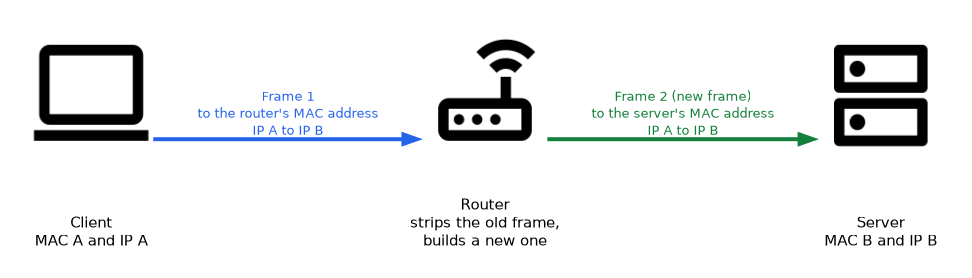
When a packet crosses a router, the router strips the old frame and builds a new one for the next link. The source and destination IP addresses stay the same from end to end, while the MAC addresses change at every hop.
What to remember for the exam
- Layers from top to bottom: Application, Presentation, Session, Transport, Network, Data link, Physical.
- Data units: bits at layer 1, frames at layer 2, packets at layer 3, segments (TCP) or datagrams (UDP) at layer 4.
- Layer 2 uses MAC addresses and switches. Layer 3 uses IP addresses and routers. Layer 4 uses ports.
- Encapsulation adds headers on the way down. Decapsulation removes them on the way up.
- IP addresses stay the same end to end, while MAC addresses change at each router hop.
- Cabling, connectors and signal problems are layer 1. A wrong IP address or bad route is layer 3.
- Encryption and data formatting are presentation layer functions. Session setup and teardown are session layer functions.
- A switch is a layer 2 device, and a router is a layer 3 device.
When a scenario mentions a protocol or an address, name the layer first. MAC means layer 2, IP means layer 3, and port number means layer 4, and that narrows the answer quickly.
Common mistakes
Mixing up frame and packet. A frame is the layer 2 unit and carries MAC addresses. A packet is the layer 3 unit and carries IP addresses.
Reversing the layer order. Layer 1 is the physical layer at the bottom, and layer 7 is the application layer at the top.
Thinking the application layer is the program itself. It is the network service that a program uses, such as HTTP or DNS, not the browser.
Assuming MAC addresses travel end to end. A new frame with new MAC addresses is built at each router, so only the IP addresses stay constant.
Treating every firewall as layer 3. A basic packet filter works at layers 3 and 4, but a next generation firewall inspects up to layer 7.
Exam questions often describe a symptom, such as a dead link light, and ask for the layer. A link light problem is physical (layer 1), even if the user reports that a web page will not load.
Check yourself
Answer these without looking back at the page.
What is the data unit at layer 2, and which address does it use?
The data unit is the frame, and it uses the MAC address.
At which layer do TCP and UDP work, and what do they use to identify the application?
They work at layer 4, the transport layer, and use port numbers.
What changes and what stays the same when a packet crosses a router?
The frame and MAC addresses change at each hop, while the source and destination IP addresses stay the same.
Topic 1 of 11 in Networking Concepts
Test yourself on Networking Concepts
The full CompTIA Network+ N10-009 question bank has 910 questions, with timed practice exams and an explanation for every answer.
This study guide is independent and is not affiliated with, endorsed by, or sponsored by CompTIA. Vendor names, certification names and exam codes are trademarks of their respective owners and are used for identification only.