Network Troubleshooting · Topic 1 of 6
The Troubleshooting Methodology
Learn the seven step CompTIA network troubleshooting methodology, from identifying the problem to documentation, OSI based approaches and escalation.
- 5 min
- Includes a diagram
- The steps in order: identify, theory, test, plan, implement or escalate, verify and prevent, document.
- Step 1 includes asking users, finding what changed and duplicating the problem.
- Question the obvious before assuming a complex cause.
What it is
The troubleshooting methodology is a fixed series of steps for finding and fixing a problem in an organized way. It stops technicians from guessing, making random changes or fixing a symptom while the cause remains.
Exam questions often show a scenario and ask which step comes next. Learning the order, and what belongs in each step, earns easy points.
How it works
The seven steps
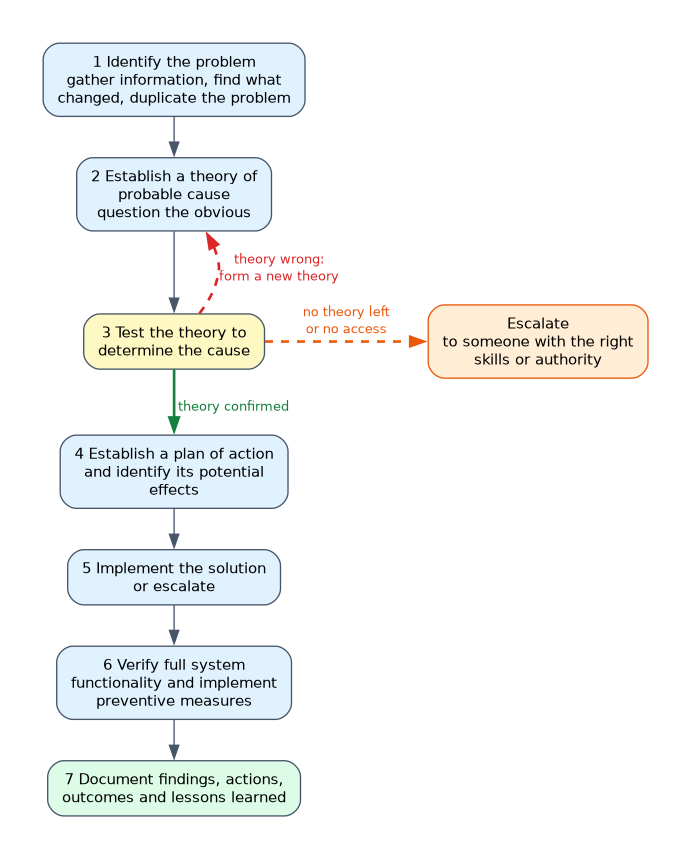
| Step | Name | What you do |
|---|---|---|
| 1 | Identify the problem | Gather information, question users, identify symptoms, find out what changed, duplicate the problem if possible and approach multiple problems one at a time |
| 2 | Establish a theory of probable cause | Question the obvious and consider several possible causes |
| 3 | Test the theory to determine the cause | Check whether the theory is right. If it is, plan the next steps. If not, form a new theory or escalate |
| 4 | Establish a plan of action | Plan the fix and identify its potential effects |
| 5 | Implement the solution or escalate | Apply the fix, or pass the problem to someone with the right skills or authority |
| 6 | Verify full system functionality and implement preventive measures | Confirm the fix works and add measures to stop a repeat |
| 7 | Document findings, actions, outcomes and lessons learned | Record what happened throughout the process |
Step 1: identify the problem
Start with information, not tools. Ask what is wrong, who is affected, when it began and what has changed recently, such as an update, a new device or a moved cable.
Try to reproduce the problem, because a problem you can repeat is easier to test. If several problems exist, deal with them one at a time so each fix can be judged separately.
Step 2: establish a theory
Question the obvious first. Is the cable plugged in, is the port up, is the user typing the right address?
Consider more than one cause. Use the Open Systems Interconnection (OSI) model as a map. You can work from the physical layer up, from the application layer down, or divide and conquer by testing at the middle layer and moving up or down depending on the result.
| Approach | When it fits |
|---|---|
| Bottom to top | Likely a physical or link problem, such as a dead link light |
| Top to bottom | Likely an application problem, with the network apparently working |
| Divide and conquer | Unclear. Test at layer 3 first, such as a ping, then move up or down |
Steps 3 to 5: test, plan, implement
Test the theory with a safe check, such as a ping, a cable test or reading an interface counter. If the theory is wrong, make another one. If you run out of ideas or lack access, escalate with your notes.
Before changing anything, make a plan and think about who or what will be affected. Follow change management where it applies, make one change at a time and keep a way to undo it.
Steps 6 and 7: verify and document
Verify that the problem is gone and that nothing else broke. Ask the user to confirm. Then add preventive measures, such as a configuration change, a monitoring alert or user training.
Documentation records the symptoms, the cause, the fix and the lessons learned. It builds a knowledge base so the next technician solves a similar problem faster.
What to remember for the exam
- The steps in order: identify, theory, test, plan, implement or escalate, verify and prevent, document.
- Step 1 includes asking users, finding what changed and duplicating the problem.
- Question the obvious before assuming a complex cause.
- Divide and conquer starts at the middle of the OSI model and moves up or down.
- If the theory is not confirmed, make a new theory or escalate.
- The plan of action includes the potential effects of the fix.
- Verification includes full functionality and preventive measures.
- Documentation comes last and covers findings, actions, outcomes and lessons learned.
- Make one change at a time.
When a question asks what to do next after a fix, look for "verify full system functionality". When it asks what to do after verification, the answer is documentation.
Common mistakes
Jumping straight to a fix. The first step is to identify the problem and gather information.
Changing several things at once. You then cannot tell which change worked or caused a new fault.
Skipping the question about what changed. Many faults start with a recent change.
Forgetting to escalate. If the theory fails and you lack access or skill, escalate rather than guess.
Treating documentation as optional. It is the final step and it supports future troubleshooting.
Testing a theory must not make things worse. Choose non disruptive tests first, and avoid changes to a production device before you have a plan and a way to undo it.
Check yourself
Answer these three.
What step follows establishing a theory of probable cause?
Testing the theory to determine the cause.
A test shows the theory was wrong. What are the options?
Establish a new theory, or escalate if you cannot continue.
What is the last step of the methodology?
Document findings, actions, outcomes and lessons learned.
Topic 1 of 6 in Network Troubleshooting
Test yourself on Network Troubleshooting
The full CompTIA Network+ N10-009 question bank has 910 questions, with timed practice exams and an explanation for every answer.
This study guide is independent and is not affiliated with, endorsed by, or sponsored by CompTIA. Vendor names, certification names and exam codes are trademarks of their respective owners and are used for identification only.