Network Operations · Topic 3 of 8
SNMP, Flow Data and Logging
Use SNMP polls and traps, MIBs and OIDs, flow data, packet captures, syslog severity levels and SIEM log aggregation to monitor network devices.
- 5 min
- Includes a diagram
- SNMP uses agents, a manager, MIBs and OIDs. Queries use UDP 161 and traps use UDP 162.
- A trap is sent by the agent without being asked. A poll is requested by the manager.
- SNMPv3 adds authentication and encryption. v1 and v2c use only community strings.
What it is
Monitoring tells you what the network is doing before users complain. Devices report their status through the Simple Network Management Protocol (SNMP), summaries of traffic called flow data, copies of packets, and log messages.
The exam asks you to choose the right source for each question. Is the link up, who is using the bandwidth, what was in that packet, and what happened on this device last night?
How it works
SNMP
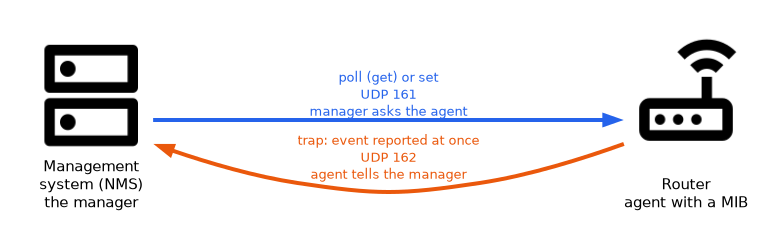 SNMP lets a network management system (NMS) read from and sometimes change settings on devices. Each device runs an agent, and the NMS is the manager.
The data on a device is organized in a Management Information Base (MIB). Each item in it has an object identifier (OID), a numeric address such as the one for interface traffic counters.
| Operation | Direction | Purpose |
|---|---|---|
| Poll (get) | Manager asks the agent | Read a value on a schedule |
| Set | Manager writes to the agent | Change a setting |
| Trap | Agent sends to the manager | Report an event right away |
Agents listen on User Datagram Protocol (UDP) port 161 for queries, and managers listen on UDP port 162 for traps.
| Version | Security |
|---|---|
| SNMP version 1 (SNMPv1) | Community string only, clear text |
| SNMPv2c | Community string only, clear text, with improved operations |
| SNMPv3 | Authentication and encryption, with user based access |
A community string acts like a shared password. Default community strings such as "public" must be changed, and SNMPv3 is preferred.
Flow data
Flow data summarizes conversations rather than storing every packet. A flow is a set of packets with the same source and destination addresses, ports and protocol.
Flow technologies such as NetFlow and the Internet Protocol Flow Information Export (IPFIX) report who talked to whom, how much and over which ports. They are good for finding the top talkers, spotting unusual traffic and planning capacity.
Packet capture
A packet capture records the actual packets on a link, using a tool such as Wireshark or tcpdump. It is the most detailed source and is used to analyze a protocol problem or a security incident.
Captures take space and may include sensitive data, so use them for targeted problems. Traffic reaches the capture tool through a mirrored port or a network tap.
| Source | Detail level | Best for |
|---|---|---|
| SNMP | Counters and status | Is it up, how busy is it |
| Flow data | Conversation summaries | Who uses the bandwidth |
| Packet capture | Every packet | Why this protocol fails |
Logs and syslog
Devices write log messages about events such as logins, link changes and errors. The syslog protocol sends these messages to a central server, normally over UDP port 514.
Each message has a severity level from 0 to 7, where a lower number is more severe.
| Level | Name |
|---|---|
| 0 | Emergency |
| 1 | Alert |
| 2 | Critical |
| 3 | Error |
| 4 | Warning |
| 5 | Notice |
| 6 | Informational |
| 7 | Debug |
Log aggregation and correlation
Log aggregation collects logs from many devices into one place so they can be searched and kept after a device fails. A security information and event management (SIEM) system goes further. It correlates events from many sources, raises alerts and keeps records for investigations and audits.
Accurate time on all devices makes logs line up, which is why Network Time Protocol (NTP) matters for monitoring.
What to remember for the exam
- SNMP uses agents, a manager, MIBs and OIDs. Queries use UDP 161 and traps use UDP 162.
- A trap is sent by the agent without being asked. A poll is requested by the manager.
- SNMPv3 adds authentication and encryption. v1 and v2c use only community strings.
- Flow data (NetFlow, IPFIX) shows who is talking and how much. It does not store payloads.
- Packet capture gives the most detail and needs a mirror port or tap to see traffic.
- Syslog uses UDP 514. Severity runs from 0 emergency to 7 debug.
- A SIEM correlates logs from many sources and raises alerts.
- Synchronized time across devices is necessary for useful logs.
A lower syslog number is more severe. A question that asks for the most severe level is asking for 0, emergency.
Common mistakes
Using default community strings. "public" and "private" are well known and let attackers read or change device settings.
Using flow data to read packet content. Flow data shows conversations, not what was said.
Capturing everywhere all the time. Captures are large and sensitive. Capture on the right link for the right time.
Reversing syslog severity. Level 0 is the most severe, not the least.
Forgetting time synchronization. Logs with clock differences cannot be matched across devices.
Syslog over UDP has no delivery guarantee, so messages can be lost during congestion. Important logs may need a reliable transport or local storage as a backup.
Check yourself
Work through these three.
Which SNMP message does a device send on its own when something happens?
A trap, sent to the manager on UDP port 162.
Which monitoring source shows the top bandwidth users without storing packet contents?
Flow data, such as NetFlow or IPFIX.
What is the most severe syslog level?
Level 0, emergency.
Topic 3 of 8 in Network Operations
Test yourself on Network Operations
The full CompTIA Network+ N10-009 question bank has 910 questions, with timed practice exams and an explanation for every answer.
This study guide is independent and is not affiliated with, endorsed by, or sponsored by CompTIA. Vendor names, certification names and exam codes are trademarks of their respective owners and are used for identification only.