Network Operations · Topic 8 of 8
Network Access and Management Methods
Compare site to site and client to site VPNs, split and full tunnels, SSH, console, GUI and API management, jump hosts, and in-band and out-of-band access.
- 5 min
- Includes a diagram
- Site to site VPN joins two networks and needs no client software on hosts.
- Client to site VPN connects one device and uses a VPN client, or a browser for a clientless VPN.
- Full tunnel sends all traffic through the VPN. Split tunnel sends only company traffic.
What it is
Staff and users need to reach the network from outside, and administrators need safe ways to configure devices. This topic covers remote access with Virtual Private Networks (VPNs) and the methods used to manage devices.
The exam asks you to choose between VPN types, between tunnel modes, and between ways of connecting to a device when something has gone wrong.
How it works
Site to site VPN
A site to site VPN joins two whole networks, such as a branch office and headquarters, over the internet. VPN gateways or routers at each site build an encrypted tunnel, and users do not run any VPN software.
It is usually always on and carries traffic for all hosts at both sites. Internet Protocol Security (IPsec) is the common technology.
Client to site VPN
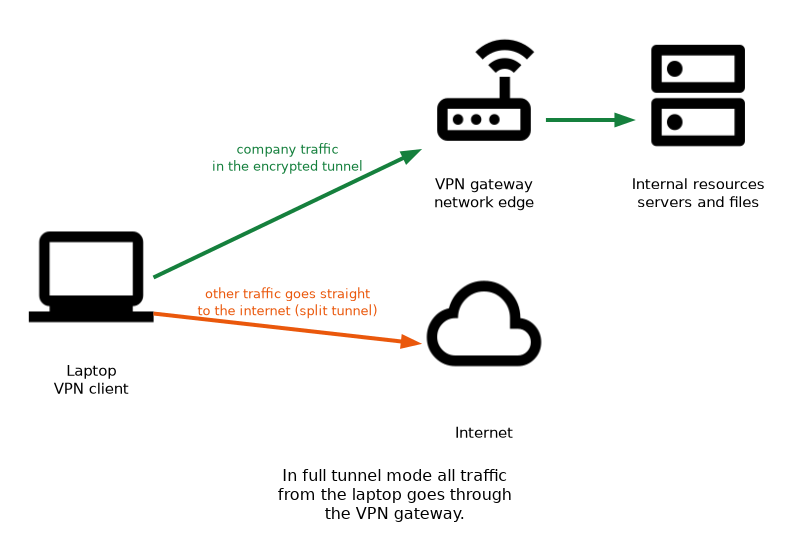 A client to site VPN (remote access VPN) connects one user device to the network. The user runs a VPN client, authenticates and receives access to internal resources.
| Mode | Description |
|---|---|
| Full tunnel | All traffic from the client goes through the VPN, so the organization can inspect and filter it |
| Split tunnel | Only traffic for the company network goes through the VPN, and other traffic goes straight to the internet |
| Clientless VPN | The user connects through a web browser, usually over Hypertext Transfer Protocol Secure (HTTPS), with no installed client |
Full tunnel gives more control and security, but it uses VPN bandwidth for all traffic. Split tunnel saves bandwidth but sends internet traffic outside company controls. A clientless VPN is convenient for limited access from an unmanaged device.
Management connection methods
| Method | What it is | Notes |
|---|---|---|
| Secure Shell (SSH) | Encrypted command line over the network | Replaces Telnet. Transmission Control Protocol (TCP) port 22 |
| Console | Direct cable connection to the console port | Needs physical or console server access |
| Graphical user interface (GUI) | Web interface or graphical tool | Often uses HTTPS |
| Application programming interface (API) | Lets software configure the device | Used for automation |
| Remote Desktop | Graphical session to a server or workstation | Remote Desktop Protocol uses port 3389 |
An API lets a script or an orchestration tool read and change configuration without a person typing commands, which supports automation at scale.
In-band and out-of-band management
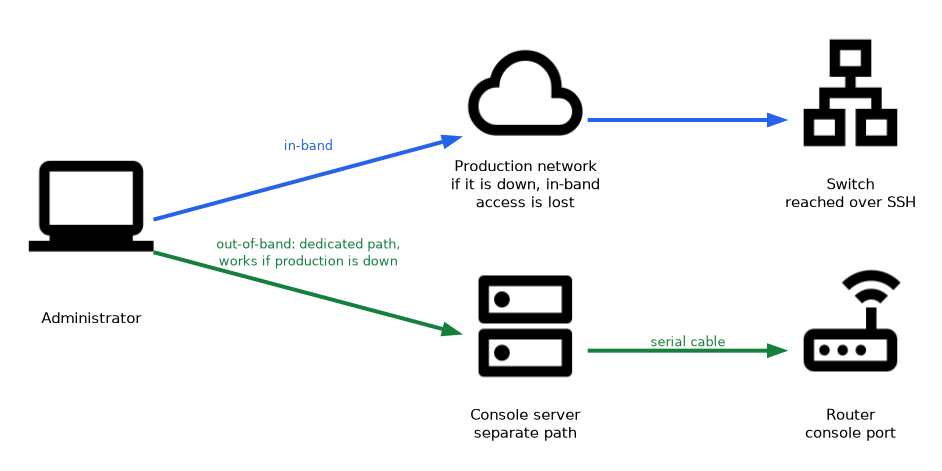 In-band management uses the production network to reach the device, for example SSH to the switch over normal links. If the network is down, the administrator also loses access.
Out-of-band management uses a separate path, such as a console connection, a dedicated management network or a console server. It still works when the production network fails.
Jump box
A jump box (or jump host) is a hardened server that administrators connect to first, and from which they reach the devices they manage. It creates one controlled place to enforce authentication and to record administrator activity.
Devices can be configured to accept management connections only from the jump box, which reduces exposure.
Remote access safeguards
Use strong authentication, preferably multifactor, for remote access. Limit what a remote user can reach. Log remote sessions and turn off protocols that send passwords in clear text, such as Telnet.
What to remember for the exam
- Site to site VPN joins two networks and needs no client software on hosts.
- Client to site VPN connects one device and uses a VPN client, or a browser for a clientless VPN.
- Full tunnel sends all traffic through the VPN. Split tunnel sends only company traffic.
- SSH is the secure replacement for Telnet and uses TCP port 22.
- Console access is direct and works even with no network configured.
- In-band management uses the production network. Out-of-band uses a separate path.
- A jump box is a hardened server used as the controlled entry point for administration.
- An API supports automation of configuration changes.
When a question says "the router is unreachable after a bad configuration change", the answer that still works is out-of-band access such as the console.
Common mistakes
Assuming split tunnel is safer. It saves bandwidth, but internet traffic bypasses company filtering.
Using Telnet for remote administration. Passwords and commands travel in clear text.
Relying only on in-band access. If the change breaks the network, you lose the path you need to undo it.
Confusing site to site and client to site. Site to site connects networks, and client to site connects a single device.
Treating a jump box as optional hardening. Without it, administrators connect from many places and logging becomes weaker.
Management interfaces exposed to the internet are a common attack target. Limit them to VPN, a jump box or a management network.
Check yourself
Answer these three.
Which VPN mode sends all of a user's traffic through the company network?
Full tunnel.
When is out-of-band management needed?
When the production network is down or misconfigured and you still need to reach the device, for example through a console.
What is the purpose of a jump box?
It is a hardened server that serves as the single controlled entry point for administering other devices.
Topic 8 of 8 in Network Operations
Test yourself on Network Operations
The full CompTIA Network+ N10-009 question bank has 910 questions, with timed practice exams and an explanation for every answer.
This study guide is independent and is not affiliated with, endorsed by, or sponsored by CompTIA. Vendor names, certification names and exam codes are trademarks of their respective owners and are used for identification only.