Security Operations · Topic 5 of 10
Packet, File and Email Analysis
Use Wireshark, tcpdump, flow data, hashing, sandboxes and email header checks to judge whether traffic, files and messages are malicious for CySA+.
- 6 min
- Includes a diagram
- Wireshark is graphical and tcpdump is command line.
- Capture filters limit recording, and display filters limit what is shown.
- A normal TCP handshake is SYN, SYN/ACK, ACK, and a pile of unanswered SYN packets suggests scanning.
What it is
When an alert from a Security Information and Event Management (SIEM) platform is not enough, the analyst looks at the raw evidence. Packet analysis examines network traffic, file analysis examines a suspicious program or document, and email analysis examines a suspicious message.
The goal is the same each time: decide whether the item is malicious, and collect indicators that can be searched for elsewhere.
How it works
Packet capture
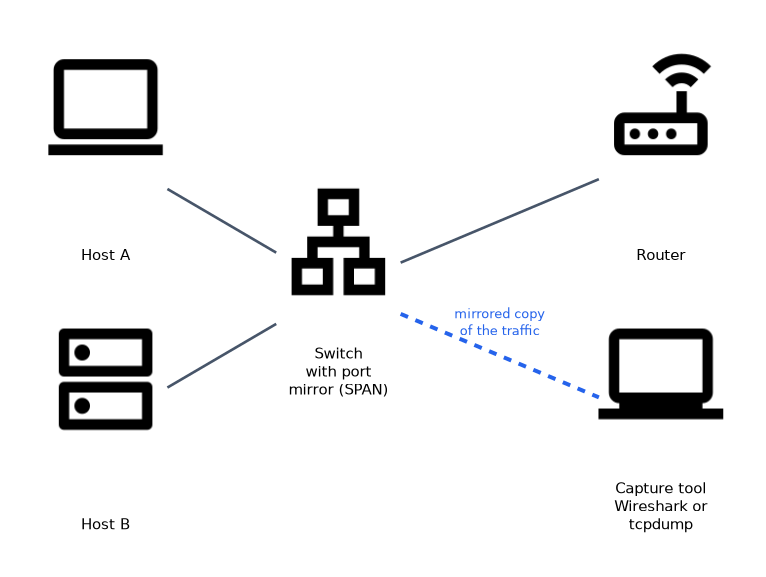 A packet capture (PCAP) is a recording of network traffic, saved to a file. To see traffic for other hosts, the capture has to be taken where it passes, such as on a switch port mirror (SPAN, Switched Port Analyzer) or a network tap.
| Tool | Style | Typical use |
|---|---|---|
| Wireshark | Graphical | Deep inspection, following a conversation, decoding protocols |
| tcpdump | Command line | Quick capture on servers, saving files to open later |
tcpdump -i eth0 -nn -w dns.pcap host 192.0.2.10 and port 53
tcpdump -nn -r dns.pcap
In this Linux shell example, -i picks the interface, -nn turns off name and port name lookups, -w writes a file and -r reads one. The words at the end form a capture filter, which limits what is recorded.
A capture filter limits what is saved, while a display filter limits what is shown from data already saved. Wireshark display filters look like ip.addr == 192.0.2.10, tcp.port == 443 or dns.
What to look for
- TCP flags. A normal Transmission Control Protocol (TCP) connection opens with SYN (synchronise), SYN/ACK and ACK (acknowledge). Many SYN packets with no completion suggest scanning, and many RST (reset) replies show closed ports.
- Domain Name System (DNS). Long random names, many lookups to one domain or unusual record types may hide a covert channel.
- Cleartext protocols. Hypertext Transfer Protocol (HTTP), File Transfer Protocol (FTP) and Telnet carry data readable in a capture, including passwords.
- Regular timing. Repeated connections at fixed intervals suggest beaconing.
- Large outbound transfers to unfamiliar hosts.
Encryption limits what a capture shows. With Transport Layer Security (TLS), the analyst still sees addresses, ports, timing, volume and handshake details, but not the content.
Flow data such as NetFlow summarises conversations (who talked to whom, how much, when) without storing the payload. It is cheap to keep for a long time, so it suits trend and exfiltration questions.
File analysis
- Hashing. A hash such as Secure Hash Algorithm 256 (SHA-256) identifies a file exactly. Searching the hash in a reputation service or internal tools shows whether the file is known, and a changed hash means a changed file.
- Static analysis examines the file without running it, for example by reading readable text strings, headers and metadata.
- Dynamic analysis runs the file in a sandbox, an isolated environment, and records what it does: files written, registry changes, network calls.
- Reputation and lookups for addresses and domains use public services and WHOIS records, which show who registered a domain and when. A domain registered a few days ago is more suspicious than one that is many years old.
Decoding with CyberChef
Attackers often encode commands and data so that a quick glance reveals nothing. CyberChef is a browser based tool that chains small operations into a recipe, such as From Base64, From Hex, URL Decode and XOR. It runs locally in the browser, so the sample does not have to be sent to an outside service.
| Encoded text | Operation | Result |
|---|---|---|
dwBoAG8AYQBtAGkA | From Base64, then decode as UTF-16LE text | whoami |
68 74 74 70 3a 2f 2f | From Hex | http:// |
http%3A%2F%2F | URL Decode | http:// |
The first row matches a PowerShell command line such as powershell.exe -enc dwBoAG8AYQBtAGkA. The -enc option takes Base64 of UTF-16LE text, so Base64 decoding alone leaves a null byte between the letters.
An XOR encoded string needs the key, which the analyst may know or try with a brute force operation. The Magic operation can suggest the encoding when it is not obvious.
Decode, then read the result as evidence: extract any addresses, domains or file names, and check them against threat intelligence. Never run the decoded content.
Email analysis
Check the headers, not just the visible sender name. The Received lines show the path the message took, and the newest hop is at the top, so read them from the bottom up to follow the journey.
| Check | What it verifies |
|---|---|
| Sender Policy Framework (SPF) | The sending server is allowed to send for the domain |
| DomainKeys Identified Mail (DKIM) | The message carries a valid signature that was not altered |
| Domain based Message Authentication, Reporting and Conformance (DMARC) | A policy that says what to do when SPF or DKIM checks fail and aligns with the visible From domain |
Also look at mismatched From and Reply-To addresses, look alike domains, and links whose real destination differs from the displayed text. Open attachments only in an isolated environment.
What to remember for the exam
- Wireshark is graphical and tcpdump is command line.
- Capture filters limit recording, and display filters limit what is shown.
- A normal TCP handshake is SYN, SYN/ACK, ACK, and a pile of unanswered SYN packets suggests scanning.
- Cleartext protocols expose credentials in a capture, and TLS hides the content but not the metadata.
- Flow data records conversations without payload.
- A hash identifies a file exactly, and static analysis does not execute the file.
- Dynamic analysis runs a sample in a sandbox and records its behaviour.
- SPF checks the sending server, DKIM checks a signature, and DMARC sets the policy.
- Email headers are read from the bottom up to follow the route.
Never open a suspicious file or attachment on a normal workstation. Use an isolated sandbox or analysis machine so that a real infection cannot spread.
Common mistakes
Expecting to see everything in an encrypted capture. Without keys, the payload is unreadable, so the analyst relies on metadata.
Capturing in the wrong place. A capture on a host sees only that host's traffic, unless the switch mirrors other traffic to it.
Trusting the display name of a sender. The visible name is easy to fake, so check the actual address and authentication results.
Judging a file by its name or extension. Names are easy to change, while the hash and behaviour are reliable.
Using one reputation result as proof. A clean score may only mean the sample is new, so combine it with behaviour and other evidence.
Check yourself
What does
tcpdump -nn -w out.pcapdo?It captures traffic without resolving names or port names and writes the packets to the file out.pcap.
What is the difference between static and dynamic file analysis?
Static analysis inspects a file without running it, while dynamic analysis runs it in a sandbox to observe behaviour.
Which email check confirms that a message signature was valid and not altered?
DKIM.
Topic 5 of 10 in Security Operations
Test yourself on Security Operations
The full CompTIA CySA+ CS0-004 question bank has 654 questions, with timed practice exams and an explanation for every answer.
This study guide is independent and is not affiliated with, endorsed by, or sponsored by CompTIA. Vendor names, certification names and exam codes are trademarks of their respective owners and are used for identification only.