Security · Topic 3 of 13
Windows Accounts and NTFS Permissions
Configure Windows accounts, groups, sign in options, User Account Control and NTFS permissions, including inheritance and what happens when files move.
- 4 min
- Includes a diagram
- Use a standard account for daily work and an administrator account only when required.
- Guest is limited and normally disabled.
- Windows Hello offers PIN, fingerprint and facial recognition sign in.
What it is
Windows decides what a person can do from their account type, their group memberships and the permissions on each file or folder. A technician sets up accounts with the right level of rights and uses permissions to keep data private. These are some of the most tested settings on the exam.
How it works
Account types
| Type | Rights |
|---|---|
| Administrator | Full control of the computer, can install software and change any setting |
| Standard user | Can run apps and change personal settings, but cannot change system-wide settings |
| Guest | Very limited temporary access, usually disabled |
| Power user | An older group with more rights than a standard user. It remains for compatibility |
A local account lives on one computer. A Microsoft account is an online identity that can sign in to many devices and sync settings. A domain account is managed by Active Directory.
Daily work should use a standard account. An administrator account is for tasks that need it, since malware that runs under a standard user can do less harm.
Sign in options
Windows supports a username and password, a personal identification number (PIN), and Windows Hello biometrics such as fingerprint and facial recognition. A PIN is tied to the one device, so it is less useful to an attacker than a password that works everywhere. Single sign on (SSO) lets one authentication give access to several services.
User Account Control (UAC)
UAC asks for confirmation before an action that needs administrator rights. A standard user must enter administrator credentials, and an administrator confirms the prompt.
This makes it harder for malware to change the system silently. Run as administrator starts a program with elevated rights for that session only.
NTFS permissions
NTFS (New Technology File System) stores permissions on files and folders.
| Permission | Allows |
|---|---|
| Full control | Everything, including changing permissions and taking ownership |
| Modify | Read, write, delete and run |
| Read and execute | View and run programs |
| List folder contents | See the names inside a folder |
| Read | View files and attributes |
| Write | Create files and write data |
Permissions from several groups add up. If the user is in a group that can read and another that can write, the user can do both. In general, a Deny entry overrides an Allow.
Inheritance and moving files
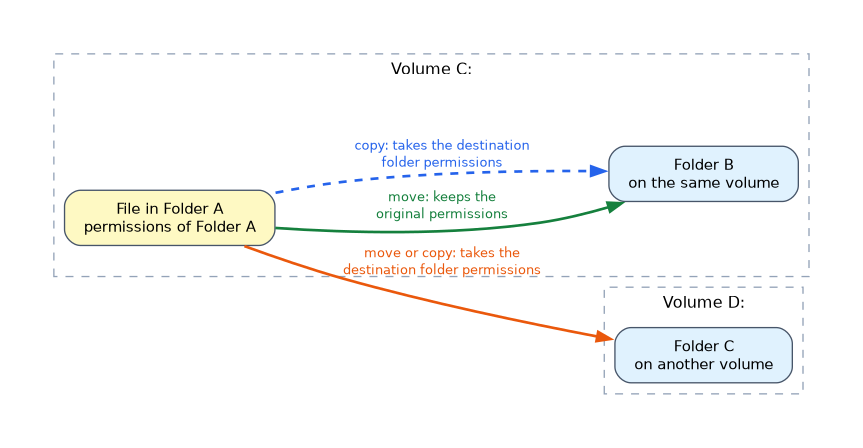 By default, a file inherits permissions from its parent folder. Inheritance can be turned off to set unique permissions.
| Action | Result |
|---|---|
| Copy within a volume | Takes the destination folder permissions |
| Move within the same volume | Keeps the original permissions |
| Move or copy to a different volume | Takes the destination folder permissions |
Sharing and local access
Share permissions apply only to network access. When both share and NTFS permissions exist, the more restrictive result applies to a network user. Share permissions are covered on the sharing page.
Folder and file attributes
File properties can mark a file as Read only or Hidden. Hidden files are not shown unless File Explorer is set to show them. Neither setting replaces permissions.
Memorise the move rule. Move within the same volume keeps permissions. Anything that crosses to another volume, or any copy, takes the destination permissions.
What to remember for the exam
- Use a standard account for daily work and an administrator account only when required.
- Guest is limited and normally disabled.
- Windows Hello offers PIN, fingerprint and facial recognition sign in.
- UAC prompts before actions that need administrator rights.
- NTFS permissions include Full control, Modify, Read and execute, List folder contents, Read and Write.
- Permissions from several groups add up, but an explicit Deny wins.
- Files inherit permissions from their parent folder by default.
- A move on the same volume keeps permissions. A copy or a move to another volume takes the destination permissions.
- Network users get the more restrictive of share and NTFS permissions.
Common mistakes
Running as administrator all day. Malware then inherits those rights. Use a standard account.
Assuming a move always keeps permissions. It does only on the same volume.
Forgetting Deny. An explicit Deny blocks access even if another group allows it.
Thinking a hidden file is protected. Hiding changes visibility, not access.
Check yourself
What happens to NTFS permissions when you move a file to a different volume?
The file takes the permissions of the destination folder.
Which account type should be used for everyday work?
A standard user account.
What does UAC do?
It asks for confirmation or credentials before actions that need administrator rights.
Topic 3 of 13 in Security
Test yourself on Security
The full CompTIA A+ 220-1202 question bank has 835 questions, with timed practice exams and an explanation for every answer.
This study guide is independent and is not affiliated with, endorsed by, or sponsored by CompTIA. Vendor names, certification names and exam codes are trademarks of their respective owners and are used for identification only.