Security · Topic 12 of 13
SOHO Wireless and Wired Security
Secure a small office router: change default logins, use WPA3 or WPA2, update firmware, filter MAC addresses, forward ports and use a screened subnet.
- 4 min
- Includes a diagram
- Change default router credentials and the default SSID.
- Update router firmware.
- Use WPA3 or WPA2 with AES, and a long passphrase.
What it is
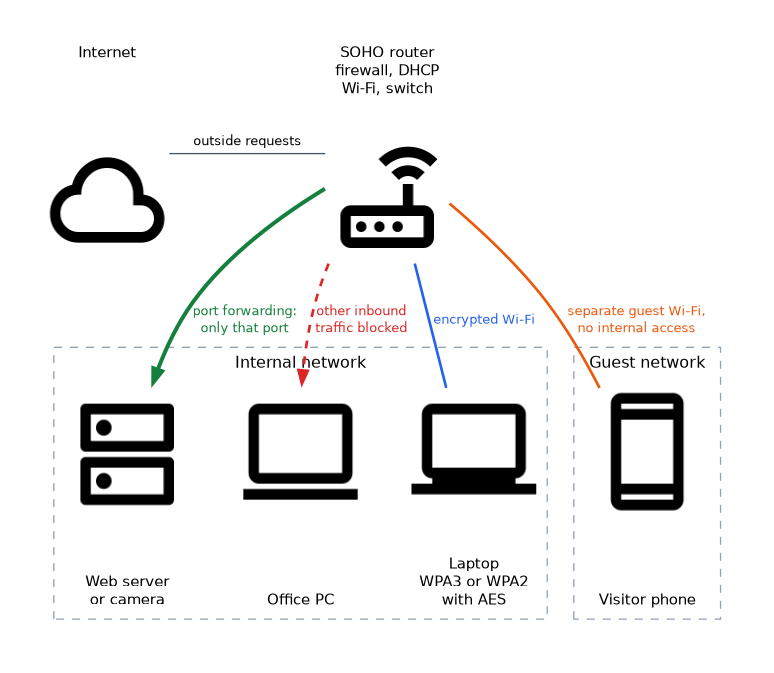
A small office or home office (SOHO) usually relies on one router that acts as a switch, wireless access point, firewall and Dynamic Host Configuration Protocol (DHCP) server. Its default settings are known to attackers, so securing it is a standard technician task. The settings fall into wireless, access and traffic control groups.
How it works
Basic hardening
- Change the default administrator name and password. Default logins are published online.
- Update the firmware. Updates fix security flaws in the router itself.
- Disable remote administration from the internet unless it is needed and protected.
- Disable unused features, such as old services, to reduce exposure.
- Place the router in a central, protected spot. Physical access to the reset button can undo the configuration.
Wireless settings
| Setting | Guidance |
|---|---|
| Encryption | Use Wi-Fi Protected Access 3 (WPA3), or WPA2 with Advanced Encryption Standard (AES). Avoid Wired Equivalent Privacy (WEP) and the original WPA with Temporal Key Integrity Protocol (TKIP) |
| Passphrase | Long and unique, not the default |
| SSID | Change the default network name (service set identifier) so it does not reveal the router brand |
| SSID broadcast | Disabling hides the name from casual users, but it is weak protection, so it must not replace encryption |
| Guest network | Keep visitors on a separate network without access to internal devices |
| Channel | Choose a less busy channel, such as 1, 6 or 11 on 2.4 GHz, to reduce interference |
| Signal power and placement | Reduce coverage that spills outside the building |
Wi-Fi Protected Setup (WPS) with a personal identification number (PIN) has known weaknesses, so it is wise to turn it off.
Address and access control
MAC filtering. The router allows or blocks devices by their MAC (Media Access Control) address. It adds a small barrier, but attackers can copy a permitted address, so it is not strong security.
DHCP reservation. The router always gives the same address to a given MAC address. Useful for printers and servers, and it is not a security feature by itself.
Static public address. A fixed public Internet Protocol (IP) address on the wide area network (WAN) side of the router, used when something on the network must be reached from outside. It comes from the internet provider.
Traffic control
| Feature | What it does |
|---|---|
| Firewall | Filters traffic by rules. Blocks unsolicited inbound traffic by default |
| Port forwarding | Sends outside traffic on a chosen port to one internal device, such as a camera or web server |
| Port triggering | Opens a port only after an internal device makes a matching outgoing connection |
| UPnP | Universal Plug and Play lets devices open ports on their own. Convenient but risky, so disable it if not needed |
| Content filtering | Blocks categories of sites or keywords |
| Screened subnet | A separate network segment (formerly called a demilitarized zone, or DMZ) for public facing servers |
A screened subnet places internet facing servers apart from the internal network, so a compromise there does not give direct access inside. Port forwarding is a more modest way to expose one service and should be limited to the port required.
Wired network
Disable switch ports that are not in use, and keep network jacks and wiring in locked areas. This stops someone from plugging in an unknown device.
Hiding the SSID and filtering MAC addresses are not substitutes for strong encryption, because tools can find hidden names and copy MAC addresses.
What to remember for the exam
- Change default router credentials and the default SSID.
- Update router firmware.
- Use WPA3 or WPA2 with AES, and a long passphrase.
- Hidden SSID and MAC filtering add little real security.
- Use a guest network to separate visitors.
- Port forwarding exposes one service. Port triggering opens a port after outgoing traffic.
- UPnP can open ports automatically, so disable it when not needed.
- A screened subnet isolates public facing servers.
- Disable unused ports and turn off WPS.
- Content filtering restricts sites by category or keyword.
Common mistakes
Leaving the default password. This is the easiest way into a router.
Treating a hidden SSID as security. It is trivial to discover.
Forwarding too many ports. Each open port is a path from the internet.
Confusing port forwarding and port triggering. Forwarding is always open to a fixed device, while triggering opens after an outgoing connection.
Check yourself
Name two things to change on a new router.
The default administrator password and the default SSID, along with updating the firmware.
What does port forwarding do?
It sends incoming traffic on a chosen port to a specific internal device.
Why is MAC filtering weak?
An attacker can copy an allowed MAC address.
Topic 12 of 13 in Security
Test yourself on Security
The full CompTIA A+ 220-1202 question bank has 835 questions, with timed practice exams and an explanation for every answer.
This study guide is independent and is not affiliated with, endorsed by, or sponsored by CompTIA. Vendor names, certification names and exam codes are trademarks of their respective owners and are used for identification only.