Security · Topic 1 of 13
Physical Security Measures
Learn physical security controls for A+ Core 2: access control vestibules, badge readers, biometrics, cameras, alarms, locks, guards, bollards and fences.
- 5 min
- Includes a diagram
- Use layers: perimeter, building, room and device.
- An access control vestibule (mantrap) prevents tailgating.
- Badge readers tie entry to a person and keep a log.
What it is
Physical security protects the building, rooms and devices that hold data. Strong passwords do not help if a thief can walk out with a laptop or plug a device into a server. The idea is to use layers, so an intruder has to defeat several controls.
Each step adds a barrier. Common controls are grouped by what they do: deter, detect, delay or verify identity.
How it works
Perimeter controls
| Control | Purpose |
|---|---|
| Fences | Mark the boundary and delay a person on foot |
| Bollards | Short, strong posts that stop vehicles from reaching a building |
| Security guards | Check identity, patrol and respond to events |
| Lighting | Deters intruders and helps cameras and guards see |
Entry controls
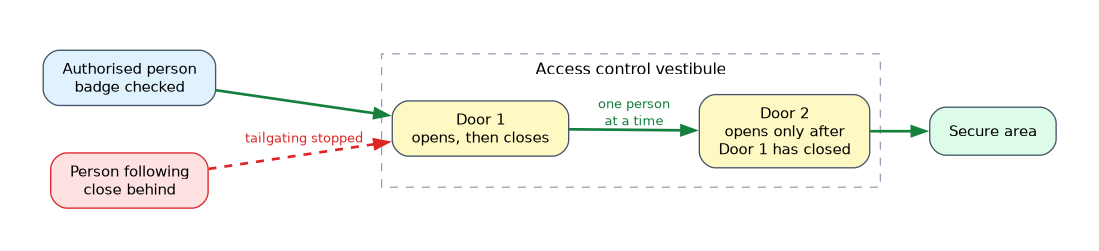 An access control vestibule is a small space with two interlocking doors. The second door opens only after the first has closed, so only one person can enter at a time. It was formerly called a mantrap and it stops tailgating, where an unauthorised person follows someone through a door.
A badge reader checks a card or fob that a person holds against a database and unlocks the door if the person is allowed. Readers keep a log of who entered and when. A lost badge should be disabled at once.
Door locks come in several forms.
| Lock type | Notes |
|---|---|
| Key lock | Simple, but keys can be copied or lost |
| Keypad or cipher lock | Uses a code, which can be shared or watched |
| Smart card or badge lock | Ties access to an individual and keeps a record |
| Biometric lock | Uses a body trait that is hard to share |
Mobile digital keys
A mobile digital key stores an access credential in a phone, often in its wallet app. The phone talks to the reader using Near Field Communication (NFC) or Bluetooth, replacing a badge or key fob. A lost phone should have its key revoked, just like a lost badge.
Biometrics
Biometrics identify a person by a physical trait. Examples are a fingerprint, palm print, iris or retina scan and facial recognition. They are hard to lose or share, but a trait cannot be reset if the data is stolen, and readers can make errors.
Voice recognition identifies a person by a voiceprint. It is easy to use over a phone, but a recording or synthetic voice may fool it, and noise or a cold can cause errors.
Detection and monitoring
Video surveillance records or streams camera images. It deters people and gives evidence after an incident.
Alarm systems signal when a door or window opens, and motion sensors detect movement in a room that should be empty. Some alarms notify a monitoring company or guard.
Magnetometers are metal detectors placed at entrances. They find weapons or devices before a person enters the building.
Protecting equipment
Equipment locks keep hardware in place. A cable lock tethers a laptop to a desk.
Locked racks and cabinets protect servers, switches and patch panels. A privacy screen filter limits the viewing angle of a monitor to stop shoulder surfing.
Detective and preventive controls
Controls can be grouped by purpose. Preventive controls, such as locks, fences and vestibules, stop an intruder from getting in.
Detective controls, such as cameras, alarms and motion sensors, show that something has happened. Deterrent controls, such as visible cameras, warning signs and guards, discourage the attempt in the first place.
A good design uses all three. A locked door stops most people, a camera records those who try, and a guard responds to the alarm.
Visitors and records
Visitors should sign in, wear a visible badge and be escorted. Entry logs from badge readers and sign in sheets are used later to review who was where.
When a scenario describes people following others through a secure door, the best control is an access control vestibule. When it describes screens viewed by passers-by, the best control is a privacy filter.
What to remember for the exam
- Use layers: perimeter, building, room and device.
- An access control vestibule (mantrap) prevents tailgating.
- Badge readers tie entry to a person and keep a log.
- Biometrics include fingerprint, palm, iris, retina and face.
- Bollards stop vehicles. Fences mark and delay.
- Video surveillance deters and records. Motion sensors and alarms detect.
- Cable locks and locked racks protect equipment.
- A privacy filter reduces shoulder surfing.
- Visitors must be logged and escorted.
Common mistakes
Choosing a keypad for high security. A code can be shared or seen. A badge or biometric control is stronger because it ties access to a person.
Confusing detective and preventive controls. Cameras and alarms detect and deter. Locks and vestibules prevent entry.
Forgetting to disable lost badges. A lost badge works for anyone until it is revoked.
Trusting one control alone. A fence does not stop someone who walks through the front door, so layering matters.
Check yourself
Which control stops one person from following another through a secure door?
An access control vestibule, which lets only one person pass at a time.
What does a bollard protect against?
Vehicles driven into a building or entrance.
How does a privacy filter help?
It narrows the viewing angle so people beside or behind the user cannot read the screen.
Topic 1 of 13 in Security
Test yourself on Security
The full CompTIA A+ 220-1202 question bank has 835 questions, with timed practice exams and an explanation for every answer.
This study guide is independent and is not affiliated with, endorsed by, or sponsored by CompTIA. Vendor names, certification names and exam codes are trademarks of their respective owners and are used for identification only.