Operational Procedures · Topic 8 of 9
Remote Access Technologies
Compare RDP, VPN, SSH, VNC, Remote Assistance, RMM and screen sharing tools, with their ports, security risks and the best tool for each support scenario.
- 4 min
- Includes a diagram
- RDP uses TCP 3389 and needs a host with Pro or above.
- SSH uses TCP 22 and gives encrypted command line access.
- VNC shares a screen across platforms, commonly on TCP 5900.
What it is
Remote access lets a person use or support a computer from another location. It saves travel and is vital for remote workers, but it also opens a way in for attackers, so it must be set up and used with care. The exam asks which technology fits a situation and what makes it secure.
How it works
Common technologies
| Technology | What it does | Port or notes |
|---|---|---|
| RDP (Remote Desktop Protocol) | Full Windows desktop session on another computer | Transmission Control Protocol (TCP) 3389. Host needs Pro or above |
| VPN (virtual private network) | Encrypted tunnel to a remote network | Gives access to internal resources |
| SSH (Secure Shell) | Encrypted command line access | TCP 22. Replaces Telnet |
| VNC (Virtual Network Computing) | Shares a graphical desktop across platforms | Often TCP 5900 by default |
| Microsoft Remote Assistance | A user invites a helper to view or control their screen | Needs the user's consent |
| Quick Assist | Windows tool for a helper to connect to a user with a code | User approves the session |
| Screen sharing and video conferencing | Shows a screen during a call, sometimes with control | Handy for guiding a user |
| File transfer software | Moves files to and from a device | Use secure versions such as SFTP |
| RMM (remote monitoring and management) | Platform for managing many devices from one place | Used by managed service providers |
| Desktop management software | Central tools to install software and set policy | Used by information technology (IT) departments |
SFTP (SSH File Transfer Protocol) runs over SSH, and unlike plain FTP (File Transfer Protocol) it encrypts the session. Telnet sends everything in clear text and should not be used.
How each is used
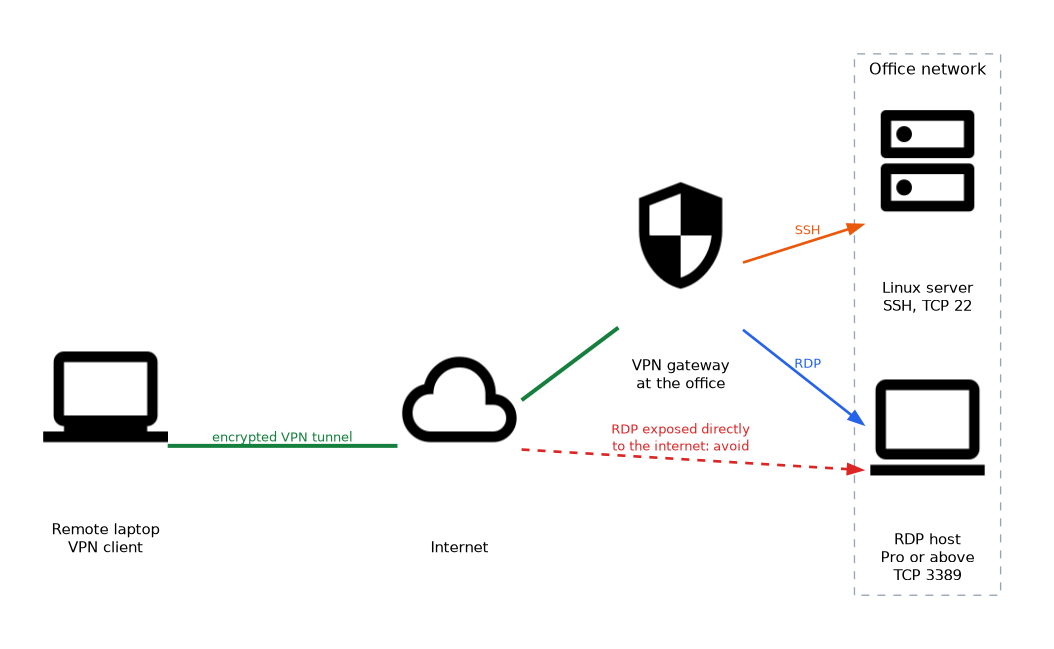 RDP is the standard way to reach a Windows desktop. On the target, Remote Desktop is turned on in Settings and users are allowed to connect. The client uses the Remote Desktop Connection tool,
 mstsc.
VPN connects a remote laptop to the office network, and from there RDP or file shares can be used as if on site. A VPN can send all traffic through the tunnel, or only traffic for the company network (split tunnel).
SSH is used to manage Linux servers and network devices from a terminal. It can use a password or key pairs.
VNC shows the same screen that a local user sees. It works across Windows, macOS and Linux, but needs extra care because it may not be encrypted by default.
Remote Assistance and Quick Assist are help tools. The user starts the session and the helper can view or take control with permission, which makes them suitable for help desks.
RMM tools run an agent on each machine for monitoring, patching and remote control at scale.
SPICE (Simple Protocol for Independent Computing Environments) is a remote display protocol for virtual machines, often used with KVM and QEMU. It supports audio and USB redirection.
WinRM (Windows Remote Management) is Microsoft's remote administration service, and PowerShell remoting uses it. It listens on TCP 5985 for HTTP and TCP 5986 for HTTPS. It is turned on with winrm quickconfig.
Security considerations
- Do not expose RDP directly to the internet. Put it behind a VPN or a gateway.
- Use strong passwords and multifactor authentication (MFA) on all remote tools.
- Keep remote access software updated.
- Use encrypted options, such as SSH and SFTP, instead of Telnet and FTP.
- Get the customer's permission before connecting, and tell them what you will do.
- End the session and close the connection when done, and log what you did.
- Be careful with third party tools that leave a permanent way in.
When the user must start and approve the session, think Remote Assistance or Quick Assist. When an administrator needs a Windows desktop on a known computer, think RDP, ideally over a VPN.
What to remember for the exam
- RDP uses TCP 3389 and needs a host with Pro or above.
- SSH uses TCP 22 and gives encrypted command line access.
- VNC shares a screen across platforms, commonly on TCP 5900.
- A VPN creates an encrypted tunnel to a remote network.
- Remote Assistance and Quick Assist need the user's consent.
- RMM manages many devices from one platform.
- SFTP is secure. FTP and Telnet are not.
- Do not expose RDP directly to the internet.
- Use MFA and get permission before connecting.
Common mistakes
Choosing Telnet for remote administration. It sends data in clear text. Use SSH.
Opening RDP to the world. It invites brute force attacks. Use a VPN.
Connecting without permission. Always get the customer's consent first.
Forgetting to close the session. An open session leaves a way in.
Check yourself
Which port does RDP use?
TCP 3389.
Which tool replaces Telnet with an encrypted command line?
SSH (Secure Shell).
What should you put in front of RDP rather than exposing it to the internet?
A VPN or a secure gateway.
Topic 8 of 9 in Operational Procedures
Test yourself on Operational Procedures
The full CompTIA A+ 220-1202 question bank has 835 questions, with timed practice exams and an explanation for every answer.
This study guide is independent and is not affiliated with, endorsed by, or sponsored by CompTIA. Vendor names, certification names and exam codes are trademarks of their respective owners and are used for identification only.