Hardware · Topic 6 of 13
RAID Levels and Arrays
Compare RAID 0, 1, 5, 6 and 10 by speed, redundancy, minimum drives and usable capacity, and learn hardware versus software RAID, hot spares and rebuilds.
- 4 min
- Includes a diagram
- RAID 0 stripes with no redundancy and needs at least 2 drives.
- RAID 1 mirrors and needs 2 drives.
- RAID 5 uses parity, needs 3 drives and survives one failure.
What it is
Redundant array of independent disks (RAID) combines several drives into one logical volume. The goal is better speed, protection against drive failure, or both.
Each RAID level has its own layout. You need to know which levels protect data, how many drives each needs and how much space is usable.
How it works
Three ideas build every level.
- Striping: data is split into blocks and spread across drives to gain speed.
- Mirroring: the same data is written to two drives, so one copy survives a failure.
- Parity: extra calculated data lets the array rebuild the contents of a lost drive.
The common levels
| Level | Method | Minimum drives | Survives | Usable space |
|---|---|---|---|---|
| RAID 0 | Striping | 2 | No drive failure | All of it |
| RAID 1 | Mirroring | 2 | One drive | Half |
| RAID 5 | Striping with parity | 3 | One drive | All drives minus one |
| RAID 6 | Striping with double parity | 4 | Two drives | All drives minus two |
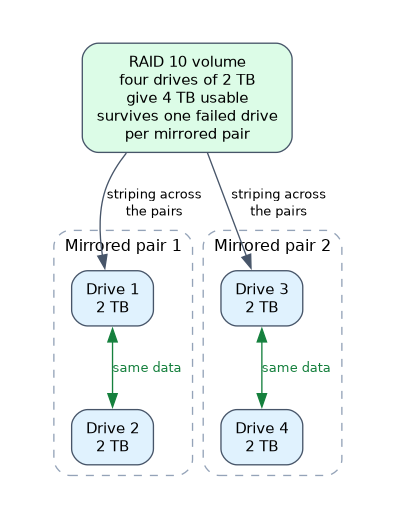
| RAID 10 | Mirrored pairs striped together | 4 | One drive per mirrored pair | Half |
RAID 0 is the fastest and the riskiest: losing any drive loses everything. RAID 1 gives simple protection and is common for boot drives.
RAID 5 balances capacity, speed and protection and is common in servers. RAID 6 adds safety for large arrays.
RAID 10, also written 1+0, combines the speed of striping with the safety of mirroring.
Worked example: four drives of 2 terabytes (TB) each. RAID 0 gives 8 TB, RAID 5 gives 6 TB, RAID 6 gives 4 TB and RAID 10 gives 4 TB.
Hardware or software RAID
| Type | Description |
|---|---|
| Hardware RAID | A dedicated controller card or the motherboard chip manages the array and often has its own memory and battery |
| Software RAID | The operating system manages the array using processor time; cheaper and more flexible |
Hardware RAID usually performs better, while software RAID needs no extra card.
Hot spares and hot swapping
A hot spare is an unused drive in the array that starts rebuilding on its own when another drive fails. A hot swappable drive can be removed and replaced while the system runs. Server drive bays often support this.
Failure and rebuild
When a drive fails in a protected array, the array keeps running in a degraded state. Data is still available, but performance drops and another failure may lose data.
Replace the failed drive promptly. Rebuilding takes time and heavy use of the surviving drives, so a second failure during a rebuild is a real risk.
RAID is not a backup. It protects against drive failure only, not against deleted files, malware, fire or a controller fault, so keep separate backups.
Choosing a level
- Pick RAID 0 for speed where the data is not important, such as temporary video editing space.
- Pick RAID 1 for a simple, safe two drive setup.
- Pick RAID 5 or 6 for file servers needing capacity with protection.
- Pick RAID 10 for busy databases that need speed and safety.
Drive types in arrays
Use drives of the same size and speed. A larger drive in an array is limited to the size of the smallest one in most levels, so the extra space is wasted.
What to remember for the exam
- RAID 0 stripes with no redundancy and needs at least 2 drives.
- RAID 1 mirrors and needs 2 drives.
- RAID 5 uses parity, needs 3 drives and survives one failure.
- RAID 6 uses double parity, needs 4 drives and survives two failures.
- RAID 10 needs 4 drives and combines mirroring and striping.
- A degraded array still works but is at risk until rebuilt.
- A hot spare takes over when a drive fails.
- RAID is not a replacement for backup.
Common mistakes
Thinking RAID 0 is redundant. The R in RAID suggests it, but RAID 0 has none; one failure loses all data.
Treating RAID as a backup. It will not restore deleted or corrupted files.
Ignoring a degraded array. A second failure before the rebuild finishes can cause data loss.
Mixing up RAID 5 and RAID 6. RAID 5 survives one failed drive and RAID 6 survives two.
Mixing drive sizes. The array uses the smallest drive size per member, so larger drives lose capacity.
Check yourself
Which RAID level has no fault tolerance?
RAID 0, because it only stripes data.
How many drives does RAID 5 need at minimum, and how many failures does it survive?
Three drives, and it survives one failure.
Why is RAID not a backup?
It only protects against drive failure, not deletion, malware or disasters.
Topic 6 of 13 in Hardware
Test yourself on Hardware
The full CompTIA A+ 220-1201 question bank has 856 questions, with timed practice exams and an explanation for every answer.
This study guide is independent and is not affiliated with, endorsed by, or sponsored by CompTIA. Vendor names, certification names and exam codes are trademarks of their respective owners and are used for identification only.