Hardware · Topic 11 of 13
Printer Types and Printing Process
Compare laser, inkjet, thermal, impact and 3D printers, follow the laser imaging process step by step, and know what multifunction devices add to printing.
- 5 min
- Includes a diagram
- Laser printers use toner, a drum, a laser and a fuser.
- The laser process order is processing, charging, exposing, developing, transferring, fusing, cleaning.
- Inkjet printers spray ink from a print head and can clog if unused.
What it is
Printers differ in how they put marks on paper. Each type suits a different job, and each has its own parts, supplies and common faults.
A multifunction device (MFD), also called a multifunction printer (MFP), adds scanning, copying and sometimes faxing to the printer. Knowing the types and their parts helps you choose, set up and later repair them.
How it works
Printer types
| Type | How it prints | Typical use |
|---|---|---|
| Laser | Uses a laser, toner powder and heat to fuse the image onto paper | Offices; fast, sharp text, low cost per page |
| Inkjet | Sprays tiny drops of liquid ink from a print head | Homes; colour photos and light office use |
| Thermal | Heats special paper or a ribbon to form the image | Receipts, labels, shipping tags |
| Impact (dot matrix) | Pins strike an inked ribbon against the paper | Multi part forms, invoices, harsh environments |
| 3D printer | Builds an object layer by layer from filament or resin | Prototypes, models and parts |
Laser printer parts
A laser printer has several key parts.
- Toner cartridge: holds the fine powder that forms the image, and often the drum too.
- Photosensitive drum: a roller that holds a pattern of electric charge.
- Laser: writes the image onto the drum as light.
- Transfer belt or roller: moves the toner from the drum onto the paper.
- Fuser assembly: heated rollers that melt the toner onto the page.
- Pickup rollers and separation pad: feed paper from the tray.
- Duplexing assembly: flips the sheet for printing on both sides.
The laser imaging process
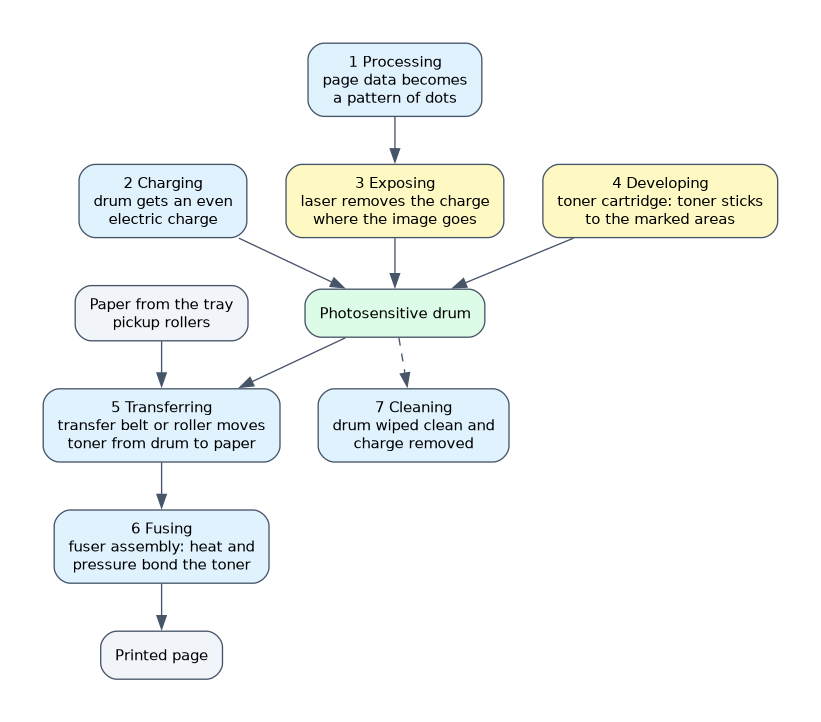 There are seven steps, and the order is tested.
- Processing: the printer converts the page data into a pattern of dots to print (a raster image).
- Charging: the drum is given an even electric charge.
- Exposing: the laser draws the image and removes the charge in those spots.
- Developing: toner sticks to the areas the laser marked.
- Transferring: the toner moves from the drum to the paper.
- Fusing: heat and pressure bond the toner to the paper.
- Cleaning: the drum is wiped clean and its charge removed for the next page.
If toner smudges when touched, the fuser is a likely cause. Marks that repeat at regular spacing down the page often point to a dirty or damaged roller or drum.
Inkjet parts
An inkjet has ink cartridges, a print head that sprays the ink, a carriage and belt that move the head across the page, and a stepper motor that feeds the paper. Some cartridges include the print head, and others use a separate head. Inkjet printers can have clogged nozzles if used rarely.
Thermal and impact printers
Direct thermal printers heat special paper that darkens, so they need no ink or toner. Thermal transfer printers melt wax or resin from a ribbon onto labels. Impact printers use a print head with pins that strike the ribbon, and they can print through several copies in one pass, such as on carbon forms.
If a scenario needs carbon copy forms printed in one go, the answer is an impact printer. If it needs receipts with no ink, the answer is a thermal printer.
Three dimensional printers
A 3D printer melts plastic filament (such as polylactic acid, PLA, or acrylonitrile butadiene styrene, ABS) and deposits it layer by layer, or hardens liquid resin with light. Additive manufacturing is the formal name for this process. Heated beds and nozzles run hot, so take care.
Multifunction devices
A multifunction device combines a printer with a scanner and copier, and often a fax. It scans to email, to a network folder or to cloud storage, and it can print from a phone or a Universal Serial Bus (USB) drive. One fault in a shared part, such as the paper path, can affect several functions.
What to remember for the exam
- Laser printers use toner, a drum, a laser and a fuser.
- The laser process order is processing, charging, exposing, developing, transferring, fusing, cleaning.
- Inkjet printers spray ink from a print head and can clog if unused.
- Thermal printers use heat; direct thermal uses special paper.
- Impact printers use pins and a ribbon and can make carbon copies.
- 3D printers build objects layer by layer from filament or resin.
- A multifunction device adds scan, copy and fax to printing.
- The fuser melts toner; if toner smears, suspect the fuser.
Common mistakes
Mixing up the laser steps. Charging comes before exposing, and the fuser is near the end.
Touching a hot fuser. It stays hot after printing, so wait for it to cool.
Using a thermal printer with plain paper. Direct thermal needs special heat sensitive paper.
Thinking toner is a liquid. It is a fine powder, which is why a dirty laser printer should not be cleaned with a normal vacuum.
Assuming all inkjet cartridges include the head. Designs vary by model.
Check yourself
What is the correct order of the first three laser printing steps?
Processing, charging and exposing.
Which printer type can print multi part carbon forms?
An impact (dot matrix) printer.
What does the fuser do?
It uses heat and pressure to bond the toner to the paper.
Topic 11 of 13 in Hardware
Test yourself on Hardware
The full CompTIA A+ 220-1201 question bank has 856 questions, with timed practice exams and an explanation for every answer.
This study guide is independent and is not affiliated with, endorsed by, or sponsored by CompTIA. Vendor names, certification names and exam codes are trademarks of their respective owners and are used for identification only.