Basic Network Security Concepts · Topic 3 of 7
Security Architecture, DMZ, Virtualization and Cloud
Learn how a secure network is laid out in zones, what a DMZ does, and the security points of virtualization and cloud including shared responsibility.
- 5 min
- Includes a diagram
- A secure design uses zones with controls between them.
- A DMZ holds public facing servers between the internet and the internal network.
- Internet traffic should not go straight to the internal network.
What it is
Security architecture is the plan for how a network is divided, connected and protected.
A good plan puts systems in zones according to how much they are trusted, and controls the traffic between the zones. This page looks at that plan, the DMZ zone, and two technologies that change where systems live: virtualization and the cloud.
The aim is to understand what each design protects and where it adds new risks.
How it works
Every design decision comes back to separating zones and limiting what may pass between them.
Network security architecture
A secure design uses zones of different trust levels. Common zones are the outside (untrusted internet), the inside (trusted internal network), and a middle zone for public facing servers. Firewalls and access control lists sit between the zones.
Good designs follow these ideas:
- defence in depth, with several layers of controls
- least privilege, so each zone and user only gets the access needed
- segmentation, so a problem in one zone stays there
- monitoring, so traffic between zones is logged and checked
A network edge is the point where your network meets another one, such as the internet. It needs the strongest controls, because that is where outside traffic first arrives.
The DMZ
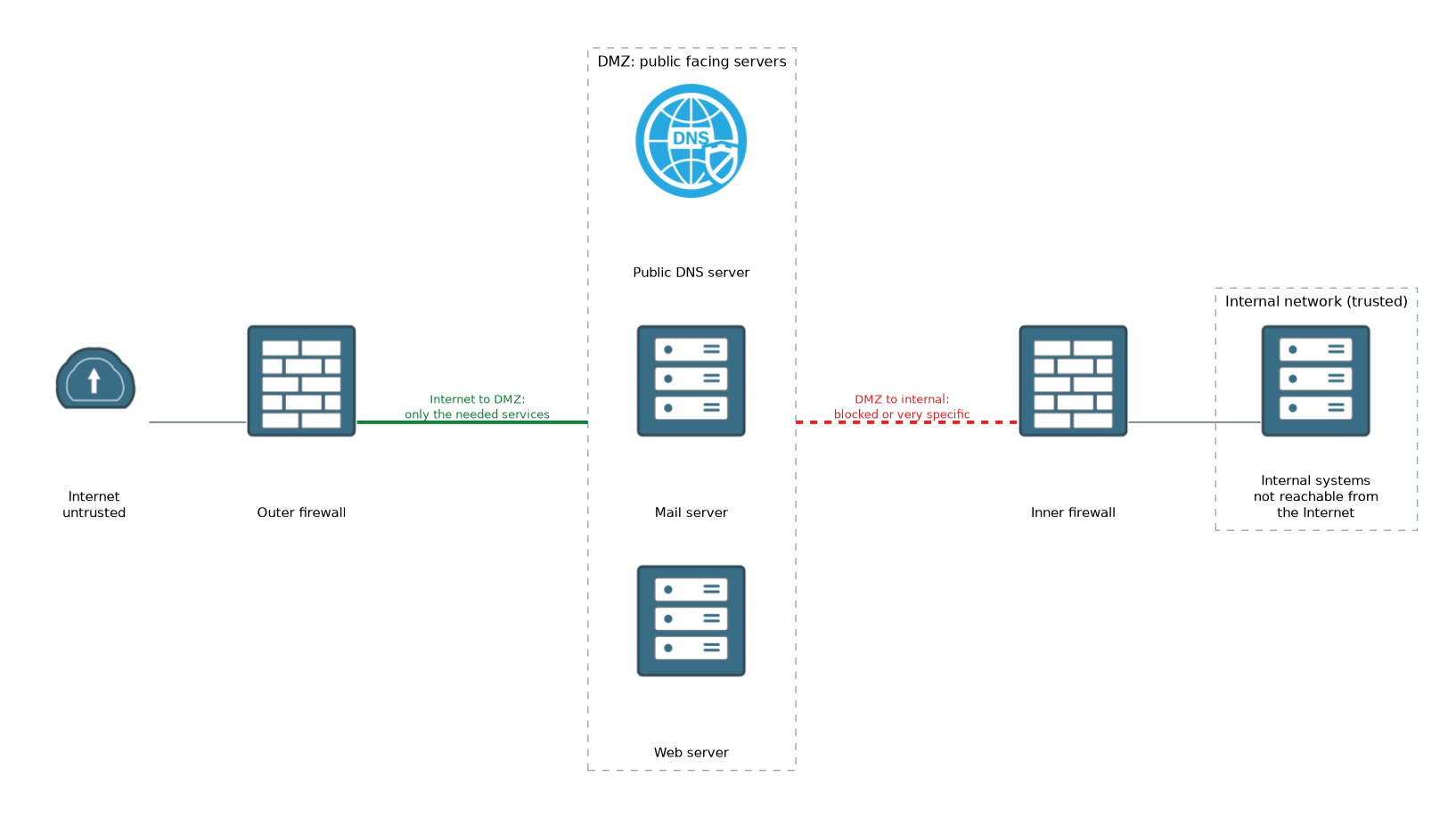 A DMZ (demilitarized zone) is a separate network segment that holds servers that must be reachable from the internet, such as web, mail and public DNS servers. It sits between the internet and the internal network.
The firewall rules for a DMZ are strict:
| Traffic direction | Typical rule |
|---|---|
| Internet to DMZ | Allow only the needed services, such as web traffic |
| Internet to internal | Block |
| DMZ to internal | Block, or allow only very specific connections |
| Internal to DMZ | Allow as needed |
The reason is simple. Public servers are attacked often, so you assume one may be compromised. If it is in the DMZ, the attacker still faces another firewall before reaching internal systems.
Virtualization
Virtualization lets one physical computer run several virtual machines (VMs). A program called a hypervisor shares the hardware between them, and each VM behaves like a separate computer.
Benefits include lower costs, quick recovery from snapshots and easy testing. Security points to know:
- the hypervisor is a high value target, so it must be patched and tightly controlled
- a rare attack called VM escape breaks out of a VM to reach the hypervisor or other VMs
- VM sprawl means unmanaged and forgotten VMs that miss patches and add risk
- VMs on the same host need proper separation between them
- snapshots and VM files may contain sensitive data and must be protected
Cloud
Cloud computing means using computing services over the internet, run by a provider. Common service models are:
| Model | You use | Example idea |
|---|---|---|
| IaaS | Virtual servers and storage | Renting virtual machines |
| PaaS | A platform to build and run applications | A managed application platform |
| SaaS | A finished application | Web based email |
Deployments can be public (shared provider), private (one organisation), or hybrid (a mix).
Cloud security depends on the shared responsibility model. The provider secures the underlying data centre and infrastructure. The customer is still responsible for items such as their data, user accounts, access settings and configuration.
Common cloud risks are misconfigured storage that is open to the public, weak access control, and a lack of visibility.
What to remember for the exam
Seven facts cover most questions on this topic.
- A secure design uses zones with controls between them.
- A DMZ holds public facing servers between the internet and the internal network.
- Internet traffic should not go straight to the internal network.
- A hypervisor runs virtual machines, and it is a high value target.
- VM sprawl and VM escape are two virtualization risks.
- IaaS, PaaS and SaaS are the three main cloud service models.
- In the cloud, the customer is still responsible for their data and access settings.
In shared responsibility questions, the customer keeps responsibility for their own data and who can access it.
Common mistakes
These four errors are common.
Putting public servers on the internal network. A compromised web server would then sit next to sensitive systems.
Allowing wide DMZ to internal access. This removes the point of the DMZ, since the attacker can reach the inside.
Forgetting unused VMs. Old VMs keep running without patches and become easy targets.
Assuming the cloud provider secures everything. The customer must still configure access and protect their data.
A cloud storage bucket set to public by mistake can expose data to anyone on the internet.
Check yourself
Work through these three questions.
What is the purpose of a DMZ?
It holds public facing servers in a separate segment between the internet and the internal network. A compromised server there still faces another firewall.
What is a hypervisor?
It is the program that shares the physical hardware between virtual machines.
Who protects customer data in a cloud service?
The customer remains responsible for their data and access settings, while the provider secures the underlying infrastructure.
Topic 3 of 7 in Basic Network Security Concepts
Test yourself on Basic Network Security Concepts
The full Cisco CCST 100-160 Cybersecurity question bank has 864 questions, with timed practice exams and an explanation for every answer.
This study guide is independent and is not affiliated with, endorsed by, or sponsored by Cisco. Vendor names, certification names and exam codes are trademarks of their respective owners and are used for identification only.