Basic Network Security Concepts · Topic 4 of 7
Honeypots, Proxy Servers, IDS and IPS
Learn what honeypots, proxy servers, intrusion detection systems and intrusion prevention systems do, how they differ, and where each fits in a network.
- 5 min
- Includes a diagram
- A honeypot is a decoy with no real data, used to detect and study attackers.
- A forward proxy fronts users, and a reverse proxy fronts servers.
- An IDS detects and alerts, and an IPS detects and blocks.
What it is
These are four tools that watch, filter or lure traffic to help protect a network.
A honeypot is a decoy. A proxy server stands in for users or servers. An intrusion detection system raises alerts, and an intrusion prevention system can also block.
Each one adds visibility or control, and none of them replaces the others.
How it works
The key question for each tool is whether it only reports or also acts.
Honeypot
A honeypot is a system that looks real but holds no real data. Its purpose is to be attacked. Because nobody has a legitimate reason to use it, any contact with it is suspicious.
Honeypots are used to:
- detect attackers early, since any traffic to the decoy is a warning sign
- learn the methods and tools attackers use
- distract attackers from real systems
A group of honeypots is sometimes called a honeynet. A honeypot must be well isolated, so that an attacker who takes it over cannot use it to reach real systems.
Proxy server
A proxy server is an intermediary that sits between a client and the destination. The client talks to the proxy, and the proxy talks to the destination on its behalf.
| Type | Sits in front of | Purpose |
|---|---|---|
| Forward proxy | Users | Filters web access, hides user addresses, caches content |
| Reverse proxy | Servers | Protects servers, shares load, can inspect incoming requests |
Security uses of a proxy include blocking harmful or unwanted websites, scanning downloads for malware, and logging what users access. A proxy can also hide the real address of the client or the server from the other side.
A proxy works at the application level for the protocols it understands, such as web traffic. That means it can make decisions about content, which a basic packet filter cannot.
IDS and IPS
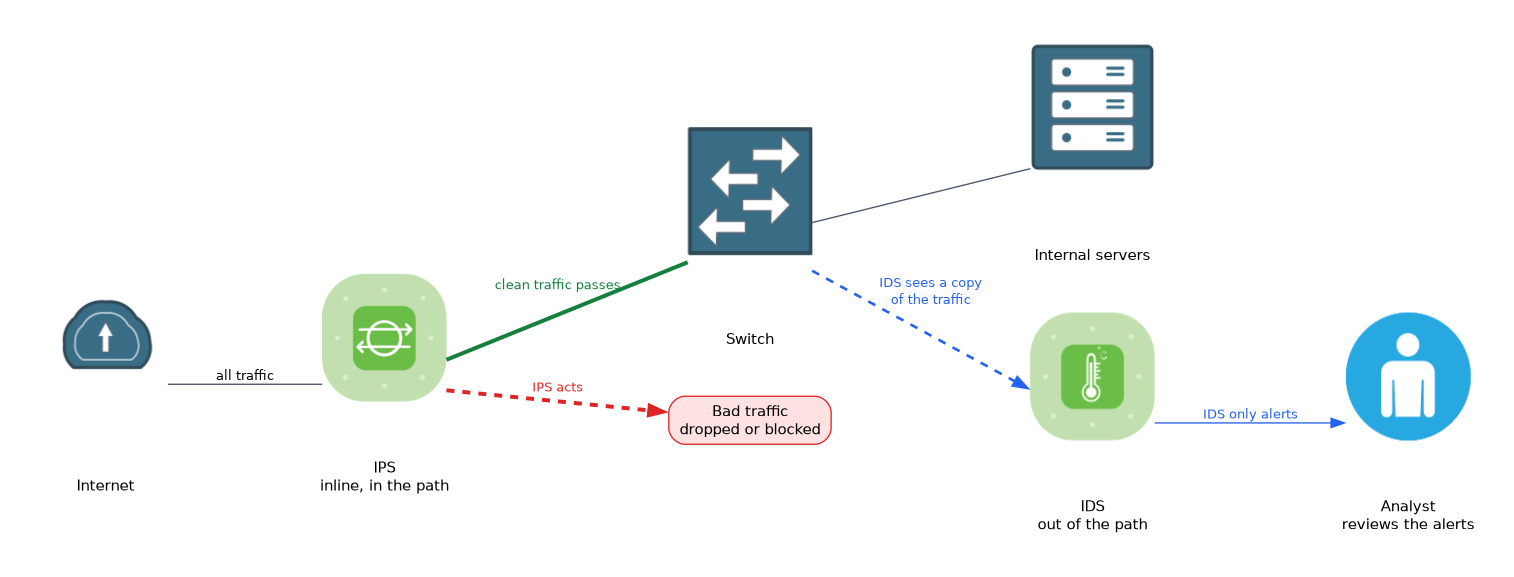 An intrusion detection system (IDS) monitors traffic or activity and raises an alert when it sees something suspicious. It is passive. It watches a copy of the traffic and does not stand in the path.
An intrusion prevention system (IPS) does the same inspection but is placed inline, so traffic passes through it. It can drop bad packets, block a source or reset a connection. It acts, instead of only warning.
| Feature | IDS | IPS |
|---|---|---|
| Position | Out of the traffic path, sees a copy | Inline, in the traffic path |
| Action | Alerts | Alerts and blocks |
| Risk | Attack may succeed before someone reacts | A fault or wrong block can disrupt good traffic |
Detection methods and placement
IDS and IPS tools find problems in two main ways.
- Signature based detection compares traffic with known attack patterns. It is accurate for known attacks, but it misses new ones.
- Anomaly based detection learns what is normal and flags what differs. It can catch new attacks, but it may raise more false alarms.
A false positive is an alert about harmless traffic. A false negative is a real attack that goes unnoticed. Tuning the system aims to reduce both.
A network based system watches traffic on the network. A host based system runs on one computer and watches that computer's activity, such as files and processes.
These tools generate many alerts, so people or a central system must review them. An unread alert protects nothing.
What to remember for the exam
Seven facts cover most questions on this topic.
- A honeypot is a decoy with no real data, used to detect and study attackers.
- A forward proxy fronts users, and a reverse proxy fronts servers.
- An IDS detects and alerts, and an IPS detects and blocks.
- An IPS sits inline, and an IDS usually sees a copy of the traffic.
- Signature based detection finds known attacks, and anomaly based detection finds unusual behaviour.
- A false positive is a harmless event flagged as an attack.
- A host based system watches one computer, and a network based system watches traffic.
If the question says the device blocks the attack automatically, the answer is IPS. If it only alerts, the answer is IDS.
Common mistakes
These four errors are common.
Mixing up IDS and IPS. Detection reports, and prevention acts.
Thinking a honeypot protects real data. It holds none. It is there to attract and reveal attackers.
Forgetting that anomaly detection raises false alarms. New but legitimate behaviour can look unusual.
Treating a proxy as the same as a firewall. A proxy works for specific application traffic, while a firewall filters traffic by rules across the network.
An inline IPS that is misconfigured can block legitimate traffic and cause an outage, so it needs careful tuning.
Check yourself
Work through these three questions.
What is the main difference between an IDS and an IPS?
An IDS detects and alerts, usually from a copy of the traffic. An IPS sits inline and can also block the attack.
Why do organisations deploy a honeypot?
It is a decoy with no real data, so any contact with it is suspicious. It helps detect attackers and learn their methods.
What is a false positive?
It is an alert raised for harmless activity that is not an attack.
Topic 4 of 7 in Basic Network Security Concepts
Test yourself on Basic Network Security Concepts
The full Cisco CCST 100-160 Cybersecurity question bank has 864 questions, with timed practice exams and an explanation for every answer.
This study guide is independent and is not affiliated with, endorsed by, or sponsored by Cisco. Vendor names, certification names and exam codes are trademarks of their respective owners and are used for identification only.