Security · Topic 1 of 5
How Firewalls Filter Traffic
Learn how firewalls permit or deny traffic using rules on addresses, protocols and ports, stateless and stateful filtering, and the order of rules.
- 5 min
- Includes a diagram
- A firewall permits or denies traffic by comparing it with rules.
- Rules can match source, destination, protocol and port, and direction.
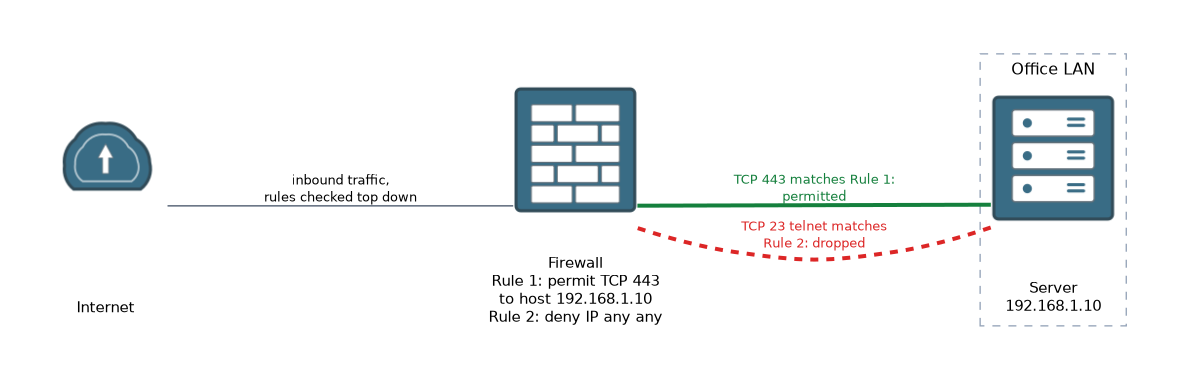
- Rules are checked top down, and the first match decides.
What it is
A firewall is a device or program that allows or blocks network traffic according to rules.
It sits between networks, for example between your office and the internet, and checks each packet or connection against its rules. Traffic that matches a permit rule goes through. Traffic that matches a deny rule is dropped.
Firewalls are a basic part of network security. They keep unwanted traffic out and limit what can leave.
How it works
The firewall compares traffic with an ordered list of rules and acts on the first one that matches.
What a rule looks at
A rule describes a kind of traffic and says what to do with it. It can match on these things.
| Field | Example |
|---|---|
| Source address | A device or a whole network |
| Destination address | A web server |
| Protocol | TCP, UDP or ICMP |
| Port number | 80 for web, 23 for telnet |
| Direction | Inbound or outbound |
The action is permit or deny. A rule that denies TCP port 23 stops telnet. A rule that permits TCP port 443 to a server allows secure web traffic to it.
Blocked ports and protocols
Blocking a port or a protocol is a simple way to reduce risk. For example, a network may block telnet because it is not encrypted, or block ICMP from the internet to hide devices from simple scans.
Blocking can also cause trouble. If a firewall blocks the port that an application needs, the application fails even though the network is fine. A technician then has to find which rule is responsible.
Rule order and the default
Rules are checked from the top down. The first rule that matches decides the result, and the firewall stops looking.
Because of this, a specific rule must come before a general one. A rule that denies everything at the top would block traffic that later rules were meant to permit.
At the end of the list is a default action. Many firewalls end with an implicit deny, so traffic that no rule permits is dropped. Home routers typically block new connections that start from the internet, and allow replies to connections that started inside.
Stateless and stateful
A stateless filter looks at each packet alone, and has no memory of earlier packets.
A stateful firewall keeps a table of connections. When an inside device opens a connection, the firewall expects the reply and lets it back in. This is simpler to manage, and safer, than writing a rule for every reply.
Where firewalls run
 A network firewall is a device at the edge of a network, or between parts of it. A host firewall is software on one computer, such as the one built in to an operating system. Both can be used together.
Some firewalls also understand applications, and not just ports. They are often called next generation firewalls. A Cisco router can also filter traffic with an access control list (ACL).
Router(config)# access-list 100 permit tcp any host 192.168.1.10 eq 443
Router(config)# access-list 100 deny ip any any
Router(config)# interface GigabitEthernet0/0
Router(config-if)# ip access-group 100 in
This IOS example permits TCP port 443 to one server, denies everything else, and applies the list to traffic arriving on the interface.
What to remember for the exam
Seven facts cover most questions on this topic.
- A firewall permits or denies traffic by comparing it with rules.
- Rules can match source, destination, protocol and port, and direction.
- Rules are checked top down, and the first match decides.
- Specific rules go before general ones.
- Many firewalls end with an implicit deny.
- A stateful firewall tracks connections, so replies to inside requests are allowed back in.
- A network firewall protects a network, and a host firewall protects one computer.
If an application suddenly stops working after a firewall change, check whether a rule now blocks its port.
Common mistakes
These four errors appear again and again.
Putting a general rule first. A broad deny at the top blocks traffic that later rules permit.
Forgetting the implicit deny. Traffic with no permit rule is dropped.
Blocking a port without checking who needs it. Users may lose a service they rely on.
Thinking a firewall stops every threat. It filters by rule, but it cannot judge a permitted user's behaviour.
Do not turn off a firewall to test a problem on a live network. Change one rule and check, so the network is not left open.
Check yourself
Work through these three questions.
What does a firewall rule normally match on?
It matches on things such as source and destination address, protocol, port number and direction.
Why does the order of rules matter?
The firewall checks rules from the top down and acts on the first match, so a specific rule must come before a general one.
What is the benefit of a stateful firewall?
It tracks connections, so replies to requests from inside are allowed back in without a separate rule.
Topic 1 of 5 in Security
Test yourself on Security
The full Cisco CCST 100-150 Networking question bank has 749 questions, with timed practice exams and an explanation for every answer.
This study guide is independent and is not affiliated with, endorsed by, or sponsored by Cisco. Vendor names, certification names and exam codes are trademarks of their respective owners and are used for identification only.