Addressing and Subnet Formats · Topic 1 of 3
Private and Public IPv4 Addresses, Classes and NAT
Compare private and public IPv4 addresses, learn the old address classes A to E and the private ranges, and see how NAT lets hosts reach the internet.
- 5 min
- Includes a diagram
- The private ranges are 10.0.0.0/8, 172.16.0.0/12 and 192.168.0.0/16.
- Private addresses are not routed on the internet. Public addresses are.
- Class A runs from 1 to 126, class B from 128 to 191, and class C from 192 to 223.
What it is
Public addresses are reachable on the internet, and private addresses are for use inside a home or company network.
Every device that sends traffic over IPv4 needs an address. There are not enough public IPv4 addresses for every device in the world, so networks reuse private ranges inside and share a few public addresses.
NAT, short for network address translation, is the service that connects the two worlds.
How it works
Private addresses are never routed on the internet, so a router translates them to a public address on the way out.
Private ranges
Three blocks are set aside for private use. Anyone can use them, and many homes and offices use the same ones.
| Block | Range | Prefix length |
|---|---|---|
| 10.0.0.0 | 10.0.0.0 to 10.255.255.255 | /8 |
| 172.16.0.0 | 172.16.0.0 to 172.31.255.255 | /12 |
| 192.168.0.0 | 192.168.0.0 to 192.168.255.255 | /16 |
Every other normal address is public. Two special ranges are also worth knowing.
The loopback range 127.0.0.0 to 127.255.255.255 points a device at itself, and 127.0.0.1 is the usual address. The range 169.254.0.0 to 169.254.255.255 is used by a device that asked for an address and did not get one. It is a sign that DHCP is not working.
Address classes
Early IPv4 split the address space into classes. The first number in the address tells you the class.
| Class | First number | Default mask | Use |
|---|---|---|---|
| A | 1 to 126 | 255.0.0.0 | Very large networks |
| B | 128 to 191 | 255.255.0.0 | Medium networks |
| C | 192 to 223 | 255.255.255.0 | Small networks |
| D | 224 to 239 | None | Multicast |
| E | 240 to 255 | None | Reserved for experiments |
The number 127 is skipped because it is used for loopback. Modern networks no longer use classes to decide the mask. They use a prefix length, as explained on the subnetting page, but the class names are still used in the exam.
NAT concepts
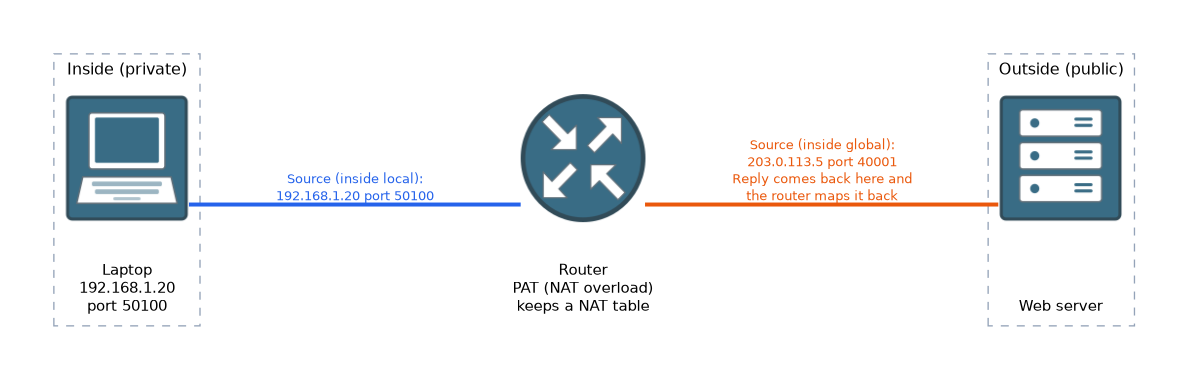 A NAT device, usually the router at the edge, rewrites the source address of packets that leave the network. It keeps a table so that replies are sent back to the right inside device.
There are three common types.
| Type | What it does |
|---|---|
| Static NAT | One private address is always mapped to one public address |
| Dynamic NAT | Private addresses are mapped to a pool of public addresses as needed |
| PAT, port address translation | Many private addresses share one public address, told apart by port numbers |
PAT is also called NAT overload. It is the type on nearly every home router, which is why a whole household can share one public address.
The addresses seen in a NAT table have names. The inside local address is the private address of the inside device. The inside global address is the public address that the outside world sees for it.
Because the router remembers the pairing, the reply comes back to the public address and port, and the router changes it back for the laptop. A host on the internet cannot start a connection to a private address on its own.
What to remember for the exam
Seven facts cover most questions on this topic.
- The private ranges are 10.0.0.0/8, 172.16.0.0/12 and 192.168.0.0/16.
- Private addresses are not routed on the internet. Public addresses are.
- Class A runs from 1 to 126, class B from 128 to 191, and class C from 192 to 223.
- Class D, from 224 to 239, is multicast. Class E is reserved.
- 127.0.0.1 is the loopback address. An address starting 169.254 means no address was received.
- NAT translates private addresses to public ones. PAT lets many hosts share one public address.
- The inside local address is the private one, and the inside global address is the public one.
If the first number is 10, 172 with a second number from 16 to 31, or 192.168, the address is private.
Common mistakes
These four errors appear again and again.
Thinking all 172 addresses are private. Only 172.16.0.0 to 172.31.255.255 is private. An address such as 172.32.1.1 is public.
Forgetting that 127 is not class A. The loopback range sits in the gap between class A and class B.
Believing NAT is a security feature on its own. NAT hides inside addresses, but it is not a firewall.
Mixing up the two NAT address names. Inside local is the private address. Inside global is the public address.
Two networks that use the same private range can clash when they are joined together, for example over a VPN.
Check yourself
Work through these three questions.
Is the address 172.20.5.9 private or public?
It is private, because 172.16.0.0 to 172.31.255.255 is a private range.
Which type of NAT lets many private hosts share one public address?
PAT, also called NAT overload, does this. It tells the hosts apart by port number.
What is the class of an address that starts with 150?
It is class B, because class B runs from 128 to 191.
Topic 1 of 3 in Addressing and Subnet Formats
Test yourself on Addressing and Subnet Formats
The full Cisco CCST 100-150 Networking question bank has 749 questions, with timed practice exams and an explanation for every answer.
This study guide is independent and is not affiliated with, endorsed by, or sponsored by Cisco. Vendor names, certification names and exam codes are trademarks of their respective owners and are used for identification only.