Secure Service Edge · Topic 3 of 5
Configuring Cisco Secure Access Secure Private Access
Learn how Secure Private Access in Cisco Secure Access gives ZTNA and VPN as a service using resource connectors, private resources and access rules.
- 5 min
- Includes a diagram
- ZTNA gives per application access. A VPN gives network access.
- Resource connectors make outbound connections, so no inbound firewall rule is needed.
- A private resource has an address, a protocol and port, and an access type.
What it is
Secure Private Access lets users reach applications in your data centre or private cloud without placing them on the corporate network.
It replaces a traditional remote access VPN with zero trust network access (ZTNA). A user gets access to a defined application, after identity and device checks, and not to a whole subnet. Cisco Secure Access can also provide a VPN as a service for traffic that needs network level access.
How it works
Define the private resources, deploy the connectivity, and then write access rules.
ZTNA compared with VPN
A classic VPN puts the user onto the network, so a compromised device can scan and move sideways. ZTNA connects the user to one application at a time, based on policy.
| Aspect | Classic remote access VPN | ZTNA |
|---|---|---|
| Access granted | The network or subnet | One application or resource |
| Lateral movement | Possible | Limited by design |
| Inbound firewall rules | Often needed at the VPN head end | Not needed with outbound connectors |
| Policy basis | Network location and credentials | Identity, device posture and context |
| Application visibility | Low | High, per application logs |
Ways users connect
Secure Private Access supports more than one access method.
- Client based ZTNA: the Cisco Secure Client has a ZTNA capability, and gives a seamless connection to private applications.
- Browser based ZTNA: users reach web applications through a browser, with no client software. It suits contractors and unmanaged devices.
- VPN as a service: the Secure Client builds a tunnel to the cloud service for traffic that is not a single web application, and the service applies policy to it.
Private resources
A private resource is a definition of an internal application or destination. It describes where the resource is, and how users reach it.
| Item | What you set |
|---|---|
| Address | A fully qualified domain name, an IP address or a range |
| Protocol and port | For example HTTPS, SSH or RDP, with the port numbers |
| Access type | Client based, browser based, or both |
| Connector group | Which connectors can reach the resource |
Users do not need to know the internal addresses. They use the resource defined in policy.
Resource connectors
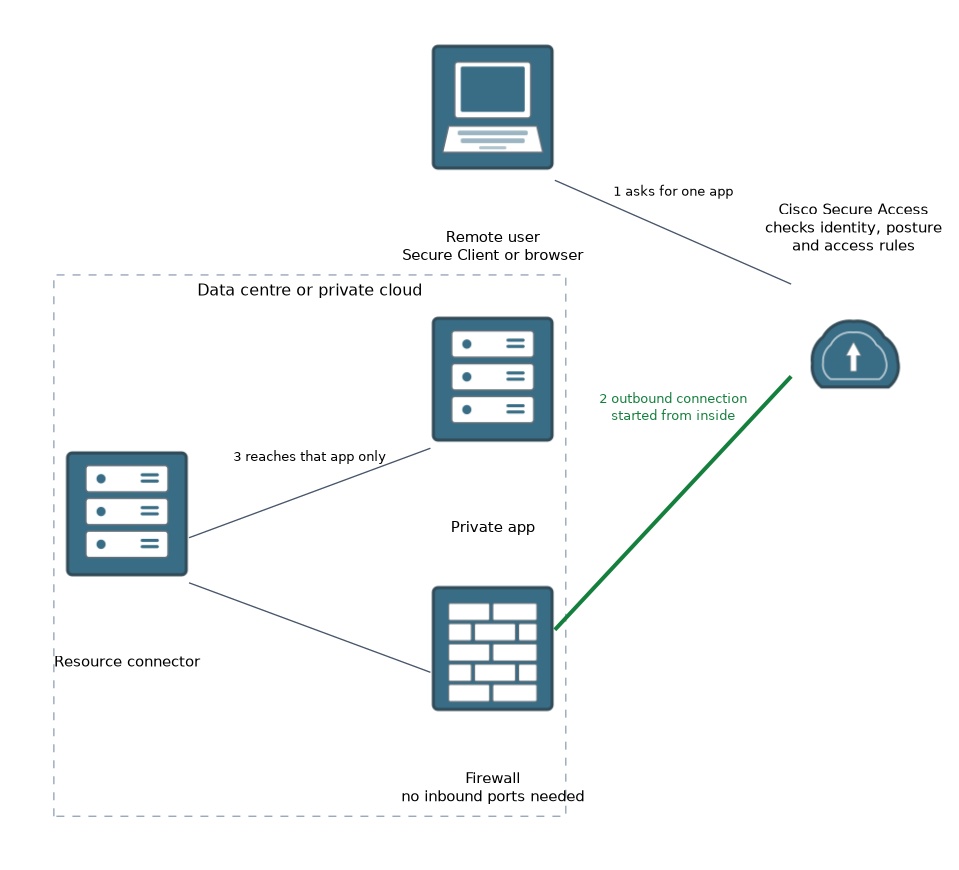 A resource connector is a lightweight component that you deploy in the private network, often as a virtual machine. It makes an outbound connection to the cloud service. Because the connection starts from inside, you do not need to open inbound ports in the data centre firewall, so the application is not exposed to the internet.
Connectors are placed in groups, so they can share load and give resilience. Deploy them close to the applications they serve, and make sure that they can reach the application and the internet.
Private access rules
An access rule says who may use which private resource, and under what conditions.
| Part | Meaning |
|---|---|
| Sources | Users or groups from the identity provider |
| Destinations | One or more private resources or groups of resources |
| Conditions | Device posture and context checks |
| Action | Allow or block |
| Inspection | Optional security checks on the traffic |
The default stance is to deny. A user reaches only the resources that a rule explicitly allows. Posture checks, such as an encrypted disk or an up to date operating system, can be part of the conditions.
Typical rollout
A sensible order is:
- Deploy a connector group in the data centre.
- Define the private resources, starting with a few applications.
- Write the access rules for the right groups.
- Test with a pilot group of users.
- Widen the set of resources, and retire the legacy VPN rules.
Operations
Review the activity logs to see who accessed what. They show the user, the resource and the decision, which is much clearer than VPN logs that show only a tunnel. Keep the connectors patched, and monitor their status.
What to remember for the exam
Six facts cover most questions on this topic.
- ZTNA gives per application access. A VPN gives network access.
- Resource connectors make outbound connections, so no inbound firewall rule is needed.
- A private resource has an address, a protocol and port, and an access type.
- Access rules use identity, device posture and context.
- Access is denied unless a rule allows it.
- Browser based ZTNA suits unmanaged devices, and VPN as a service handles non web traffic.
If a question asks how to publish an internal app without opening inbound ports, the answer is a resource connector with an outbound connection.
Common mistakes
These four mistakes appear often.
Defining a whole subnet as one resource. This brings back the broad access that ZTNA is meant to remove.
Placing connectors far from the applications. Latency and routing problems follow.
Forgetting device posture. Identity alone does not tell you if the device is safe.
Using one connector only. A single connector is a single point of failure.
Keep a tested fallback path while you migrate from VPN, so a mistake in a new rule does not cut off every remote user.
Check yourself
Work through these three questions.
Why does a resource connector remove the need for inbound firewall rules?
The connector starts an outbound connection to the cloud service, so the data centre does not accept inbound connections.
How does ZTNA reduce lateral movement?
It gives access to one defined application at a time, and does not place the user on the network.
When is browser based ZTNA a good choice?
When users such as contractors need web application access from unmanaged devices without client software.
Topic 3 of 5 in Secure Service Edge
Test yourself on Secure Service Edge
The full Cisco CCNP 350-701 SCOR question bank has 822 questions, with timed practice exams and an explanation for every answer.
This study guide is independent and is not affiliated with, endorsed by, or sponsored by Cisco. Vendor names, certification names and exam codes are trademarks of their respective owners and are used for identification only.