Network Security · Topic 1 of 8
IPS, Firewall Deployment Models and Telemetry
Compare firewall and IPS deployment models such as routed, transparent, inline and passive, and telemetry sources: NetFlow, SPAN, syslog and SNMP.
- 5 min
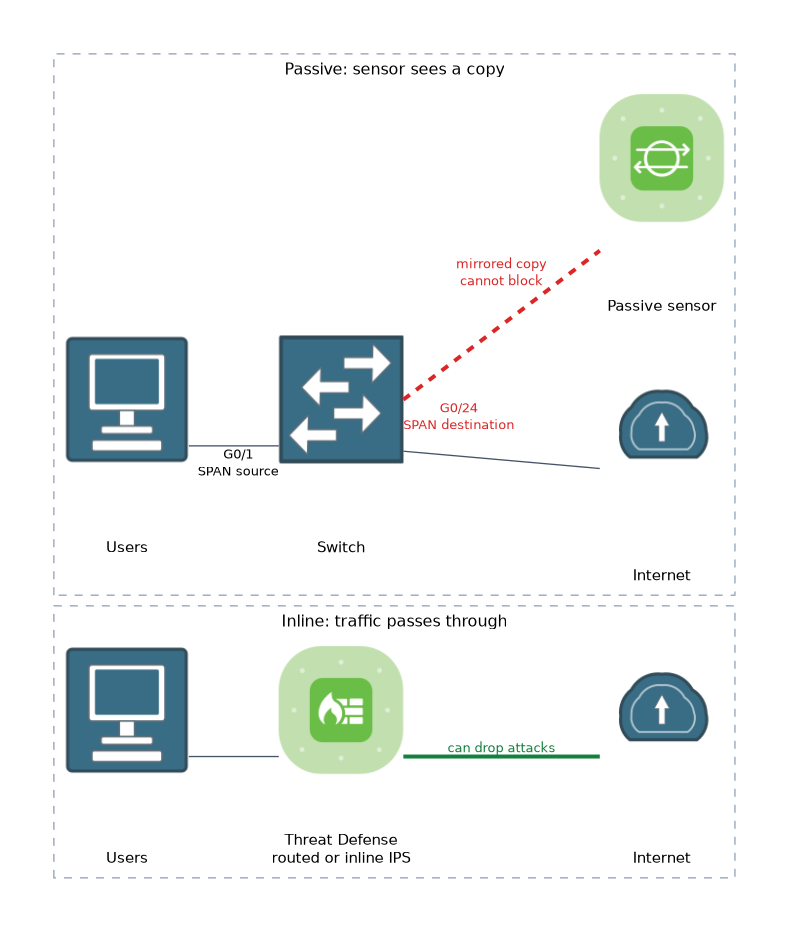
- Includes a diagram
- A routed firewall is a Layer 3 hop. A transparent firewall bridges at Layer 2.
- Inline deployments can block traffic. Passive and inline tap cannot.
- Passive mode sees a mirrored copy of traffic, so it can only detect.
What it is
Firewalls and intrusion prevention systems enforce policy on traffic, and telemetry shows you what the network is actually doing.
A next generation firewall (NGFW) adds application awareness, user identity and threat inspection to stateful filtering. A next generation IPS (NGIPS) inspects traffic for exploits and can block them. On Cisco Secure Firewall, one Threat Defense (FTD) image provides both functions.
How it works
You choose a deployment model by how the device sits in the path, and how much it may interfere with traffic.
Deployment models
| Model | Position | Can block traffic |
|---|---|---|
| Routed | Layer 3 hop between subnets | Yes |
| Transparent | Layer 2 bridge, invisible to hosts | Yes |
| Inline IPS | In the path, no routing or switching role | Yes |
| Inline tap | In the path, but works on a copy | No |
| Passive | Receives a mirrored copy from a switch port | No |
A routed firewall has IP addresses on its interfaces and acts as the gateway. A transparent firewall bridges the same subnet on both sides, so you can insert it without readdressing. An inline IPS interface pair passes traffic through and can drop it.
A passive deployment is for visibility only. The sensor sees a copy of the traffic, so it can detect but cannot stop an attack. Use it to test policy or when the device must never affect production traffic.
Placement and resilience
Common places are the internet edge, the data centre and between internal zones. Pairs of firewalls run in high availability, where one is active and one is standby. Larger sites can use clustering, where several units share the load.
Inspection features
A modern firewall combines several functions in a single policy path.
- Access control: zones, networks, users and applications decide permit or block.
- IPS: signatures and anomaly rules detect exploits. Snort is the engine in Cisco Secure Firewall.
- Malware and file inspection: looks at files in transit and retrospective verdicts.
- URL filtering: controls web categories and reputation.
Telemetry sources
Telemetry is data that devices send out about themselves and their traffic. Each source answers a different question.
| Source | What it gives you |
|---|---|
| Syslog | Event messages from devices |
| SNMP | Counters and device state, by polling or traps |
| NetFlow and IPFIX | Records of who talked to whom, how much and when |
| SPAN or ERSPAN | A copy of packets for a sensor or analyser |
| Streaming telemetry | Model driven data pushed continuously by newer platforms |
NetFlow records describe conversations, not content, so they are cheap to store and good for spotting scans and data theft. Cisco Secure Network Analytics uses flow data to build a baseline and flag unusual behaviour. SPAN gives full packets, which suits detailed analysis but costs more capacity.
Example: flow export and SPAN on IOS XE
R1(config)# flow exporter EXPORTER1
R1(config-flow-exporter)# destination 10.1.1.50
R1(config-flow-exporter)# transport udp 2055
R1(config)# flow monitor MONITOR1
R1(config-flow-monitor)# exporter EXPORTER1
R1(config-flow-monitor)# record netflow ipv4 original-input
R1(config)# interface GigabitEthernet0/1
R1(config-if)# ip flow monitor MONITOR1 input
Switch(config)# monitor session 1 source interface GigabitEthernet0/1 both
Switch(config)# monitor session 1 destination interface GigabitEthernet0/24The first block exports flow records from an interface to a collector. The second copies traffic from one port to a port where a sensor is connected.
Putting telemetry to work
Logs, flows and packet data are most useful when they flow into one place. A SIEM correlates them, and analytics tools learn what normal looks like. Time must be accurate on all devices, or events cannot be lined up, so NTP is part of monitoring too.
What to remember for the exam
Seven facts cover most questions on this topic.
- A routed firewall is a Layer 3 hop. A transparent firewall bridges at Layer 2.
- Inline deployments can block traffic. Passive and inline tap cannot.
- Passive mode sees a mirrored copy of traffic, so it can only detect.
- High availability uses active and standby units. Clustering shares load.
- Snort is the inspection engine in Cisco Secure Firewall.
- NetFlow records conversations. SPAN copies full packets.
- Syslog gives events, and SNMP gives counters and state.
If the question says the device must not risk affecting production traffic, pick passive or inline tap.
Common mistakes
These four mistakes appear often.
Expecting a passive sensor to block. It sees only a copy of traffic, so it cannot stop an attack.
Mixing up NetFlow and SPAN. NetFlow summarises conversations, and SPAN copies the packets themselves.
Forgetting about time. Without synchronised clocks, logs from different devices do not line up.
Putting a transparent firewall on a different subnet. It bridges one subnet, so both sides share the same addressing.
A SPAN destination port is dedicated to the sensor, so do not connect a normal host to it.
Check yourself
Work through these three questions.
Which deployment modes can block traffic?
Routed, transparent and inline IPS can block traffic, while passive and inline tap work on a copy and cannot.
What does NetFlow provide that SPAN does not?
NetFlow gives compact records of conversations, which are cheap to store, while SPAN copies full packets.
Why can a transparent firewall be added without readdressing?
It bridges at Layer 2 on the same subnet and is invisible to hosts.
Topic 1 of 8 in Network Security
Test yourself on Network Security
The full Cisco CCNP 350-701 SCOR question bank has 822 questions, with timed practice exams and an explanation for every answer.
This study guide is independent and is not affiliated with, endorsed by, or sponsored by Cisco. Vendor names, certification names and exam codes are trademarks of their respective owners and are used for identification only.