Network Security · Topic 8 of 8
Site-to-Site and Remote Access VPN on FTD, and Troubleshooting
Configure site-to-site and remote access VPN on Cisco Secure Firewall Threat Defense with Secure Client, and troubleshoot IKE and IPsec tunnel setup.
- 5 min
- Includes a diagram
- FTD VPN is configured in FMC, as site to site topologies or remote access policies.
- Topology types are point to point, hub and spoke, and full mesh.
- Both peers need matching IKE and IPsec parameters and mirrored protected networks.
What it is
FTD can terminate both site-to-site VPNs and remote access VPNs, and it is configured from the Firewall Management Center.
A site to site VPN joins two networks through an IPsec tunnel between two gateways. A remote access VPN lets a user connect from anywhere using Cisco Secure Client. Both need matching security parameters at both ends, and a path for the traffic.
How it works
First get the tunnel to form, then make sure the right traffic uses it.
Site-to-site VPN
In FMC you create a site to site VPN topology, and the topology type sets the shape.
| Topology | Use |
|---|---|
| Point to Point | Two devices, one tunnel |
| Hub and Spoke | Spokes connect through a central hub |
| Full Mesh | Every device connects to every other |
For each endpoint you choose the device, the interface that terminates the tunnel, and the protected networks. You choose IKEv1 or IKEv2, and IKEv2 is preferred because it is more efficient and more secure. You then set the IKE policy, the IPsec proposal and the authentication, which is a pre-shared key or a certificate.
Both peers need the same IKE settings: encryption, integrity, Diffie-Hellman group and authentication method. The protected network definitions must mirror each other. One side's local network is the other side's remote network.
Traffic handling for site-to-site
Traffic that goes into the tunnel should not be translated by NAT. Create a NAT exemption, often called identity NAT, for the protected networks. The firewall also needs routes that point the remote network out of the VPN interface, and an access control rule or the VPN bypass option to permit the decrypted traffic.
Remote access VPN
The remote access policy wizard asks for the main parts.
- Connection profile: names the tunnel group and how users authenticate.
- Authentication: usually a RADIUS server such as ISE, or LDAP, or a certificate.
- Address pool: the IP addresses given to connected clients.
- Group policy: attributes such as DNS, split tunnelling and banners.
- Secure Client package: the client software that the gateway can push to users.
- Access interface and certificate: the outside interface and the identity certificate that the gateway presents.
Clients connect by SSL, using TLS or DTLS, or by IPsec with IKEv2. Split tunnelling sends only listed networks through the VPN. Without it, all user traffic goes through the firewall.
As with site to site, you need NAT exemption for the client pool, and policy that permits the client traffic. An identity certificate that clients trust avoids security warnings.
Troubleshooting tunnel establishment
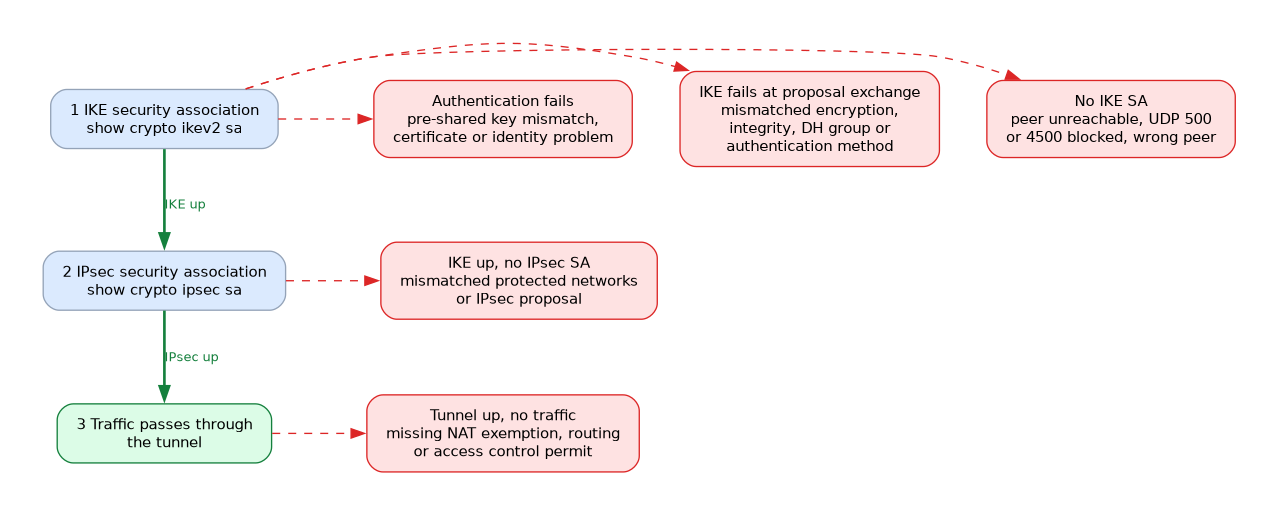 IKE first builds a secure channel, then IPsec builds the data tunnel. Check each stage in order, and note where it stops.
> system support diagnostic-cli
firepower> enable
firepower# show crypto ikev2 sa
firepower# show crypto ipsec sa
firepower# show vpn-sessiondb anyconnect
firepower# debug crypto ikev2 platform 255
firepower# debug crypto ikev2 protocol 255
The system support diagnostic-cli command opens the diagnostic CLI on the Threat Defense device, where these ASA style commands run.
The first two show the IKE and IPsec security associations. The third lists remote access sessions. Debugs show the negotiation, and you should disable them after use.
| Symptom | Common cause |
|---|---|
| No IKE security association | Peer unreachable, UDP 500 or 4500 blocked, or wrong peer address |
| IKE fails during proposal exchange | Mismatched encryption, integrity, DH group or authentication |
| Authentication fails | Pre-shared key mismatch, or certificate or identity problem |
| IKE up, no IPsec association | Mismatched protected networks or IPsec proposal |
| Tunnel up, no traffic passes | Missing NAT exemption, routing or access control permit |
| Remote client cannot connect | Wrong profile, authentication failure or blocked outside port |
The protected network mismatch is a classic case. The peers agree on IKE, but they refuse the IPsec negotiation, because the proxy identities do not mirror each other.
Useful extra checks
Use a packet capture on the outside interface to see whether IKE packets arrive. Use packet-tracer to test whether the firewall policy and NAT allow a flow. The FMC health and event views also show VPN status.
What to remember for the exam
Seven facts cover most questions on this topic.
- FTD VPN is configured in FMC, as site to site topologies or remote access policies.
- Topology types are point to point, hub and spoke, and full mesh.
- Both peers need matching IKE and IPsec parameters and mirrored protected networks.
- Remote access uses Cisco Secure Client over TLS or DTLS, or IPsec with IKEv2.
- A remote access policy needs a connection profile, an address pool and a group policy.
- NAT exemption is needed so VPN traffic is not translated.
- Use
show crypto ikev2 saandshow crypto ipsec sato see which phase fails.
If IKE is up but no IPsec association appears, suspect mismatched protected networks or a mismatched IPsec proposal.
Common mistakes
These four mistakes appear often.
Forgetting the NAT exemption. The traffic is translated, so it no longer matches the VPN.
Mismatched protected networks. The two ends must mirror each other exactly.
Blocking VPN ports upstream. IKE needs UDP 500, and NAT traversal needs UDP 4500.
Ignoring access control. A tunnel can be up while a policy still blocks the decrypted traffic.
Debug commands on a busy firewall can affect performance, so use them briefly, and prefer targeted filters where available.
Check yourself
Work through these three questions.
Which settings must match on both site to site peers?
The IKE settings, such as encryption, integrity, DH group and authentication, plus the IPsec proposal and mirrored protected networks.
Why is a NAT exemption needed?
So the VPN traffic is not translated and still matches the protected networks of the tunnel.
What does it suggest if
show crypto ikev2 sashows an association but there is no IPsec association?IKE is working, so look for mismatched protected networks or a mismatched IPsec proposal.
Topic 8 of 8 in Network Security
Test yourself on Network Security
The full Cisco CCNP 350-701 SCOR question bank has 822 questions, with timed practice exams and an explanation for every answer.
This study guide is independent and is not affiliated with, endorsed by, or sponsored by Cisco. Vendor names, certification names and exam codes are trademarks of their respective owners and are used for identification only.