Network Access, Visibility, and Enforcement · Topic 3 of 6
Network Access with Change of Authorization
Learn how RADIUS CoA lets ISE change an active session with reauthenticate, port bounce and disconnect, and how to configure and check it on IOS XE.
- 5 min
- Includes a diagram
- CoA lets the RADIUS server change an active session.
- It is defined in RFC 5176. Cisco IOS XE and ISE commonly default to UDP 1700, and the standard names 3799.
- Actions are reauthenticate, port bounce and disconnect.
What it is
Change of Authorization (CoA) lets the RADIUS server change an existing session, after the device has already been admitted.
Normally the network device asks the server, and the server answers. CoA reverses the direction. ISE sends a message to the switch or controller, telling it to reauthenticate the session, bounce the port or disconnect the endpoint.
How it works
CoA is needed because the right access can change after the first login.
Why CoA is needed
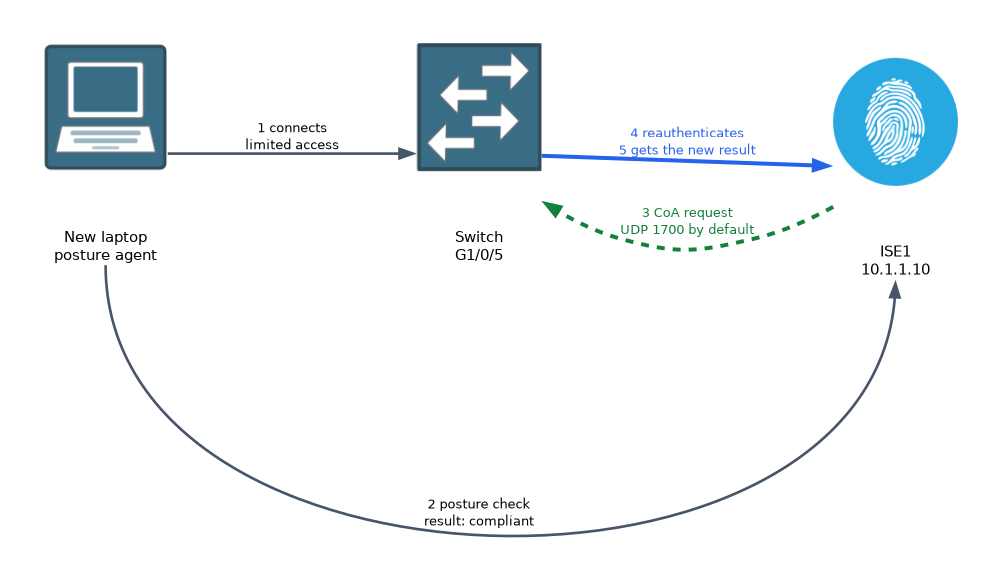 Think about posture. A new laptop first gets limited access, then the agent checks it. When the check ends, ISE sends a CoA, the switch reauthenticates, and the endpoint gets its new result.
Other events that need CoA include:
- Profiling: a new profile is learned, so the endpoint should get different access.
- Guest login: the guest has signed in on the portal, so the session must be upgraded.
- Compliance change: a device becomes noncompliant and must be restricted.
- Threat response: an external tool tells ISE to quarantine a host.
Standard and port
CoA is defined by RFC 5176, as an extension of RADIUS. It uses a UDP port on the network device, and Cisco IOS XE and ISE commonly default to UDP 1700, while the standard names 3799. The port can be changed, so match it on both sides.
The ISE node must be able to reach the device on that port.
CoA actions
| Action | Effect |
|---|---|
| Reauthenticate | The device repeats the authentication, and gets a new result |
| Port bounce | The port is shut down and brought back, so the endpoint renews its address |
| Disconnect | The session is ended, and the endpoint must authenticate again |
A reauthenticate request is the least disruptive, and suits a change of result such as a new ACL. A port bounce suits a VLAN change, because many endpoints do not notice it and must renew their IP address. Avoid a bounce on a port with an IP phone and a PC where you can, since it affects both.
How ISE identifies the session
Each session has an audit session ID. The switch includes it in its requests, and ISE uses it to say which session the CoA is for. The message can also name the MAC address.
Configuring CoA on IOS XE
The device must accept CoA requests from ISE, and use the same shared secret.
Switch(config)# aaa new-model
Switch(config)# aaa authorization network default group radius
Switch(config)# aaa server radius dynamic-author
Switch(config-locsvr-da-radius)# client 10.1.1.10 server-key SHAREDSECRET
The dynamic-author block creates the CoA listener. The client line names each ISE node that may send requests. ISE must also know the switch as a network device, with a matching secret.
Configuring ISE behaviour
On ISE, an authorisation rule decides the result, and the CoA type decides how the change is applied. ISE can use reauthenticate or port bounce, and other flows have their own default behaviour. Check that your design uses the least disruptive action that works.
Verifying and troubleshooting
Switch# show authentication sessions interface GigabitEthernet1/0/5 details
Switch# debug aaa coa
Switch# debug radius
First check the session on the switch, and confirm its status and result. Then check the ISE live logs to see whether a CoA was sent, and whether it succeeded. A failed CoA is often shown as a failure to reach the device.
| Symptom | Likely cause |
|---|---|
| Endpoint stays in limited access after posture passes | CoA not reaching the switch, or dynamic-author missing |
| CoA rejected | Shared secret mismatch, or ISE not listed as a client |
| VLAN changed but the endpoint keeps its old address | Reauthenticate used where a port bounce is needed |
| Session ends unexpectedly | A disconnect action was triggered by policy |
Firewalls between ISE and the switch must allow the CoA port. A common error is to open only the RADIUS authentication and accounting ports.
What to remember for the exam
Six facts cover most questions on this topic.
- CoA lets the RADIUS server change an active session.
- It is defined in RFC 5176. Cisco IOS XE and ISE commonly default to UDP 1700, and the standard names 3799.
- Actions are reauthenticate, port bounce and disconnect.
- A VLAN change usually needs a port bounce, so the endpoint renews its address.
- On IOS XE,
aaa server radius dynamic-authorwith aclientline enables CoA. - Posture, profiling and guest flows depend on CoA to move the endpoint to the right access.
If a question says that a device passed posture but still has limited access, check that CoA is configured and reachable.
Common mistakes
These four mistakes appear often.
Forgetting the dynamic-author configuration. The switch ignores CoA requests from ISE.
Blocking the CoA port. ISE sends to the device, so the reverse direction must be open.
Using a port bounce for every change. It is disruptive, so use reauthenticate when you can.
Mismatched shared secret. The switch drops a request that it cannot verify.
A port bounce briefly drops every device on the port, including an IP phone. Plan for this in voice designs.
Check yourself
Work through these three questions.
What problem does CoA solve?
It lets ISE change an active session when access should change, for example after posture or profiling completes.
When is a port bounce needed instead of reauthenticate?
When the VLAN changes, because the endpoint has to renew its IP address.
Which IOS XE configuration lets a switch accept CoA from ISE?
aaa server radius dynamic-authorwith acliententry and the shared key for the ISE node.
Topic 3 of 6 in Network Access, Visibility, and Enforcement
Test yourself on Network Access, Visibility, and Enforcement
The full Cisco CCNP 350-701 SCOR question bank has 822 questions, with timed practice exams and an explanation for every answer.
This study guide is independent and is not affiliated with, endorsed by, or sponsored by Cisco. Vendor names, certification names and exam codes are trademarks of their respective owners and are used for identification only.