MPLS and Segment Routing · Topic 1 of 4
MPLS with LDP, Unified MPLS and OAM
Implement MPLS with LDP neighbours, LDP IGP synchronization, session protection, unified MPLS with BGP labelled unicast and MPLS OAM ping and traceroute.
- 6 min
- Includes a diagram
- LDP discovery uses UDP 646, and the session uses TCP 646.
- The LDP transport address is usually the loopback, so the IGP must carry it.
- LDP IGP sync keeps a link at a high metric until LDP is up.
What it is
MPLS with LDP builds label switched paths by giving every IGP prefix a label that neighbours agree on.
LDP, the Label Distribution Protocol, runs between neighbouring routers. Each router tells its neighbours which label to use to reach each prefix. The result is a hop by hop path that follows the IGP.
How it works
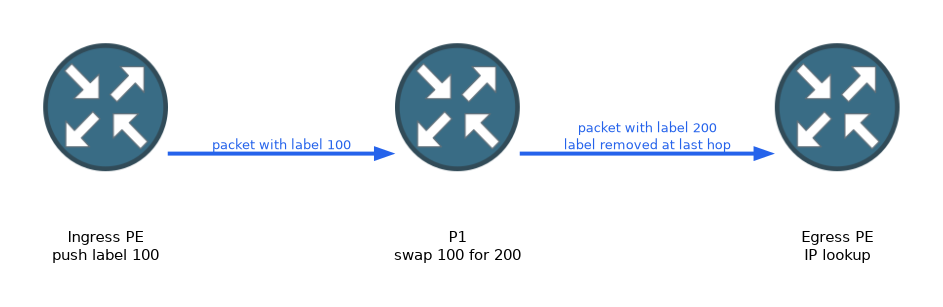 LDP finds neighbours, opens a session, and then exchanges label bindings for the prefixes in the routing table.
LDP neighbours
LDP discovery uses UDP port 646 hello messages sent to the all routers multicast address on each enabled link. When two routers hear each other, one of them opens a TCP session on port 646.
The session is made to the transport address, which is usually the loopback. The loopback must therefore be reachable through the IGP. The LDP ID is the router ID plus a zero.
RP/0/RP0/CPU0:P1(config)# mpls ldp
RP/0/RP0/CPU0:P1(config-ldp)# router-id 1.1.1.1
RP/0/RP0/CPU0:P1(config-ldp)# interface GigabitEthernet0/0/0/0
RP/0/RP0/CPU0:P1(config-ldp-if)# commit
The IOS XE equivalent enables LDP on the interface:
P1(config)# mpls label protocol ldp
P1(config)# mpls ldp router-id Loopback0 force
P1(config)# interface GigabitEthernet0/0/0
P1(config-if)# mpls ip
Check the result with these IOS XR commands:
RP/0/RP0/CPU0:P1# show mpls ldp neighbor
RP/0/RP0/CPU0:P1# show mpls ldp bindings
RP/0/RP0/CPU0:P1# show mpls forwarding
On IOS XE, the first two commands are the same, and the forwarding table is show mpls forwarding-table.
LDP IGP synchronisation
The IGP can converge before LDP has labels on a new link. Traffic is then sent to a neighbour that has no label for it, and it is dropped.
LDP IGP sync prevents this. The IGP keeps the link at a high metric until the LDP session is up and the labels are exchanged. Only then does the link carry traffic at its normal cost.
RP/0/RP0/CPU0:P1(config)# router ospf 1
RP/0/RP0/CPU0:P1(config-ospf)# mpls ldp sync
On IOS XE the command is also mpls ldp sync, entered under the router process. The same idea works for IS-IS.
LDP session protection
When a direct link fails, the LDP session over it normally drops, and the labels are lost. After the link returns, the labels are learned again, which causes a delay.
With session protection, the routers also exchange targeted hellos. If the direct link fails but another path exists to the neighbour, the session stays up over that path. The labels are kept, so recovery is fast.
RP/0/RP0/CPU0:P1(config)# mpls ldp
RP/0/RP0/CPU0:P1(config-ldp)# session protection
On IOS XE the command is mpls ldp session protection.
Unified MPLS
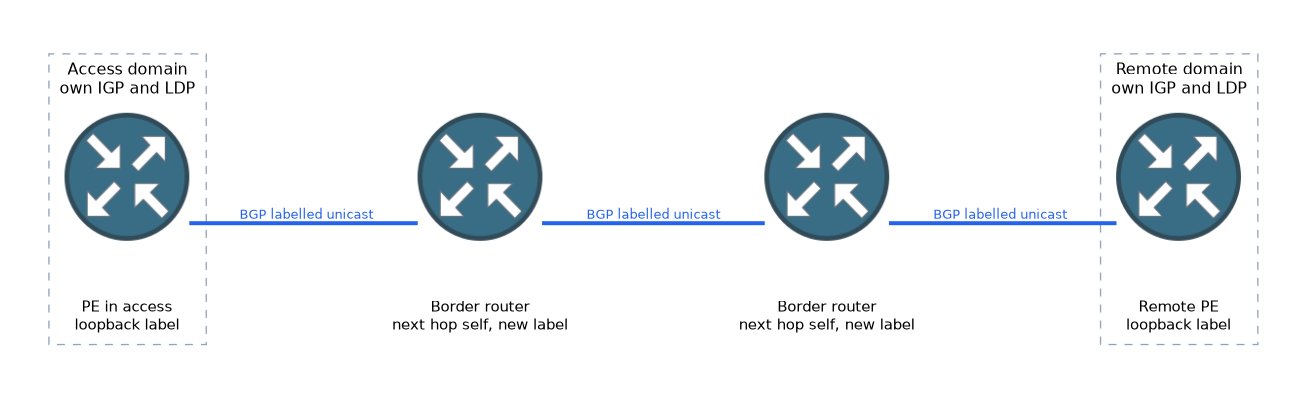 Unified MPLS joins access, aggregation and core domains into one end to end LSP. Each domain has its own IGP and LDP. BGP labelled unicast carries the PE loopbacks and their labels between domains.
The border routers do the joining. They are usually route reflector clients or route reflectors, and they set themselves as the next hop. This makes a new label for the next domain.
R1(config)# router bgp 65000
R1(config-router)# address-family ipv4
R1(config-router-af)# neighbor 192.0.2.2 send-label
On IOS XR the matching steps are allocate-label in the address family, and the ipv4 labeled-unicast family on the neighbour.
MPLS OAM
MPLS OAM tests an LSP in the data plane. A normal ping can succeed over IP even when the LSP is broken, so it does not prove the label path works.
MPLS ping and traceroute send an echo request along the LSP itself, using a label stack. The reply tells you whether the path works and which hop failed.
RP/0/RP0/CPU0:PE1# ping mpls ipv4 10.0.0.2/32
RP/0/RP0/CPU0:PE1# traceroute mpls ipv4 10.0.0.2/32
These are IOS XR commands, and IOS XE has the same ping and traceroute forms.
The echo uses UDP port 3503 and a destination address in 127.0.0.0/8, which keeps it from being routed as normal IP traffic if the LSP is broken.
What to remember for the exam
Seven facts cover most questions on this topic.
- LDP discovery uses UDP 646, and the session uses TCP 646.
- The LDP transport address is usually the loopback, so the IGP must carry it.
- LDP IGP sync keeps a link at a high metric until LDP is up.
- Session protection uses targeted hellos to keep the session during a link failure.
- Unified MPLS uses BGP labelled unicast to join separate IGP domains.
- MPLS ping and traceroute test the LSP in the data plane, not just IP reachability.
show mpls forwardingshows the label forwarding table on IOS XR.
A black hole on a new link can mean the IGP is up but LDP is not, which is what LDP IGP sync prevents.
Common mistakes
These four mistakes appear often.
Leaving the loopback out of the IGP. The LDP session cannot form to its transport address.
Enabling LDP on only one side of a link. Without both ends, no session forms.
Testing an MPLS path with a normal ping only. IP can work while the LSP is broken.
Mistaking session protection for fast reroute. It keeps the session and labels, and does not move traffic by itself.
Many designs use LDP only inside a domain, and BGP labelled unicast between domains.
Check yourself
Work through these three questions.
Which ports does LDP use?
Discovery uses UDP port 646 and the session uses TCP port 646.
What problem does LDP IGP sync solve?
It stops the IGP sending traffic over a link before LDP has labels there, which would drop the traffic.
Why use MPLS ping instead of a normal ping?
It sends an echo along the LSP, so it tests the label path in the data plane.
Topic 1 of 4 in MPLS and Segment Routing
Test yourself on MPLS and Segment Routing
The full Cisco CCNP 350-501 SPCOR question bank has 738 questions, with timed practice exams and an explanation for every answer.
This study guide is independent and is not affiliated with, endorsed by, or sponsored by Cisco. Vendor names, certification names and exam codes are trademarks of their respective owners and are used for identification only.