Profiler · Topic 2 of 4
Profiling Probes
Understand the ISE profiling probes, including DHCP, RADIUS, HTTP, SNMP, NMAP, DNS and Active Directory, and how to configure the network to feed them.
- 5 min
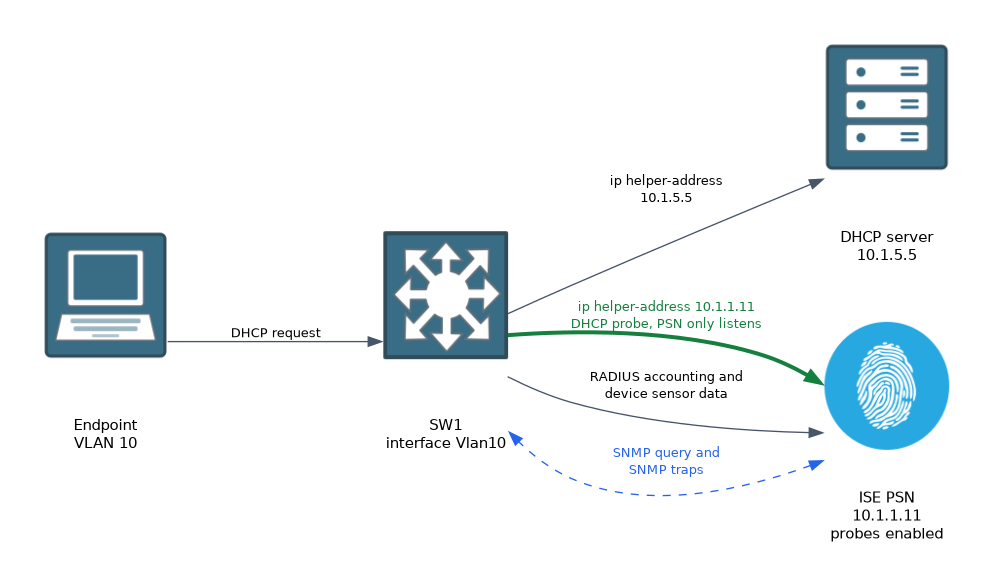
- Includes a diagram
- Probes collect the attributes that profiling policies use.
- The RADIUS probe needs no extra setup, since ISE already receives RADIUS.
- The DHCP probe needs the PSN added as a helper address on the client VLAN.
What it is
A probe is a way for ISE to collect attributes about an endpoint.
Each probe listens for a different kind of data, or asks for it. The more varied the data, the more accurate the profile. You enable probes on the Policy Service Node, and you also configure the network so the data reaches the node.
How it works
You pick the probes, then arrange for each kind of data to arrive.
Probe summary
| Probe | Data it collects | How data arrives |
|---|---|---|
| RADIUS | MAC address, IP address, NAS details | Comes with authentication and accounting |
| DHCP | Host name, class identifier, parameter request list | Switch forwards DHCP to ISE |
| DHCP SPAN | The same DHCP data | A mirror of DHCP traffic |
| HTTP | The browser user agent | Redirect traffic or mirrored web traffic |
| SNMP query | Interface, CDP and LLDP data | ISE polls the switch |
| SNMP trap | Link and MAC changes | Switch sends traps to ISE |
| Network scan | Operating system guess | ISE scans with NMAP |
| DNS | Host name by reverse lookup | ISE queries DNS |
| Active Directory | Domain and operating system data | From a joined AD |
| NetFlow | Traffic flow records | Switch exports flows to ISE |
RADIUS probe
This probe needs no extra setup, because ISE already receives RADIUS. It learns the MAC address from the calling station ID. If the switch includes the Framed IP address, ISE also learns the IP address.
On a switch you can ask for more attributes in the request.
Switch(config)# radius-server attribute 8 include-in-access-req
Switch(config)# radius-server vsa send accounting
DHCP probe
The DHCP request holds some of the best data for profiling. It shows the requested options, the vendor class and the host name.
Switches forward DHCP requests to the DHCP server with a helper address. You add the PSN as an extra helper address on the client VLAN interface.
Switch(config)# interface Vlan10
Switch(config-if)# ip helper-address 10.1.5.5
Switch(config-if)# ip helper-address 10.1.1.11
The first address is the DHCP server. The second is the PSN, which listens and does not answer.
HTTP probe
The user agent in a browser request often names the operating system and the device type. ISE can get it from the redirect traffic that already goes to the PSN for web authentication. It can also get it from mirrored traffic.
SNMP probes
The SNMP query probe polls a switch for data such as the CDP and LLDP neighbours on a port. It needs the network device to have an SNMP community or credentials set in ISE, and the switch has to allow the PSN to query it.
The SNMP trap probe reacts to a change. A switch sends a trap when a new MAC address appears or leaves. ISE then queries the switch for the details.
Switch(config)# snmp-server community SNMPCOMM RO
Switch(config)# snmp-server enable traps mac-notification change move
Switch(config)# snmp-server host 10.1.1.11 version 2c SNMPCOMM mac-notification
Switch(config)# mac address-table notification change
Device sensor
A switch can collect profiling data itself, using the device sensor. It watches DHCP, CDP and LLDP packets and sends the data to ISE in RADIUS accounting. This needs no mirrored traffic.
A full setup also needs filter lists that choose which fields are sent, so check the platform guide.
Switch(config)# device-sensor accounting
Switch(config)# device-sensor notify all-changes
NMAP and other probes
The network scan probe runs NMAP against an endpoint to guess its operating system and open services. It sends traffic, so use it sparingly. You can run it as an action from a policy, so only certain endpoints are scanned.
The DNS probe looks up the host name for an IP address. The Active Directory probe reads data about a domain member. The NetFlow probe collects flow records, and these are heavy, so only use it where you need it.
Choosing probes
A good start is RADIUS, DHCP and device sensor or SNMP. Add the HTTP probe for more detail on user devices. Add the others only where the first set gives a poor result.
Verify
On ISE, open the endpoint in the context visibility pages, and look at the attributes. If DHCP data is missing, the helper address is not set, or the DHCP probe is off on that PSN. On the switch, check the helper address.
Switch# show running-config interface Vlan10Look at the attributes that ISE holds for an endpoint before you add probes. It shows you what is missing.
What to remember for the exam
Seven facts cover this topic.
- Probes collect the attributes that profiling policies use.
- The RADIUS probe needs no extra setup, since ISE already receives RADIUS.
- The DHCP probe needs the PSN added as a helper address on the client VLAN.
- The HTTP probe reads the user agent from redirect or mirrored traffic.
- SNMP query polls the switch, and SNMP trap reacts to MAC changes.
- The device sensor lets the switch send DHCP, CDP and LLDP data in accounting.
- The network scan probe uses NMAP, and it generates traffic.
The NetFlow and network scan probes add load to the network and the PSN. Enable them only where the other probes cannot give a result.
Common mistakes
These four mistakes are common.
Enabling every probe. The load rises, and the profile does not improve.
Forgetting the helper address. The DHCP probe then sees nothing.
No SNMP setup. The query probe cannot read the switch.
Scanning everything with NMAP. It floods the network with probes.
Check yourself
Work through these three questions.
How does the DHCP probe get data?
The switch forwards DHCP requests to the PSN using an extra helper address on the client VLAN.
Which probe needs no extra configuration?
The RADIUS probe, since ISE already receives RADIUS authentication and accounting.
What does the device sensor do?
It makes the switch collect DHCP, CDP and LLDP data and send it to ISE in RADIUS accounting.
Topic 2 of 4 in Profiler
Test yourself on Profiler
The full Cisco CCNP 300-715 SISE question bank has 852 questions, with timed practice exams and an explanation for every answer.
This study guide is independent and is not affiliated with, endorsed by, or sponsored by Cisco. Vendor names, certification names and exam codes are trademarks of their respective owners and are used for identification only.