Policy Enforcement · Topic 6 of 7
Cisco TrustSec
Understand Cisco TrustSec security group tags, classification, propagation by inline tagging and SXP, and enforcement with SGACLs on ISE and switches.
- 5 min
- Includes a diagram
- TrustSec uses security group tags to control traffic by role, not by IP address.
- Classification is dynamic from ISE, or static on the device.
- Propagation uses inline tagging or SXP.
What it is
Cisco TrustSec controls traffic by the role of the user or device, instead of by IP address.
Each role is a security group, and each group has a number called a security group tag, or SGT. Policy is then written as a matrix of source group and destination group. A rule says whether traffic from one group to another is allowed.
How it works
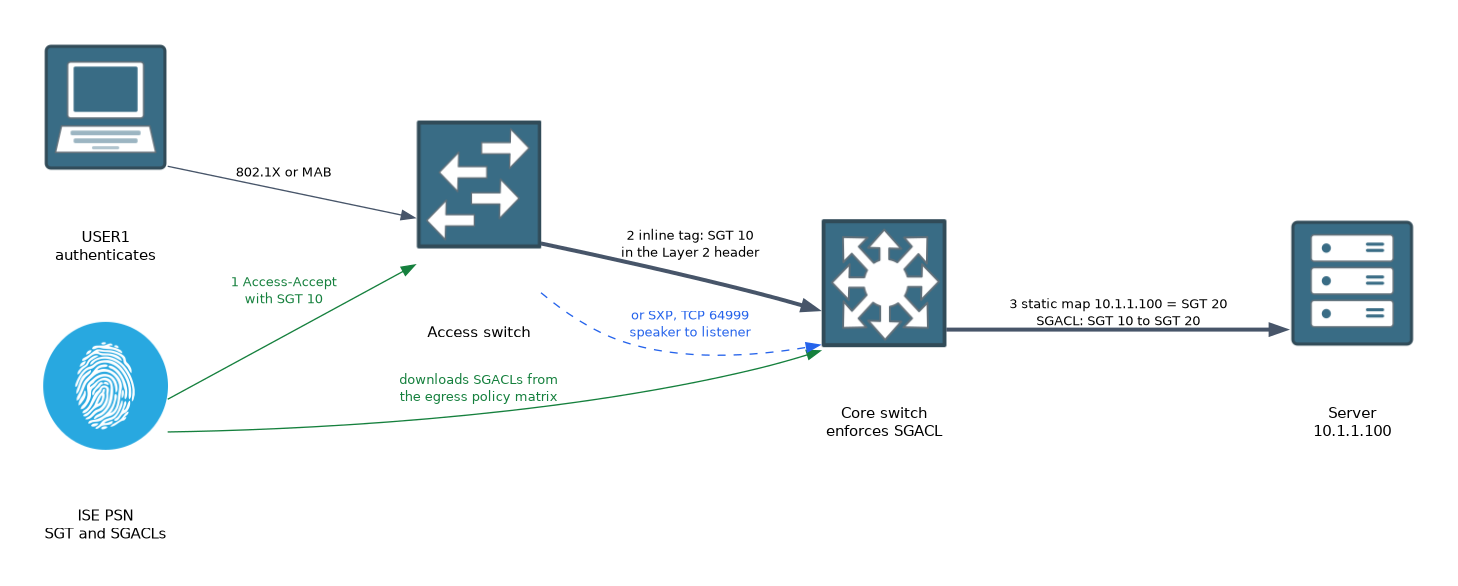 TrustSec has three jobs: classification, propagation and enforcement.
Classification
Classification is how traffic gets its tag. There are two kinds.
- Dynamic: ISE returns the SGT in the authorization result when a user or device authenticates.
- Static: You map an IP address, a subnet, a VLAN or a port to an SGT by hand on the device.
Servers are often tagged statically, since they do not authenticate. Users and endpoints are tagged dynamically.
Propagation
The tag has to reach the point where policy is enforced. There are two ways.
| Method | How it works |
|---|---|
| Inline tagging | The tag is carried in the Layer 2 frame header between capable devices |
| SXP | A TCP protocol that sends IP to SGT mappings between devices that cannot tag inline |
SXP, the Security Group Exchange Protocol, has a speaker that sends mappings and a listener that receives them. It runs over TCP, and the default port is 64999. SXP is used on devices or links that do not support inline tagging.
Enforcement
Enforcement usually happens at the point nearest the destination. The device looks up the source SGT and the destination SGT, and applies the rule from the matrix.
The rule is a security group ACL, or SGACL. It is like an ACL, but it has no IP addresses in it. Because it refers to roles, it does not change when addresses change.
A firewall or router can also enforce by SGT. Switches enforce with the SGACL from the matrix.
ISE configuration
Configuration on ISE is done in the TrustSec work center. The main steps are:
- Create the security groups and give each one a value.
- Create the SGACLs that hold the permit and deny rules.
- Add the network devices and set their TrustSec settings, including a device ID and password.
- Build the egress policy matrix by choosing an SGACL for each source and destination pair.
- Assign a security group in the authorization profile for the users and devices.
ISE has some built in tags. The tag for unknown traffic has value 0, and there is a tag for the TrustSec devices themselves.
The switches download the tags and policy from ISE. They authenticate to ISE with the device ID and password, and receive a protected access credential, or PAC, which secures later requests. The tag names and device information come down as environment data, and the SGACLs come down as policy.
Switch configuration
This is IOS XE.
Switch(config)# aaa authorization network ISE-CTS group ISE-GRP
Switch(config)# cts authorization list ISE-CTS
Switch(config)# cts role-based enforcement
Switch# cts credentials id SW1 password CTSPASS
The credentials are entered in privileged mode, not in configuration mode. The ID and password must match what you set for the device on ISE.
Static mappings and SXP use these commands:
Switch(config)# cts role-based sgt-map 10.1.1.100 sgt 20
Switch(config)# cts sxp enable
Switch(config)# cts sxp default password SXPPASS
Switch(config)# cts sxp connection peer 10.1.1.2 source 10.1.1.1 password default mode local speaker
The first line tags a server address with SGT 20. The last line sets this switch as a speaker towards a peer.
Verify
Switch# show cts environment-data
Switch# show cts pacs
Switch# show cts role-based sgt-map all
Switch# show cts role-based permissions
Switch# show cts sxp connections
The environment data shows the tags learned from ISE, and the permissions show the SGACLs. The SXP output shows whether each connection is up.
If the device does not download policy, check that the CTS credentials match ISE and that a PAC exists. Use show cts pacs first.
What to remember for the exam
Eight facts cover this topic.
- TrustSec uses security group tags to control traffic by role, not by IP address.
- Classification is dynamic from ISE, or static on the device.
- Propagation uses inline tagging or SXP.
- SXP has a speaker and a listener, and runs over TCP port 64999 by default.
- Enforcement uses SGACLs chosen from the egress policy matrix.
- The matrix is built in the TrustSec work center on ISE.
- A switch authenticates to ISE with a device ID and password and gets a PAC.
show cts role-based sgt-map allandshow cts environment-dataare core checks.
Enforcement without a working tag path blocks the wrong traffic or allows too much. Test classification and propagation before you turn on enforcement.
Common mistakes
These four mistakes are common.
Mismatched CTS credentials. The switch cannot get a PAC or the environment data.
Using SXP where inline tagging works. Inline tagging is simpler and carries the tag with the packet.
Enforcing before classifying. Untagged traffic falls into the unknown group.
Mixing up speaker and listener. One side must be the speaker and the other the listener.
Check yourself
Work through these three questions.
What does a security group tag represent?
It is a number that stands for a role, so policy can follow the role rather than the IP address.
When is SXP used?
When devices or links cannot carry the tag inline, so IP to SGT mappings are sent over TCP.
What do you build on ISE to decide what traffic is allowed between groups?
The egress policy matrix, which picks an SGACL for each source and destination pair.
Topic 6 of 7 in Policy Enforcement
Test yourself on Policy Enforcement
The full Cisco CCNP 300-715 SISE question bank has 852 questions, with timed practice exams and an explanation for every answer.
This study guide is independent and is not affiliated with, endorsed by, or sponsored by Cisco. Vendor names, certification names and exam codes are trademarks of their respective owners and are used for identification only.