Policy Enforcement · Topic 5 of 7
MAC Authentication Bypass
Learn how MAC Authentication Bypass authenticates devices with no supplicant, how the switch and ISE use the MAC address, and how to set it up.
- 5 min
- Includes a diagram
- MAB uses the MAC address as the identity for devices with no supplicant.
- The username and password are both the MAC address, in lower case with no separators by default.
- ISE recognises the request by the Call Check service type.
What it is
MAC Authentication Bypass lets a device without an 802.1X supplicant join the network by using its MAC address as its identity.
Printers, cameras, badge readers and many phones cannot run 802.1X. For these, the switch learns the MAC address and asks ISE whether that address is allowed. The MAC address is not a secret, so MAB gives a weaker guarantee than 802.1X.
How it works
The switch sends the MAC address to ISE as both the username and the password, and ISE looks it up.
The request
With MAB the switch builds a RADIUS request from the first frame it sees on the port. The username and password are both the MAC address. By default the format is lower case with no separators.
The request also carries the MAC address in the calling station ID attribute, and it marks the request as a host lookup. The service type is Call Check, which is how ISE tells MAB from other requests.
| Item | Value in a MAB request |
|---|---|
| Username | MAC address, lower case, no separators |
| Password | The same MAC address |
| Service type | Call Check |
| Calling station ID | The MAC address, usually in a separator format |
Where ISE looks up the MAC
ISE needs a list of known endpoints. There are several choices:
- Internal endpoints: Local store of MAC addresses you add by hand or import.
- Endpoint identity groups: Groups of MAC addresses, such as one for printers.
- Profiling: ISE decides what the device is from what it sees, and policy uses the result.
- External store: Some directories hold MAC addresses and can be searched.
Profiling is a common design, because it avoids typing MAC addresses by hand. A device that ISE profiles as a printer can be matched by profile and given printer access.
ISE configuration
MAB must be allowed on the policy set. In the allowed protocols list you turn on host lookup, which is called Process Host Lookup. You also allow the simple password methods that MAB uses, such as PAP.
The policy set matches wired MAB with a built in condition, and a matching wireless MAB condition also exists. The authentication rule then uses the internal endpoints store.
An important option is what to do if the MAC is unknown. You can choose to continue, so that the authorization policy can still give a limited result.
Switch configuration
On IOS XE the interface needs the mab command, and the switch needs the same global AAA settings as 802.1X.
Switch(config)# interface GigabitEthernet1/0/10
Switch(config-if)# switchport mode access
Switch(config-if)# authentication port-control auto
Switch(config-if)# mab
This is classic syntax. With IBNS 2.0 the policy map names MAB as a method, as in authenticate using mab priority 20.
MAB with 802.1X
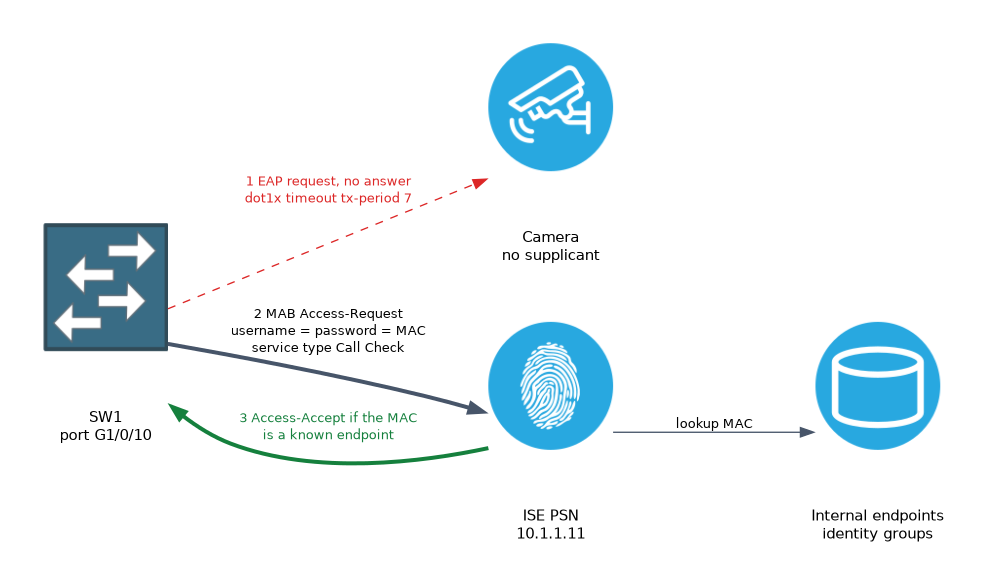 Most ports run both. The switch tries 802.1X first. If the device does not answer, the switch falls back to MAB.
The wait before the fallback can be long if the timers are left at their defaults. You can shorten it with the 802.1X timer.
Switch(config-if)# dot1x timeout tx-period 7A shorter timer speeds up devices that have no supplicant. It must not be so short that slow supplicants fail.
You can also run MAB first on a port. This is useful where most devices are non 802.1X, but it makes 802.1X clients wait.
Wireless MAB
On a wireless controller MAB is called MAC filtering. The WLAN sends the client MAC to ISE for a lookup. It is often used for the first step of central web authentication on a guest network.
Verify
Switch# show authentication sessions interface GigabitEthernet1/0/10 details
Switch# show mab all
The details show the method as mab and the status. On ISE, the live logs show the lookup and the MAC address of the device.
A device that fails 802.1X for a long time before MAB starts is waiting on the 802.1X timers. Shorten the transmit period rather than removing 802.1X.
What to remember for the exam
Seven facts cover this topic.
- MAB uses the MAC address as the identity for devices with no supplicant.
- The username and password are both the MAC address, in lower case with no separators by default.
- ISE recognises the request by the Call Check service type.
- The allowed protocols list needs Process Host Lookup and a simple method such as PAP for MAB.
- Profiling and endpoint identity groups save you from typing every MAC address.
- The interface needs the
mabcommand, and fallback follows the 802.1X timers. - MAB is weaker than 802.1X, because a MAC address can be copied.
A MAC address can be spoofed. Combine MAB with profiling and limited access so that a copied address gets little.
Common mistakes
These four mistakes are common.
Forgetting host lookup in the allowed protocols. ISE then rejects the MAB request.
Treating MAB as strong security. The identity can be copied by an attacker.
Leaving the default 802.1X timers. Non supplicant devices wait a long time to get online.
Giving MAB devices full access. Use profiling and a limited result.
Check yourself
Work through these three questions.
What does a switch send as the username and password in MAB?
The MAC address of the device is used for both.
Which allowed protocol option must be on for MAB requests?
Process Host Lookup.
Why is MAB weaker than 802.1X?
A MAC address is not a secret and can be copied by an attacker.
Topic 5 of 7 in Policy Enforcement
Test yourself on Policy Enforcement
The full Cisco CCNP 300-715 SISE question bank has 852 questions, with timed practice exams and an explanation for every answer.
This study guide is independent and is not affiliated with, endorsed by, or sponsored by Cisco. Vendor names, certification names and exam codes are trademarks of their respective owners and are used for identification only.