Layer 3 Technologies · Topic 7 of 8
BGP Neighbour Relationships
Troubleshoot BGP sessions for eBGP and iBGP: states, timers, multihop, next hop, authentication, 4 byte AS, peer groups and address families.
- 6 min
- Includes a diagram
- BGP uses TCP port 179, and neighbours are configured by hand.
- A peer stuck in Idle or Active is not up.
- Default timers are keepalive 60 and hold 180.
What it is
BGP is the path vector protocol that carries routes between autonomous systems, and every route depends on a working neighbour session.
BGP peers are configured by hand. They talk over TCP port 179 and do not discover each other. An eBGP session joins routers in different AS numbers, and an iBGP session joins routers in the same AS.
This page covers the session. The next page covers how BGP picks and shapes paths.
How it works
A session must reach Established before any route is exchanged.
Neighbour states
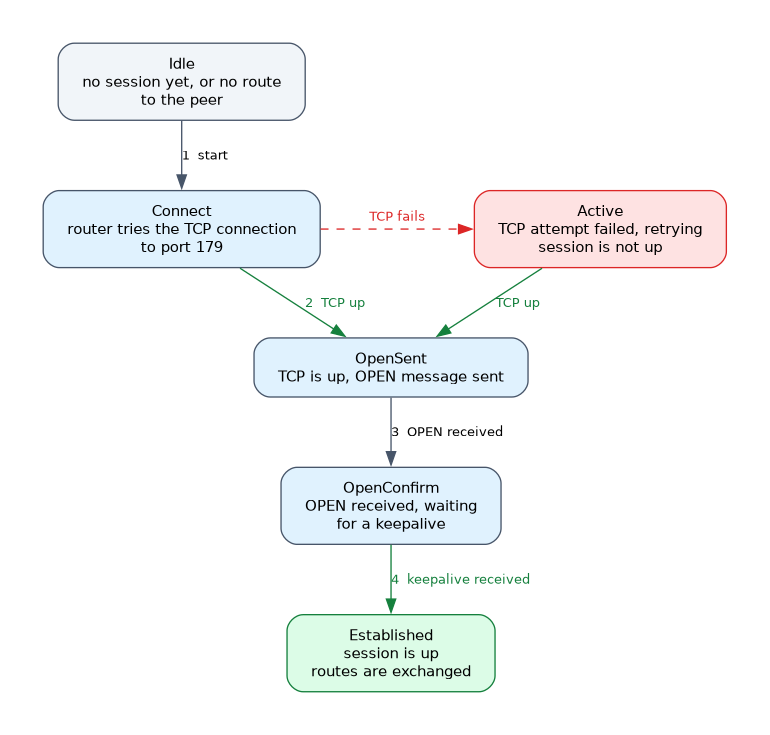
| State | Meaning |
|---|---|
| Idle | No session. Waiting to start, or no route to the peer |
| Connect | Router is trying the TCP connection |
| Active | TCP attempt failed, and the router is trying again |
| OpenSent | TCP is up and an OPEN message was sent |
| OpenConfirm | An OPEN was received and the router waits for a keepalive |
| Established | Session is up and routes are exchanged |
A peer that stays in Active or Idle never came up. The usual causes are no route to the peer address, a wrong remote AS, a wrong neighbour address, an ACL blocking TCP 179, or an authentication mismatch.
R1# show ip bgp summary
R1# show ip bgp neighbors 192.0.2.2
R1# show bgp ipv6 unicast summary
In show ip bgp summary, a number in the last column means Established and shows the count of prefixes received. A state name means the session is not up.
Timers
The default keepalive is 60 seconds and the hold time is 180 seconds on Cisco devices. Two peers negotiate the lower of the two hold times.
R1(config-router)# neighbor 192.0.2.2 timers 30 90eBGP, iBGP and next hop
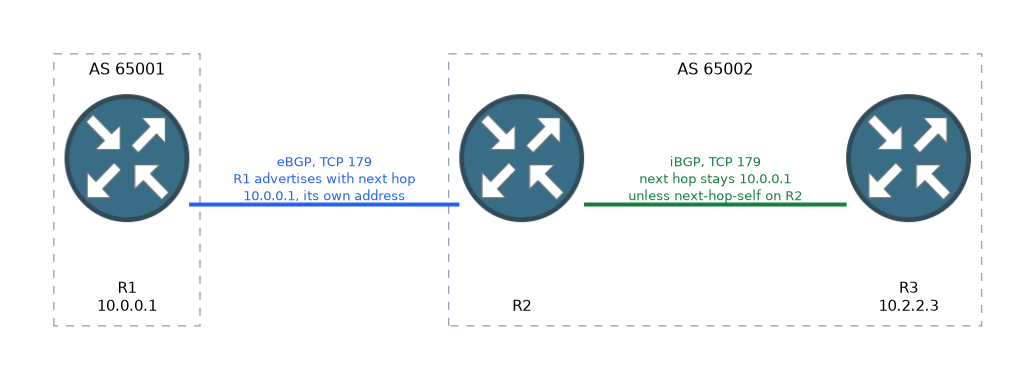 Several rules explain why a session or its routes fail.
- eBGP packets have a TTL of 1, so peers must be directly connected unless you use
ebgp-multihop. - A loopback session also needs
update-source Loopback0on both ends. - eBGP changes the next hop to itself when advertising routes. iBGP does not, so routes learned from eBGP carry the external next hop into the AS.
- A router will not use a route whose next hop it cannot reach. Fix this with
next-hop-selfor by advertising the external link in the IGP. - iBGP does not pass routes learned from an iBGP peer to another iBGP peer. Use a full mesh or a route reflector.
R2(config)# router bgp 65002
R2(config-router)# neighbor 10.0.0.1 remote-as 65001
R2(config-router)# neighbor 10.0.0.1 ebgp-multihop 2
R2(config-router)# neighbor 10.0.0.1 update-source Loopback0
R2(config-router)# neighbor 10.2.2.3 remote-as 65002
R2(config-router)# neighbor 10.2.2.3 next-hop-self
Synchronization is an old rule that stopped iBGP routes being used until the IGP also knew them. It is off by default and rarely used.
Authentication
BGP supports MD5 authentication on the TCP session with a password. Both ends must use the same password.
R1(config-router)# neighbor 192.0.2.2 password MYSECRETA password mismatch normally leaves the session stuck in Active or Idle. The device logs messages about TCP packets with a bad MD5 digest.
AS numbers and route refresh
BGP supports 4 byte AS numbers. Older routers that do not know 4 byte numbers see the placeholder AS 23456. Notation can be shown as plain numbers or in dot form.
Private AS numbers are for use inside organisations. The 16 bit range is 64512 to 65534. A provider can strip them with remove-private-as.
Route refresh lets a router ask a peer to resend its routes after a policy change, with no session reset.
R1# clear ip bgp 192.0.2.2 soft inPeer groups and address families
A peer group applies the same settings to many neighbours, which shortens configuration and keeps policy consistent.
R1(config-router)# neighbor INTERNAL peer-group
R1(config-router)# neighbor INTERNAL remote-as 65002
R1(config-router)# neighbor INTERNAL update-source Loopback0
R1(config-router)# neighbor 10.2.2.3 peer-group INTERNAL
Address families keep IPv4 and IPv6 apart. A neighbour must be activated inside the address family before it exchanges prefixes of that type.
R1(config-router)# neighbor 2001:DB8::2 remote-as 65002
R1(config-router)# address-family ipv6 unicast
R1(config-router-af)# neighbor 2001:DB8::2 activate
R1(config-router-af)# exit-address-family
R1(config-router)# address-family ipv4 vrf RED
R1(config-router-af)# neighbor 10.1.1.2 remote-as 65100
R1(config-router-af)# neighbor 10.1.1.2 activate
For VRF-lite, the neighbour is defined inside the address-family ipv4 vrf section and sessions run inside that VRF.
If the session is up but no routes arrive, check that the neighbour is activated in the right address family.
What to remember for the exam
Eight facts cover most questions on this topic.
- BGP uses TCP port 179, and neighbours are configured by hand.
- A peer stuck in Idle or Active is not up.
- Default timers are keepalive 60 and hold 180.
- eBGP needs
ebgp-multihopwhen peers are not directly connected. - Loopback peering needs
update-source. - iBGP leaves the next hop unchanged, so use
next-hop-selfwhere needed. - Private 16 bit AS numbers run from 64512 to 65534.
- Each address family needs
activatefor the neighbour.
Do not read Active as good. It means the TCP connection attempts are failing.
Common mistakes
These five mistakes appear often.
Wrong remote AS. The session fails at the OPEN message.
Loopback peering without multihop. The eBGP session never starts because the TTL is 1.
Missing activate. The session shows Established but exchanges no prefixes of that family.
Unreachable next hop. Routes are in the table but not used.
Assuming iBGP re-advertises. A route learned from one iBGP peer does not go to another iBGP peer.
Check yourself
Work through these three questions.
What does a BGP state of Active mean?
The TCP connection has failed and the router is retrying, so the session is not established.
Why might an eBGP session between two loopbacks not start?
eBGP packets have a TTL of 1, so the session needs
ebgp-multihopandupdate-source.What is the default BGP hold time on Cisco devices?
It is 180 seconds, with a keepalive of 60 seconds.
Topic 7 of 8 in Layer 3 Technologies
Test yourself on Layer 3 Technologies
The full Cisco CCNP 300-410 ENARSI question bank has 857 questions, with timed practice exams and an explanation for every answer.
This study guide is independent and is not affiliated with, endorsed by, or sponsored by Cisco. Vendor names, certification names and exam codes are trademarks of their respective owners and are used for identification only.