Infrastructure Security · Topic 1 of 4
Troubleshooting IOS AAA
Troubleshoot device login security with IOS AAA, comparing TACACS+, RADIUS and the local database, method lists, fallback behaviour and test commands.
- 5 min
- Includes a diagram
aaa new-modelenables AAA.- TACACS+ uses TCP 49 and encrypts the whole body.
- RADIUS uses UDP 1812 and 1813, and encrypts only the password.
What it is
AAA is the framework that controls who can log in to a device, what they may do, and what they did.
The three As are authentication (who are you), authorization (what may you do) and accounting (what did you do). On IOS the framework is turned on with aaa new-model.
Credentials can be checked against a local database on the device, or against a TACACS+ or RADIUS server. Most networks use a server first and the local database as a backup.
How it works
A method list names the order in which sources are tried, and a line or service uses a list.
TACACS+ and RADIUS compared
| Feature | TACACS+ | RADIUS |
|---|---|---|
| Transport | TCP port 49 | UDP ports 1812 and 1813 |
| Encryption | Whole packet body | Password only |
| AAA functions | Separate authentication, authorization and accounting | Authentication and authorization combined |
| Origin | Cisco developed | Open standard |
| Typical use | Device administration | Network access, such as 802.1X and VPN |
RADIUS authentication and authorization use UDP 1812, and accounting uses UDP 1813. Older systems used ports 1645 and 1646. TACACS+ separates the functions, which allows per command authorization.
Configuration
R1(config)# aaa new-model
R1(config)# username ADMIN privilege 15 secret LocalPass1
R1(config)# tacacs server TAC1
R1(config-server-tacacs)# address ipv4 10.1.1.10
R1(config-server-tacacs)# key MyKey
R1(config)# aaa group server tacacs+ TACGRP
R1(config-sg-tacacs+)# server name TAC1
R1(config)# aaa authentication login default group TACGRP local
R1(config)# aaa authorization exec default group TACGRP local
R1(config)# aaa accounting exec default start-stop group TACGRP
Create the local user before turning on aaa new-model. Otherwise you can lock yourself out. The RADIUS form uses radius server NAME, with address ipv4, auth-port, acct-port and key inside it.
R1(config)# radius server RAD1
R1(config-radius-server)# address ipv4 10.1.1.11 auth-port 1812 acct-port 1813
R1(config-radius-server)# key MyKey
A method list named default is applied to every line automatically. A list with another name only applies where you attach it.
R1(config)# aaa authentication login CONSOLE-LOCAL local
R1(config)# line console 0
R1(config-line)# login authentication CONSOLE-LOCAL
A separate console list that uses only the local database gives you a way in if the servers fail.
Fallback behaviour
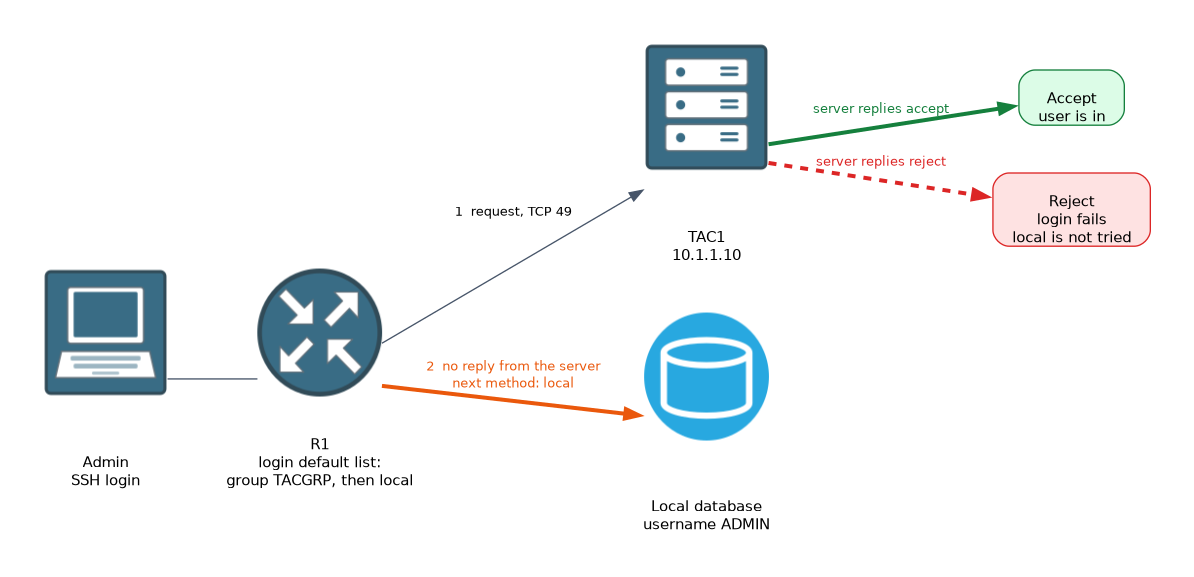 Methods are tried in order, and the router moves to the next only on an error, not on a rejection.
- If the server replies with accept, the user is in.
- If the server replies with reject, authentication fails and the local database is not tried.
- If the server does not reply at all, the router tries the next method, such as
local.
This is a common exam point. A user who is rejected by TACACS+ will not get in with a local account, but a user will get in with it when the server is down.
Troubleshooting
Start with reachability, because the router must reach the server and the key must match.
R1# show aaa servers
R1# test aaa group radius ADMIN Password1 new-code
R1# debug aaa authentication
R1# debug tacacs
R1# debug radius
The test aaa command sends a test login to the server group and reports success or failure without a real user session. It is mainly a RADIUS test, and TACACS+ support depends on platform and release, so use debug tacacs when testing TACACS+. The debug output shows whether the router sent a request and what came back.
Check these items in order.
- Can the router ping the server from the right source interface?
- Does the shared key match on both sides?
- Is the method list applied to the line in use?
- Does the server have the device defined as a client?
- Does the user have the right privilege level or authorization on the server?
R1(config)# ip tacacs source-interface Loopback0
R1(config)# ip radius source-interface Loopback0
A source interface keeps requests coming from an address that the server knows.
Keep a console session open while you test AAA changes on VTY lines, so a mistake cannot lock you out.
What to remember for the exam
Seven facts cover most questions on this topic.
aaa new-modelenables AAA.- TACACS+ uses TCP 49 and encrypts the whole body.
- RADIUS uses UDP 1812 and 1813, and encrypts only the password.
- TACACS+ separates authentication, authorization and accounting.
- A reject from the server does not trigger fallback. No reply does.
- The
defaultmethod list applies to all lines. test aaa groupand the AAA debugs help with troubleshooting.
Create a local user before enabling AAA login on the VTY lines, or you may lose access to the router.
Common mistakes
These five mistakes appear often.
Expecting fallback after a reject. Local is used only if the server does not respond.
Key mismatch. The server drops or rejects requests, and the router sees no valid reply.
No local user. The local fallback has nothing to authenticate against.
Wrong source address. The server has no client entry for the address the router uses.
Method list not attached. A named list does nothing until a line uses it.
Check yourself
Work through these three questions.
What transport and port does TACACS+ use?
TACACS+ uses TCP port 49.
Will the local database be tried if TACACS+ rejects a user?
No, because fallback happens only when the server does not respond.
Which command tests a server group without a real login?
test aaa groupfollowed by the group name, user, password andnew-code.
Topic 1 of 4 in Infrastructure Security
Test yourself on Infrastructure Security
The full Cisco CCNP 300-410 ENARSI question bank has 857 questions, with timed practice exams and an explanation for every answer.
This study guide is independent and is not affiliated with, endorsed by, or sponsored by Cisco. Vendor names, certification names and exam codes are trademarks of their respective owners and are used for identification only.