Network Fundamentals · Topic 3 of 6
Network Components and Reading a Topology Diagram
Learn what switches, routers, firewalls and load balancers do, and how to read a basic network topology diagram with its links, VLANs and port labels.
- 5 min
- Includes a diagram
- A switch forwards frames by MAC address, and a router forwards packets by IP address.
- A Layer 3 switch can route between VLANs.
- A firewall filters traffic by rules, and a next generation firewall inspects applications.
What it is
Network components are the devices that connect, direct, filter and balance traffic, and a topology diagram shows how they are joined.
Switches connect devices in a network, routers connect networks, firewalls filter traffic and load balancers share it across servers. Other devices include access points and proxies.
On the exam you have to name the role of each device and read a diagram to trace a path or find a fault.
How it works
Each device works at a specific layer and has one main job.
Common components
| Device | Main job | Layer |
|---|---|---|
| Switch | Forwards frames inside a network using MAC addresses | 2 |
| Layer 3 switch | A switch that also routes between VLANs | 2 and 3 |
| Router | Forwards packets between networks using IP addresses | 3 |
| Firewall | Allows or blocks traffic by rules | 3 to 7 |
| Load balancer | Spreads requests across a group of servers | 4 or 7 |
| Access point | Connects wireless clients to the wired network | 2 |
| Proxy | Passes requests on behalf of clients or servers | 7 |
Switch
A switch connects end devices in one network and learns MAC addresses. Each port is a separate collision domain, and all ports in a VLAN share one broadcast domain.
Router
A router joins different networks. It reads the destination IP address, finds the best route and sends the packet out of the right interface. Each router interface sits in a different subnet.
Firewall
A firewall sits between zones, such as inside and outside, and applies rules. A next generation firewall also inspects applications and detects threats. Rules usually say allow or deny for a source, destination and port.
Load balancer
A load balancer presents one address, called a virtual IP, and sends each request to one of several servers. It checks the health of the servers and stops using one that fails.
Reading a topology diagram
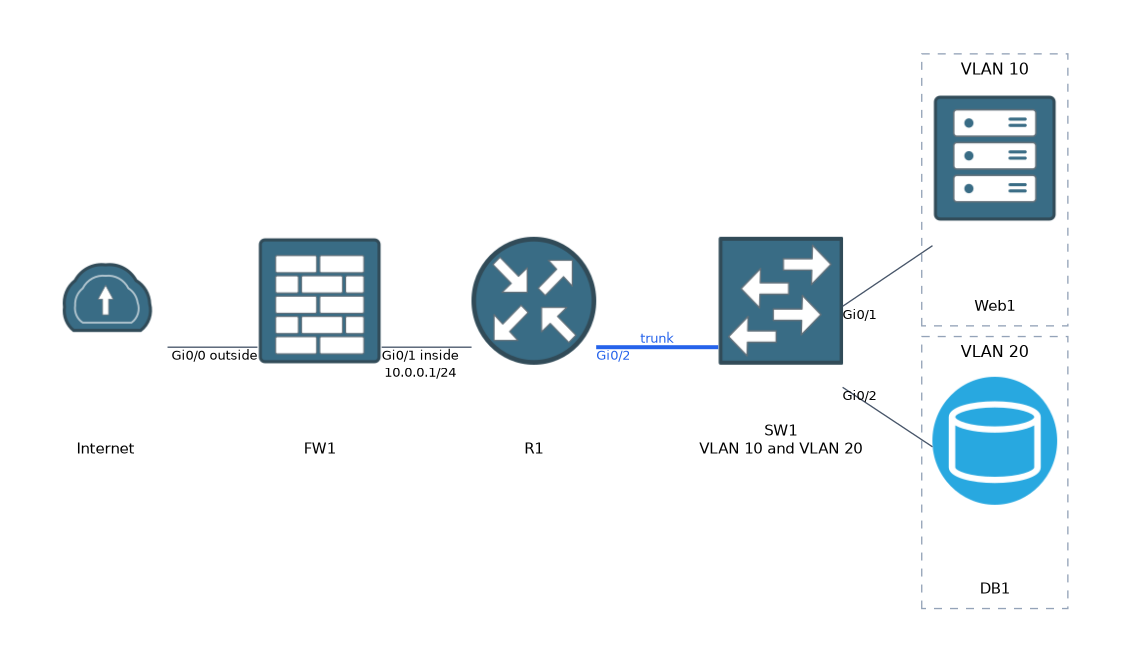 A diagram uses symbols for devices and lines for links. Labels give names, addresses, VLANs and port numbers.
                  Internet
                     |
                  [FW1]  Gi0/0 outside
                     |  Gi0/1 inside 10.0.0.1/24
                  [R1]   Gi0/2 trunk
                     |
                  [SW1]  VLAN 10 and VLAN 20
                  /      \
         Gi0/1  /          \  Gi0/2
          [Web1]            [DB1]
         VLAN 10           VLAN 20
Here are the facts that you can read from it:
- Traffic from the internet reaches the firewall first, then the router, then the switch.
- The firewall has an outside and an inside interface, and it controls what enters the network.
- The router and switch are joined by a trunk, which carries both VLANs.
- Web1 is in VLAN 10 and DB1 is in VLAN 20, so traffic between them must be routed, and a firewall or router rule can control it.
- Each device has labelled ports, which tell you where to look for a fault.
Port values on a diagram
Diagrams may also show transport ports on the links or rules, such as TCP 443 to the web server and TCP 3306 to the database. These tell you what traffic should be allowed along each path.
Tracing a path
- Find the source and the destination.
- Follow the links device by device.
- At each device, ask what it does: switch inside the VLAN, route between subnets, filter, or balance.
- Note any VLAN, address or port label that changes along the way.
Using a diagram to find a fault
If Web1 cannot reach DB1, look at the points on the path. The switch ports must be in the right VLANs.
The router needs a route or an interface for each VLAN. A rule on the router or firewall may block the database port.
Questions may add details such as a duplicated address, a port in the wrong VLAN or a missing route. Match the symptom to the device that is responsible.
Common symbols
Most diagrams show a router as a circle with arrows, a switch as a box with arrows, a firewall as a brick wall or flame, and a cloud for the internet or a network that you do not manage. A load balancer is often shown as a box with arrows that fan out.
When you read a diagram, ask what each device decides. Switches choose a port, routers choose a next hop, firewalls allow or block, and load balancers choose a server.
What to remember for the exam
Seven facts cover this topic.
- A switch forwards frames by MAC address, and a router forwards packets by IP address.
- A Layer 3 switch can route between VLANs.
- A firewall filters traffic by rules, and a next generation firewall inspects applications.
- A load balancer spreads requests over servers and checks their health.
- A trunk carries several VLANs between devices.
- Traffic between VLANs needs a router or Layer 3 switch.
- On a diagram, labels give names, addresses, VLANs and ports, so use them to trace a path.
Common mistakes
Four mistakes are typical.
Confusing a switch with a router. A switch works inside a network and a router joins networks.
Forgetting the firewall in the path. A rule there can be the cause of a failed connection.
Ignoring VLAN labels. Two devices on the same switch can still be in different networks.
Overlooking port labels. A link on the wrong interface changes the whole path.
A diagram shows the design, not the live state. A link that is drawn may be down in practice.
Check yourself
Work through these three questions.
What is the main difference between a switch and a router?
A switch forwards frames within a network using MAC addresses, and a router forwards packets between networks using IP addresses.
What does a load balancer do for a web application?
It spreads requests across several servers and stops using a server that fails its health check.
Two hosts on the same switch are in different VLANs. What do they need to communicate?
A router or Layer 3 switch to route between the VLANs.
Topic 3 of 6 in Network Fundamentals
Test yourself on Network Fundamentals
The full Cisco CCNA 200-901 DEVASC question bank has 808 questions, with timed practice exams and an explanation for every answer.
This study guide is independent and is not affiliated with, endorsed by, or sponsored by Cisco. Vendor names, certification names and exam codes are trademarks of their respective owners and are used for identification only.