Network Fundamentals · Topic 2 of 17
Network Topology Architectures
Compare two-tier, three-tier and spine-leaf designs, plus WAN, SOHO, on-premises and cloud networks, and learn where each design fits and why.
- 6 min
- Exam objective 1.2
- Includes a diagram
- Three-tier means access, distribution and core.
- Two-tier collapses core and distribution into one layer.
- Spine-leaf: every leaf connects to every spine, and nothing else.
What it is
A network topology architecture is the overall shape of a network: its layers, its links and where traffic flows.
The right shape depends on how big the network is and what it carries.
This topic covers the designs you should be able to recognise and describe:
- two-tier and three-tier campus designs
- spine-leaf data centre design
- WAN
- small office and home office (SOHO)
- on-premises versus cloud
How it works
Each design arranges devices in layers or links to suit its size and traffic pattern.
Three-tier campus design
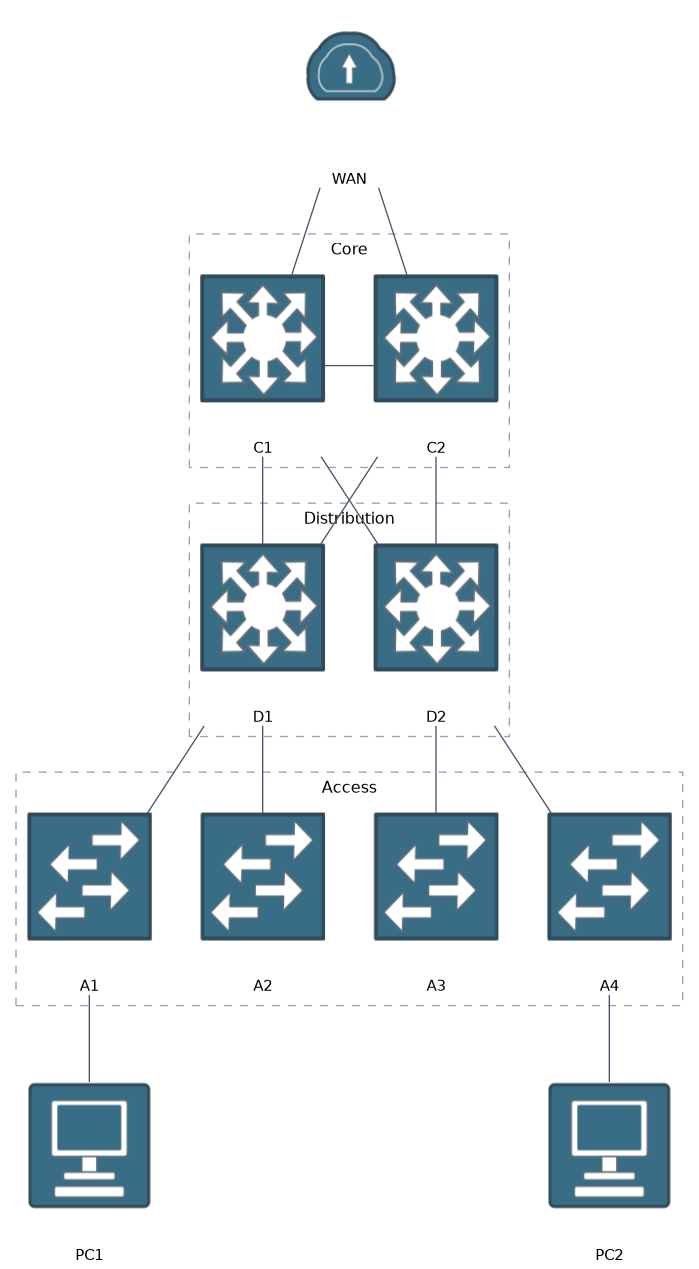 The classic campus design has three layers.
- Access layer: where end devices connect, such as PCs, phones and access points. Access switches are plentiful and give each user a port.
- Distribution layer: gathers several access switches. It is where policies, VLAN routing and filtering are often applied.
- Core layer: a fast backbone that links the distribution layers and the rest of the network. Its job is to move traffic quickly, so it avoids complex policy.
This design scales well for a large campus with many buildings. Each layer has a clear purpose, which makes the network easier to grow and troubleshoot.
Two-tier (collapsed core) design
In a smaller campus, a separate core is not worth the cost.
The two-tier design merges the core and distribution layers into one layer. This is called a collapsed core.
The access layer connects up to the collapsed core switches. It gives most of the benefits of three tiers with fewer devices.
Spine-leaf design
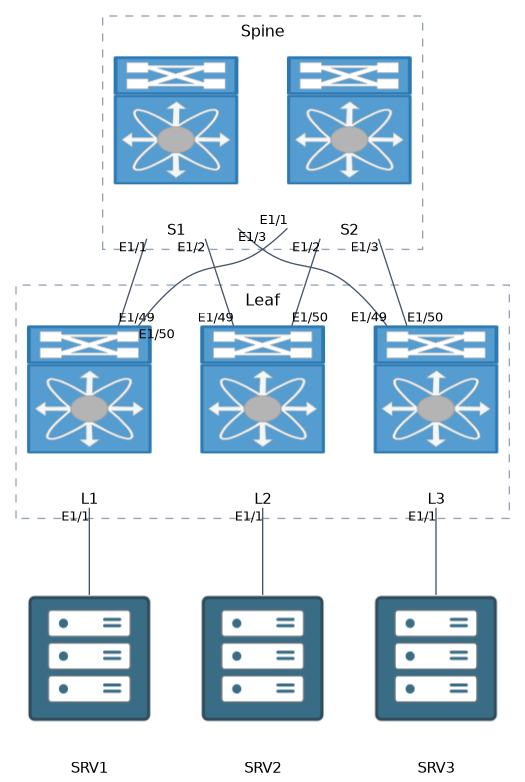 Data centres move a lot of traffic between servers, which is called east-west traffic.
The three-tier design is built more for traffic going up and out, called north-south. The spine-leaf design suits east-west traffic better.
Every leaf connects to every spine. Leaves do not connect to each other, and spines do not connect to each other.
Servers connect to leaves. Any server reaches any other server in the same number of hops: leaf, spine, leaf.
That gives predictable delay and many equal paths. To add capacity, you add spines. To add ports, you add leaves.
In a true spine-leaf design, there are no links between spines and none between leaves. A link that joins two spines or two leaves means the design is something else.
WAN
A wide area network (WAN) connects sites that are far apart, such as a head office and branch offices.
The links are usually provided by a service provider. Common choices include a private line, a metro Ethernet service, an MPLS service, and an encrypted VPN across the internet.
A WAN is typically slower and more expensive per megabit than a LAN, so its design focuses on cost, reliability and security.
SOHO
A small office or home office usually has a small number of users.
A single device often does the work of router, switch, wireless access point and firewall, connected to an internet provider. There is no distribution or core layer because the network is so small.
On-premises and cloud
An on-premises network is built and run by the organisation in its own buildings. It controls the hardware and pays for the equipment and its upkeep.
A cloud network uses computing resources hosted by a provider. The usual service models are:
- IaaS: you rent virtual machines, storage and networks.
- PaaS: you rent a platform to run your own applications.
- SaaS: you use a finished application, such as email.
Cloud can be public (shared provider infrastructure), private (dedicated to one organisation), or hybrid (a mix of on-premises and cloud). Many organisations run a hybrid network and connect the two with a VPN or a private link.
What to remember for the exam
Nine facts cover the designs on this objective.
- Three-tier means access, distribution and core.
- Two-tier collapses core and distribution into one layer.
- Spine-leaf: every leaf connects to every spine, and nothing else.
- Spine-leaf gives predictable paths for east-west traffic in data centres.
- Servers and end devices attach to leaf or access switches.
- A WAN links distant sites, often using a provider.
- SOHO networks are small, often with one all-in-one device.
- IaaS, PaaS and SaaS describe how much the provider manages.
- Hybrid cloud mixes on-premises and cloud resources.
Leaf, spine, leaf is always the path between two servers. Three tiers means access, distribution, core.
Common mistakes
These five errors are common with topology designs.
Linking spines together. In a true spine-leaf design, spines do not connect to each other, and leaves do not connect to each other.
Confusing east-west with north-south. North-south traffic enters or leaves the data centre. East-west traffic moves between servers inside it.
Assuming every network needs three tiers. A small campus does well with a collapsed core. More layers add cost without benefit.
Calling the cloud "someone else's problem". Even in the cloud, the customer is still responsible for part of the design and security. How much depends on the service model.
Placing end devices on the core. The core is for fast transport between layers. Hosts connect at the access layer.
Check yourself
Work through these three prompts.
What is the purpose of each of the three layers in the campus design, and when would you collapse two of them?
Access connects end devices, distribution gathers access switches and applies policy and VLAN routing, and core is a fast backbone. In a smaller campus you merge core and distribution into a collapsed core, giving a two-tier design.
What are the connection rules of a spine-leaf network, and why are server-to-server paths predictable?
Every leaf connects to every spine, with no links between leaves and none between spines. Any server reaches any other in the same number of hops: leaf, spine, leaf.
What does the customer get with IaaS, PaaS and SaaS?
With IaaS you rent virtual machines, storage and networks. With PaaS you rent a platform to run your own applications, and with SaaS you use a finished application such as email.
Topic 2 of 17 in Network Fundamentals
Test yourself on Network Fundamentals
The full Cisco CCNA 200-301 question bank has 1,206 questions, with timed practice exams and an explanation for every answer.
This study guide is independent and is not affiliated with, endorsed by, or sponsored by Cisco. Vendor names, certification names and exam codes are trademarks of their respective owners and are used for identification only.