IP Services · Topic 6 of 9
DHCP Client and Relay Configuration
Configure a Cisco interface as a DHCP client and set up a DHCP relay with ip helper-address, so hosts can get addresses from a server on another subnet.
- 5 min
- Exam objective 4.6
- Includes a diagram
ip address dhcpturns an interface into a DHCP client.- Look for
DHCPin the Method column ofshow ip interface brief. - A router does not forward broadcasts, so a server on another subnet needs a relay.
What it is
Two configuration jobs involve DHCP, in opposite roles.
A DHCP client is an interface that asks for its own address from a server. This is common on the internet-facing interface of a small office router, where the provider supplies the address.
A DHCP relay helps hosts reach a server that is not on their own subnet. Hosts find a server by broadcasting, and a router does not forward broadcasts by default. The relay catches the broadcast and passes it on as a unicast packet.
The earlier DHCP and DNS topic explained Discover, Offer, Request, Acknowledge. This page builds on it.
How it works
The client sends a broadcast, and the relay turns it into a unicast to the server.
Interface as a DHCP client
Replace the static address with one word:
interface GigabitEthernet0/1
 ip address dhcp
 no shutdown
The interface runs the same four-step conversation a host would. If it succeeds, it gets an address and mask, and may learn a gateway and DNS server if the server provides them.
If the server supplies a default router option, the interface installs a default route from it. That route carries an administrative distance of 254 by default, so any other default route wins.
To verify:
show ip interface brief
show dhcp lease- In
show ip interface brief, the Method column showsDHCPfor a learned address, andmanualfor a typed one. - An interface with no address shows
unassigned. show dhcp leasedisplays the lease details.
On the server side, show ip dhcp binding lists handed-out addresses, and show ip dhcp pool summarises each pool.
DHCP relay
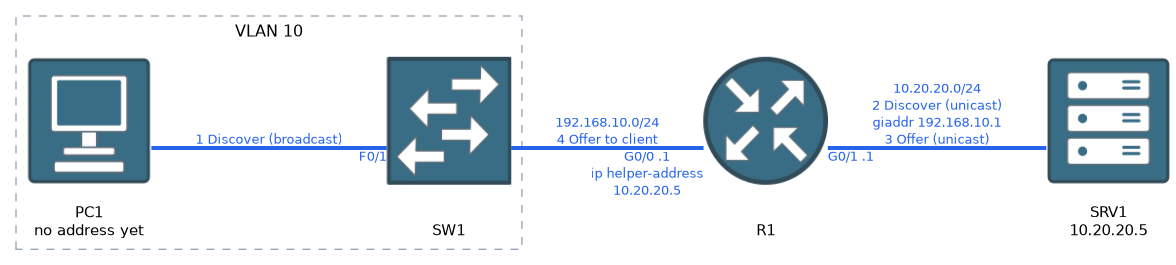 Picture a host on VLAN 10 and a DHCP server on a different subnet.
The command goes on the router interface that faces the hosts:
interface GigabitEthernet0/0
 ip address 192.168.10.1 255.255.255.0
ip helper-address 10.20.20.5Put ip helper-address on the client-facing interface. On the server-facing interface it never sees the hosts' broadcasts.
Here is the sequence:
- The host broadcasts a Discover.
- The interface with
ip helper-addressreceives it. - The router converts it to a unicast addressed to 10.20.20.5.
- The router writes its own interface address into the gateway address field of the message.
- The server reads that field to learn which subnet asked, and picks an address from the matching pool.
- The reply returns through the relay to the host.
The gateway address field is the key idea. It lets one server run several pools and choose the right one for each remote subnet.
More than DHCP
ip helper-address also forwards other UDP broadcast services by default. These are time (37), TACACS (49), DNS (53), TFTP (69) and the NetBIOS name and datagram services (137 and 138), plus the IEN 116 name service (42).
You can switch individual services off with no ip forward-protocol udp PORT, but this objective focuses on DHCP. You can also configure several helper addresses on one interface, and the router relays to each.
What to remember for the exam
Eight facts cover this objective.
ip address dhcpturns an interface into a DHCP client.- Look for
DHCPin the Method column ofshow ip interface brief. - A router does not forward broadcasts, so a server on another subnet needs a relay.
- The relay command is
ip helper-address SERVER-IP. - Put it on the interface facing the clients, not the server.
- The relay writes its own address into the message so the server picks the right pool.
- DHCP uses UDP ports 67 (server) and 68 (client).
- The relay forwards the request as unicast to the server.
A host showing a 169.254 address never heard back from a server. Check cabling, VLAN, relay and server before touching the pool.
Common mistakes
These six faults cause most failures.
Helper on the wrong interface. It belongs on the client side.
No matching pool. The server needs a pool for the client's subnet.
No route back. The server must be able to reach the relay interface address.
Forgetting no shutdown. A shut-down client interface cannot send a Discover.
Blaming DHCP for a link problem. Check the physical and VLAN path first.
Not excluding the router's own address. The server may offer it to a host.
Check yourself
Try these three prompts.
Why can a Discover not reach a server on another subnet without a relay?
A Discover is a broadcast, and a router does not forward broadcasts by default.
Which interface gets
ip helper-address, and what does the router put in the message so the server picks the right pool?The interface that faces the hosts. The router writes its own interface address into the gateway address field.
What does
show ip interface briefshow for a DHCP-learned address, and what does a 169.254 address on a host suggest?The Method column shows
DHCP. A 169.254 address suggests the host never heard back from a server.
Topic 6 of 9 in IP Services
Test yourself on IP Services
The full Cisco CCNA 200-301 question bank has 1,206 questions, with timed practice exams and an explanation for every answer.
This study guide is independent and is not affiliated with, endorsed by, or sponsored by Cisco. Vendor names, certification names and exam codes are trademarks of their respective owners and are used for identification only.