Switching and Network Access · Topic 1 of 6
Trunks and SVIs
Configure Layer 2 and Layer 3 switch interfaces, 802.1Q trunks, the native VLAN and SVIs, and read show interfaces trunk output to find the fault.
- 6 min
- Includes a diagram
- A trunk uses 802.1Q, with a 4-byte tag and a 12-bit VLAN ID.
- The native VLAN is untagged and VLAN 1 by default. Both ends must match.
switchport mode trunkforces a trunk.switchport nonegotiatestops DTP.
What it is
Switch to switch and switch to router links come in a few types, and each type has its own configuration.
A Layer 2 interface is a switchport. It is an access port for one VLAN, or a trunk for many. A Layer 3 interface is a routed port, where the switchport function is removed and an IP address is applied.
A trunk carries many VLANs over one link by tagging frames with IEEE 802.1Q. An SVI (switch virtual interface) is a virtual Layer 3 interface for a VLAN. It is the default gateway for the hosts in that VLAN.
How it works
Pick the interface type by what is on the other end of the cable.
The 802.1Q tag
A trunk port inserts a 4-byte tag into the Ethernet header, between the source MAC address and the type field. The tag holds a tag protocol identifier, a 3-bit priority, a drop eligibility bit and a 12-bit VLAN ID. Usable IDs run from 1 to 4094.
The receiving switch reads the ID, removes the tag and delivers the frame only to ports in that VLAN.
The native VLAN
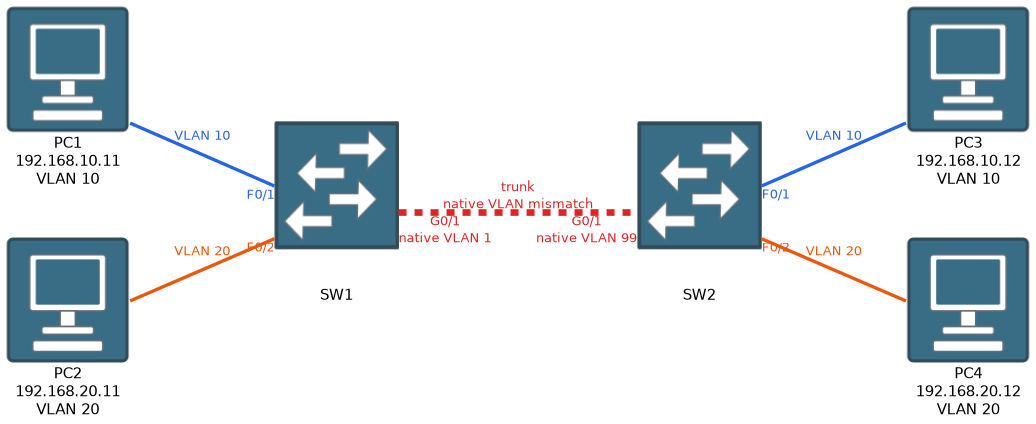 Frames in the native VLAN cross a trunk without a tag, and untagged frames arriving on a trunk are placed in the native VLAN. The default is VLAN 1.
Both ends must use the same native VLAN. If they differ, frames land in the wrong VLAN, and CDP logs a mismatch.
%CDP-4-NATIVE_VLAN_MISMATCH: Native VLAN mismatch discovered on GigabitEthernet0/1 (1), with SW2 GigabitEthernet0/1 (99).Configuring a trunk
interface GigabitEthernet0/1
 switchport mode trunk
 switchport trunk native vlan 99
 switchport trunk allowed vlan 10,20,99
switchport trunk encapsulation dot1qis needed only on switches that also support ISL. A switch that supports only 802.1Q rejects it, so leave it out.switchport trunk allowed vlanreplaces the whole list. Useswitchport trunk allowed vlan add 30to add one VLAN without losing the rest.- Cisco switches can also negotiate a trunk with DTP. A trunk forms if one side is
trunkordynamic desirableand the other is trunk, desirable ordynamic auto. Two auto ports never form a trunk, andswitchport nonegotiatestops DTP.
Reading show interfaces trunk
SW1# show interfaces trunk

Port        Mode         Encapsulation  Status        Native vlan
Gi0/1       on           802.1q         trunking      99

Port        Vlans allowed on trunk
Gi0/1       10,20,99

Port        Vlans allowed and active in management domain
Gi0/1       10,20

Port        Vlans in spanning tree forwarding state and not pruned
Gi0/1       10,20
Read it from top to bottom. VLAN 99 is allowed but missing from the active list, so VLAN 99 does not exist on this switch. An absent port means it is not trunking at all. Check it with show interfaces GigabitEthernet0/1 switchport, which shows the administrative and operational mode and the native VLAN.
Layer 3 on a switch: routed ports and SVIs
A routed port is for a point to point link to a router or another Layer 3 switch.
ip routing
interface GigabitEthernet0/2
 no switchport
 ip address 10.1.1.1 255.255.255.252
An SVI routes between VLANs inside a Layer 3 switch.
ip routing
interface vlan 10
 ip address 192.168.10.1 255.255.255.0
 no shutdown
ip routing must be on, or the switch will not route. Hosts use the SVI address as their default gateway. An SVI comes up only when its VLAN exists and at least one port in that VLAN is up, which can be an access port or a trunk that allows the VLAN.
SW1# show ip interface brief
Interface              IP-Address      OK? Method Status                Protocol
Vlan10                 192.168.10.1    YES manual up                    up
Vlan20                 192.168.20.1    YES manual down                  down
GigabitEthernet0/2     10.1.1.1        YES manual up                    up
Vlan20 is down/down, which usually means VLAN 20 does not exist on this switch. If the VLAN exists but no port in it is up and forwarding, the SVI shows up/down instead. In show interfaces status, a routed port shows routed in the VLAN column.
Switch to router with router on a stick
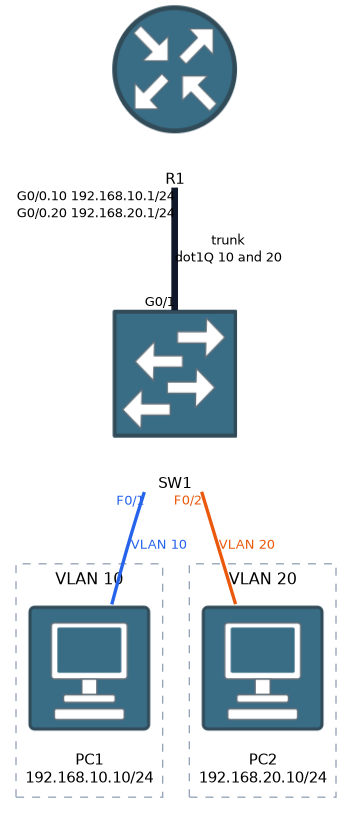 When the router has one physical link, give it a subinterface for each VLAN on a trunk.
interface GigabitEthernet0/0
 no shutdown
interface GigabitEthernet0/0.10
 encapsulation dot1Q 10
 ip address 192.168.10.1 255.255.255.0
interface GigabitEthernet0/0.99
 encapsulation dot1Q 99 native
The switch side of this link must be a trunk with a matching native VLAN.
A Layer 3 switch with SVIs is faster and scales better than router on a stick, because it does not push all inter-VLAN traffic through one link.
Common mistakes
Mismatched native VLANs. The link stays up, but untagged frames land in the wrong VLAN and CDP logs a warning.
Two dynamic auto ports. Neither side asks, so the link stays an access link.
Overwriting the allowed list. switchport trunk allowed vlan 30 removes every other VLAN from the trunk. Use the add keyword.
Forgetting ip routing. SVIs exist and have addresses, but the switch does not route between them.
A routed port left as a switchport. An IP address on a port without no switchport is rejected.
A trunk that is up does not mean every VLAN crosses it. Check the allowed and active lists before blaming the hosts.
What to remember for the exam
- A trunk uses 802.1Q, with a 4-byte tag and a 12-bit VLAN ID.
- The native VLAN is untagged and VLAN 1 by default. Both ends must match.
switchport mode trunkforces a trunk.switchport nonegotiatestops DTP.switchport trunk allowed vlan addextends the list. Withoutaddit replaces it.show interfaces trunkshows mode, native VLAN, allowed VLANs and active VLANs.- A routed port needs
no switchport. An SVI needs the VLAN, an active port andip routing. - Router on a stick uses subinterfaces with
encapsulation dot1Qand a trunk to the switch. show ip interface briefshows SVI and routed port status.
Check yourself
Why does a mismatched native VLAN cause trouble even though the trunk is up?
Untagged frames land in the native VLAN of the receiving end, so traffic ends up in a different VLAN than intended. CDP logs a native VLAN mismatch message.
A VLAN is allowed on a trunk but missing from the allowed and active list. What is the likely cause?
The VLAN does not exist on that switch, so it needs to be created there.
An SVI shows down/down in show ip interface brief. What should you check?
Check that the VLAN exists. If it exists but the SVI shows up/down, no port in that VLAN, or trunk that allows it, is up and forwarding.
Topic 1 of 6 in Switching and Network Access
Test yourself on Switching and Network Access
The full Cisco CCNA 200-301 v2.0 question bank has 1,242 questions, with timed practice exams and an explanation for every answer.
This study guide is independent and is not affiliated with, endorsed by, or sponsored by Cisco. Vendor names, certification names and exam codes are trademarks of their respective owners and are used for identification only.